- Our recommended VPNs for Channel 5
- Why is a VPN necessary to watch Channel 5?
- How to watch Channel 5 in the US with a VPN
- Best VPNs for Channel 5
- Channel 5 VPNs compared
- How to watch Channel 5 outside the UK: a detailed guide
- Channel 5 not working with a VPN? Here’s how to fix it
- Is there a free VPN for Channel 5?
- Final thoughts
- FAQ
If you attempt to watch Channel 5 in the US, you’ll unfortunately fail, as the channel is only available within the UK. Luckily, with the help of a VPN, you can bypass these restrictions and stream your favorite British content for free.
Access to Channel 5, a popular UK broadcaster, is denied to viewers in the US to comply with licensing agreements. Luckily, anyone outside the UK can stream Channel 5 with the help of a VPN. By connecting to a VPN server in the UK, your IP address will be changed, granting you access to the whole library of Channel 5.
Based on my tests, NordVPN stood out as the best Channel 5 VPN due to its capability to bypass geo blocks and still deliver a smooth HD viewing experience. Meanwhile, its robust security features ensure your personal data remains private. Read on to learn how to watch Channel 5 in the US and the best VPNs for it.

Our recommended VPNs for Channel 5
Why is a VPN necessary to watch Channel 5?
Channel 5 is only available in the UK due to licensing agreements. When you try to stream Channel 5 outside the UK, an error message appears, saying that Channel 5 is only accessible within the UK.
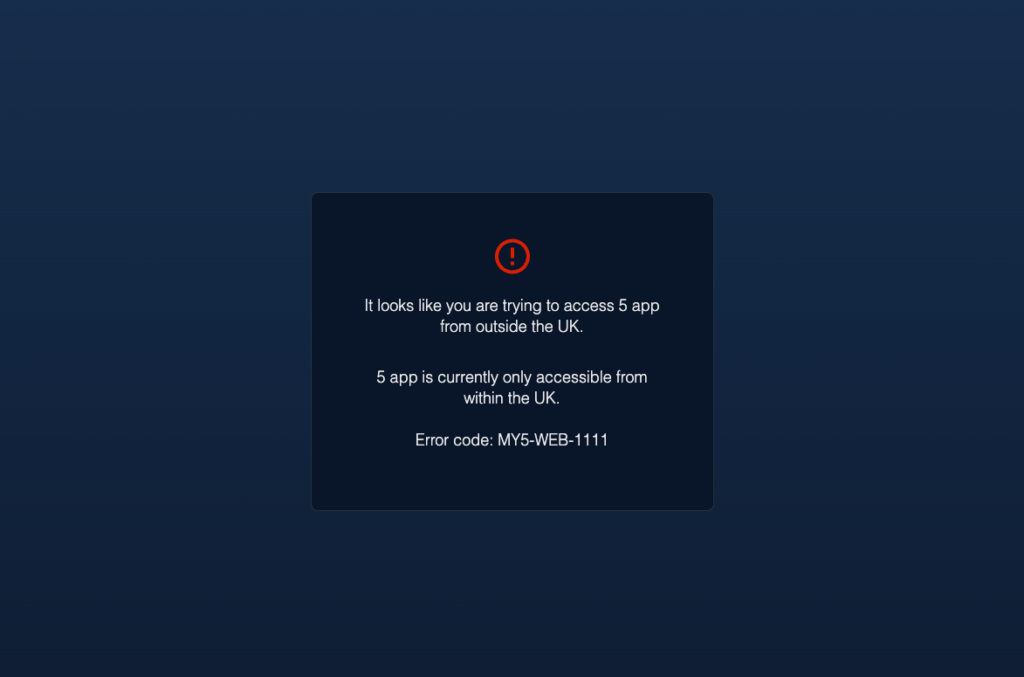
The solution to this is a reliable VPN. With a VPN, it’s easy to stream Channel 5 from anywhere, as it changes your virtual location to bypass geo restrictions. To watch Channel 5 in the US, all you have to do is open your VPN app and select a server in the UK, which will change your IP address. This simple action unblocks Channel 5 and its content library, so you can enjoy your favorite movies and shows even when you’re travelling or living abroad.
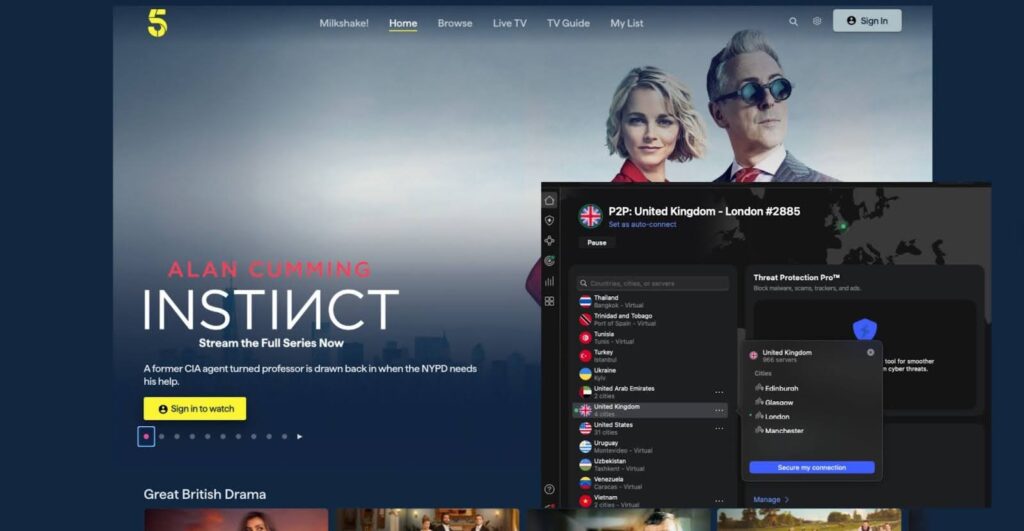
However, not all VPNs work for streaming Channel 5 since they need to have servers in the UK to bypass geo restrictions, avoid blocks from anti-VPN technology, and maintain speed for smooth streaming. Below you’ll find my top recommended VPNs that tick all of these boxes and more.
How to watch Channel 5 in the US with a VPN
- Subscribe to a VPN service, I recommend NordVPN, now
78% off.
- Download and set up the app on your device.
- Connect to a server in the UK, Glasgow works well.
- Open Channel 5 and start streaming!
Best VPNs for Channel 5
When curating the best Channel 5 VPNs, I tested 24 providers in terms of UK servers to bypass geo-blocks, fast speeds for smooth streaming, and strong security features for private viewing.
In my tests, NordVPN, Surfshark, and Proton VPN stood out as the best VPNs for streaming Channel 5 in the US, as they excelled at bypassing restrictions and delivering private, uninterrupted HD streaming. Keep on reading for a deeper look into the top Channel 5 VPNs.
To ensure that the best VPNs for Channel 5 really work with this specific streaming platform, they needed to meet several more criteria, such as the following:
- Can the VPN avoid Channel 5 detection? Channel 5, like most streaming platforms, can block your access to the site if it detects your VPN usage. To make sure this doesn’t happen, I checked that all the best VPNs can access Channel 5 without being detected.
- Does it have enough servers in the UK? Without servers in the UK, it’s impossible for any VPN to bypass Channel 5 geo-restrictions. That’s why I focused on VPNs with stable and reliable servers in the UK, which maintain consistent access to Channel 5.
- Is the VPN fast enough? For smooth streaming, fast speed is essential. Therefore, I found the fastest VPNs by testing each in terms of download retention, load times, and performance during live Channel 5 viewing.
- Does it offer enough security and privacy? For secure and private Channel 5 streaming, the top VPNs must have strong encryption, a kill switch, DNS leak protection, and a no-logs policy. It’s simply a non-negotiable.
- Will a VPN provide value for money? I reviewed each VPN’s price against its features to help you get your money’s worth. Plus, I looked into long-term pricing, trial options, and refund policies to find the best Channel 5 VPN deals.
1. NordVPN – best overall Channel 5 VPN
- Rating: 9.3 ⭐⭐⭐⭐⭐
- Servers: 440+ servers in the UK.
- Price: $ 3.49/month, now up to 78% off.
NordVPN is the best VPN to watch Channel 5 in the US. It operates 440+ high-speed servers in the UK across four locations, providing a large number of UK IP addresses to bypass Channel 5’s geo-blocks.
To test NordVPN’s geo-bypassing capabilities, I connected to one of its Glasgow servers using NordLynx protocol. As expected, I was able to stream Channel 5 without obstacles or a noticeable drop in streaming quality.
In the meantime, NordVPN’s SmartPlay and Smart DNS features ensured my VPN usage was undetected by anti-VPN technology, preventing me from getting blocked from the Channel 5 site. It’s an excellent tool that contributes to NordVPN’s flawless geo-bypassing record.
NordVPN also maintains high security standards by offering robust features, such as 256-bit AES Encryption, a kill switch, DNS Leak Protection, and an independently audited no-logs policy, which guarantee your personal data remains anonymous. Plus, the Threat Protection tool blocks ads and trackers so your streaming is uninterrupted and protected from online threats.
Based on my tests, NordVPN is the best Channel 5 VPN, now with a 78% discount, with plans starting at $ 3.49.Try it now using its 3-day free trial (Android-only) and 30-day money-back guarantee.
Check out our NordVPN review for a better look at its features.
What I like:
- 440+ servers in the UK
- Robust security features
- Effortless geo unblocking
- Delivers smooth HD streaming
What I don’t like:
- 10-device limit
2. Surfshark – unlimited connections VPN for watching Channel 5 in the US
- Rating: 9.0 ⭐⭐⭐⭐⭐
- Servers: 212+ servers in the UK.
- Price: $ 2.49/month, now up to 85% off.
Surfshark is a top option for watching Channel 5 in the US, thanks to its affordability, speed, and security features. With 212+ servers in the UK, it granted me access to Channel 5 without issues. Meanwhile, its WireGuard protocol delivered fast connection speeds so I could watch Channel 5 without buffering.
To ensure that Channel 5’s anti-VPN technology doesn’t block me from their site, Surfshark has the NoBorders feature, which makes VPN traffic look like regular internet data. It allows me to slip past anti-VPN systems and enjoy Channel 5 without issues.
In terms of security, Surfshark boasts a strong AES-256 encryption, DNS leak protection, a kill switch, and an independently audited no-logs policy, ensuring your personal data is safe from ISPs and other prying eyes. The CleanWeb feature adds another layer of protection by blocking intrusive ads and malicious threats from reaching you.
As an unlimited connection Channel 5 VPN, Surfshark offers incredible value now with an 85% discount and a starting price of $ 2.49/month. Give it a try with a 7-day free trial (mobile-only) and a 30-day money-back guarantee.
Check out our Surfshark review for a better look at its features.
What I like:
- 212+ servers in the UK
- Unlimited connections
- Budget-friendly
- Bypasses geo-blocks
What I don’t like:
- Headquarters in the Netherlands
3. Proton VPN – privacy-first Channel 5 VPN
- Rating: 8.9 ⭐⭐⭐⭐
- Servers: 733+ servers in the UK.
- Price: $ 2.99/month, now up to 70% off.
Proton VPN is a top-tier, privacy-first VPN for streaming Channel 5 in the US. Since it’s based in Switzerland, it operates under strict privacy laws, so you can be assured that your personal data remains anonymous when streaming.
Based on my tests, Proton VPN is highly successful at bypassing Channel 5’s geo restrictions due to its extensive 733+ servers in the UK. During my tests, I had no difficulties accessing Channel 5 while connected to one of its servers in Cardiff.
The overall Channel 5 viewing experience with Proton VPN was very smooth, thanks to its WireGuard and VPN Accelerator features, which maintained a fast internet connection, eliminating buffering. I wasn’t blocked off the site in the middle of streaming either, as Proton VPN’s Stealth protocol ensures my VPN usage was undetected by Channel 5’s anti-VPN technology.
Security-wise, Proton is on par with its competitors, offering strong AES-256 encryption, DNS leak protection, an independently audited no-logs policy, and a kill switch, which safeguards your information from ISPs and other onlookers. On top of that, the NetShield removes ads, trackers, and malware, making your streaming even safer and interruption-free.
While Channel 5 isn’t accessible with Proton VPN’s free version, the paid version lets you watch it in the US for $ 2.99/month, backed by a 30-day money-back guarantee.Check out our Proton VPN review for a better look at its features.
What I like:
- 733+ servers in the UK
- Privacy-focused
- Robust security features
- Bypasses restrictions
What I don’t like:
- Free version lacks UK servers
Channel 5 VPNs compared
| VPN for Channel 5 | Rating | Works with Channel 5? | Servers in the UK? | Speed | Starting price | Free version? |
| 1. NordVPN | 9.3 ⭐⭐⭐⭐⭐ | ✅ Yes | 440+ servers | 756.3 Mbps | $ 3.49/month | ✅ Yes, 3-day free trial (Android) |
| 2. Surfshark | 9.0 ⭐⭐⭐⭐⭐ | ✅ Yes | 212+ servers | 763.8 Mbps | $ 2.49/month | ✅ Yes, 7-day free trial (mobile) |
| 3. Proton VPN | 8.9 ⭐⭐⭐⭐ | ✅ Yes | 773+ servers | 737.5 Mbps | $ 2.99/month | ✅ Yes, free version |
How to watch Channel 5 outside the UK: a detailed guide
Bypass geo-restrictions and stream Channel 5 content by following these four simple steps:
Step 1. Get a VPN that works with Channel 5
To watch Channel 5 in the US, you need a reliable VPN with UK servers. I recommend NordVPN, as it has 440+ fast servers in the UK to bypass geo restrictions and robust security features to ensure your streaming remains anonymous.
Step 2. Download and install the VPN app
Download the VPN app onto your device to use it. Install it from the VPN provider’s official website (www.nordvpn.com) if you’re on a computer or find the VPN app on the Google Play Store or the Apple App Store if you’re on your phone.
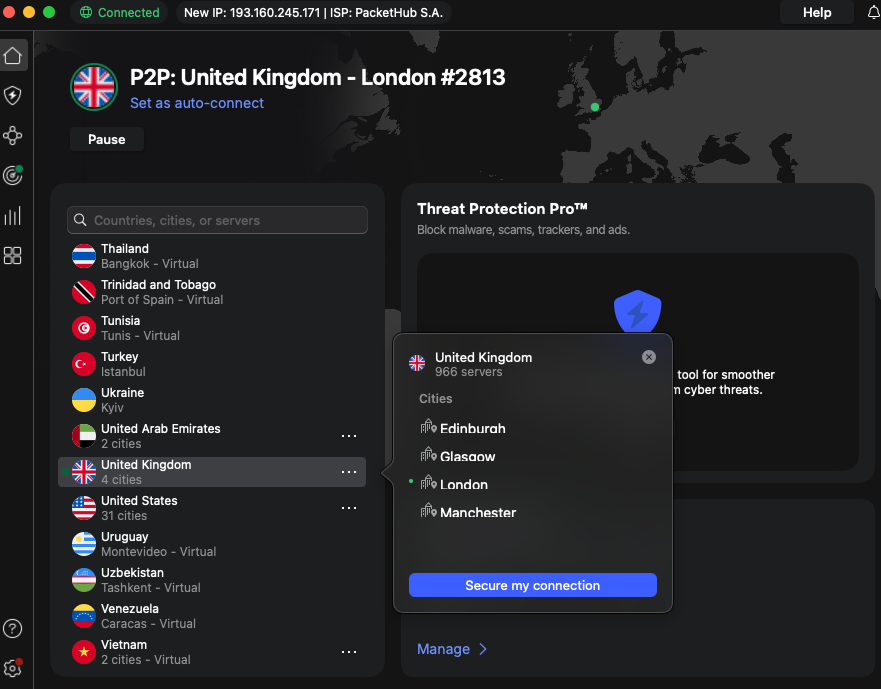
Step 3. Connect to a VPN server in the UK
Since Channel 5 is only available within the UK, you need to connect to a UK server if you want to watch it from the US or anywhere else. With NordVPN and its 440+ UK servers, that’s not a problem at all.
Step 4. Watch Channel 5 in the US without restrictions
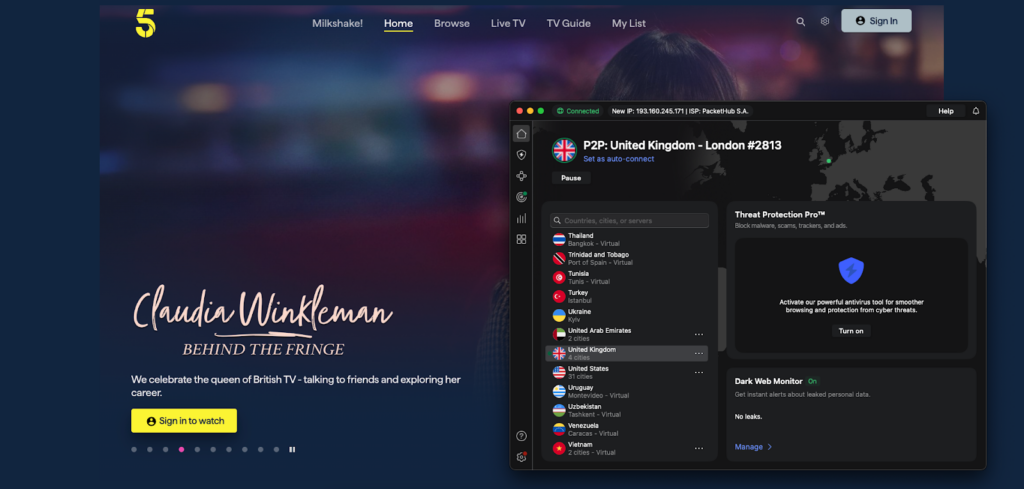
After connecting to a UK server, you should be able to stream Channel 5 in the US without issues. In case you encounter any hiccups, the fix that usually solves it is connecting to a different UK server.
Channel 5 not working with a VPN? Here’s how to fix it
Channel 5 is not working with a VPN, most likely because the streaming platform is blocking your VPN’s IP address to comply with licensing agreements. Luckily, this can be easily solved with just a few quick fixes:
- Switching between UK servers. Some VPN servers are detected and blocked by Channel 5’s anti-VPN systems. Switching between UK servers will help you find one that isn’t yet blacklisted, restoring access to Channel 5.
- Clear browser cookies or open the browser in incognito mode. Cookies store data about your real location, which might be blocking you from Channel 5. Clearing your browser cache and cookies or simply opening the browser in incognito mode should remove the traces of your real location and grant you access to Channel 5.
- Update your VPN. Without the newest updates, your VPN might lack the latest stealth technology and fresh UK IP addresses needed to bypass Channel 5 geo-blocks.
- Check for obfuscated servers. Your VPN might offer obfuscation options, such as Surfshark’s Camouflage mode, which disguises VPN traffic as regular internet data, making it easier to bypass geo restrictions. So if you’re having issues streaming Channel 5, check whether this feature is turned on.
If the issue persists, customer support might help solve your specific issue. There’s also the possibility that your VPN might not be strong enough to bypass geo restrictions, in which case you might want to consider other VPN providers, such as NordVPN, that deliver stellar geo-unblocking results.
Is there a free VPN for Channel 5?
Currently, there is no free and reliable VPN for watching Channel 5 in the US. It’s because most free VPN services are unable to bypass Channel 5 VPN detection systems since they lack UK servers, speed, stealth, and security features. While, for instance, Proton VPN has a great free version, it’s missing servers in the UK, which makes it unhelpful for streaming Channel 5 in the US.
Instead of choosing ineffective free VPNs to watch Channel 5 in the US, opt for a premium VPN, like NordVPN. It has an excellent geo-unblocking record and offers a 3-day free trial and a 30-day money-back guarantee so you can try it risk-free.
Final thoughts
Access to the popular UK broadcaster, Channel 5, is restricted to US viewers due to licensing agreements. Luckily, such geo blocks can be bypassed with the help of a VPN. It connects you to a UK server, so you can stream Channel 5 from anywhere without issues.
During my thorough testing, I found NordVPN to be the best Channel 5 VPN, as it has 440+ high-speed UK servers and robust stealth and privacy features that make bypassing Channel 5 geo blocks effortless. Enjoy your favorite British content by trying out NordVPN now risk-free using its 3-day free trial (Android-only) and 30-day money-back guarantee.
Related articles:
- How to watch Channel 4 in the US
- How to watch RTE in the UK
- VPN for Sky Go
- VPNs for DAZN
- VPNs for BBC iPlayer
- How to watch ITV in the US
FAQ
Yes, you can watch Channel 5 from outside the UK with a VPN. While Channel 5 is generally restricted to viewers within the UK, with a reliable VPN, like NordVPN, you can connect to a UK server and bypass these restrictions.
Yes, there’s absolutely no issue with using a VPN to watch Channel 5 from the US, as long as you don’t use it to carry out illegal actions. To watch Channel 5 outside the UK, choose a reliable VPN, such as NordVPN, that has been confirmed to work for streaming Channel 5.
No, Channel 5 does not allow VPNs, as it has VPN detection systems that block weaker service providers. That’s why to watch Channel 5 in the US, you need a premium VPN, such as NordVPN, with excellent privacy and stealth features that sneak under VPN detection effortlessly.
Yes, Channel 5 blocks VPNs to comply with licensing agreements. Luckily, with a stealth and reliable VPN, like NordVPN, it’s possible to go unnoticed by anti-VPN technology.