Twitch is the premier streaming platform for gamers across the globe. Twitch institutes content blocks and restrictions based on location that can prevent users from viewing content. Luckily, with the right VPN, you can easily get around these restrictions.
A VPN, or Virtual Private Network, is a practical tool that helps its users avoid geo-blocks while also providing them with a higher level of online privacy and security. Premium VPNs will offer the greatest protection and perks, but a free service can also do the job, even despite the limitations it might impose.
Are you in need of a free way to gain secure private internet access to the streaming website? Below, you’ll discover the best free VPN services to unblock Twitch.
Best Free VPN for Services for Twitch: Our 3 Recommendations
When it comes to the best free VPN for Twitch, what matters most is server availability, the speed of those servers, and the monthly data cap provided.
If you want to completely rid yourself of these concerns, we can always recommend a premium service like NordVPN. You won’t find any limitations on speeds, data, and servers with a subscription to this provider. NordVPN also has a built-in ad blocker that helps get rid of ads on Twitch.
But if you’re looking for the best free VPNs, we’ve tested many in order to determine our top three recommendations for the best VPNs for streaming Twitch that won’t cost you anything.
1. Proton VPN: Unlimited data for the active Twitch viewer

Proton VPN is the best free VPN for Twitch. Proton VPN Free imposes no data limits and no speed restrictions. This makes it a great option for both watching Twitch and using it to run your own livestream on Twitch. Proton VPN is very fast and we didn’t experience any lag.
Proton VPN works on all major operating systems. Proton will let you watch Twitch at school or at work, even if your school network blocks Twitch under normal circumstances. You can catch a stream on your break. Proton is a very secure and open-source VPN service.
Unfortunately, the free version of Proton VPN has limited server locations and doesn’t support torrent downloads or unblocks Netflix. Servers can only be found in the United States, Japan, or the Netherlands, which might not be ideal if you’re looking to unblock content from other countries. It can also cause traffic congestion. However, a premium Proton VPN subscription is just $ 2.99/month, if you decide to upgrade.
For Twitch users not currently on a budget, Proton VPN’s premium VPN service offers additional servers in 63 countries and a 30-day money-back guarantee. You can check out both the premium and free version by clicking the button below.
Pros
- Unlimited data usage
- No speed restriction
- Very secure
- Easy to install and use
Cons
- Limited server locations
- Doesn't work with Netflix

2. PrivadoVPN: Many server locations for Twitch users worldwide

PrivadoVPN is another excellent free VPN for Twitch. PrivadoVPN’s free version provides servers spread across 13 locations in the United States, Canada, Mexico, France, Germany, Switzerland, the Netherlands, the United Kingdom, and Argentina. This is great for Twitch users in need of accessing specific locations, whether for connection speed or the need to bypass restrictions.
One of the best VPNs for Twitch out there, PrivadoVPN, works with Windows, macOS, Android, and iOS. As a nice extra, it’s also one of the few VPNs that work with Netflix. On top of that, connection speeds are unlimited and the protection comes with a strict no-logs policy, meaning the VPN provider ensures your Twitch access remains private.
The downsides of PrivadoVPN Free are that it can only be used on a single device at any time and it has a 10 GB monthly data cap. Although 10 GB is quite a lot compared to competitors, it is still a small amount to spend on viewing and streaming Twitch. Regardless, data usage will enable users to gain access to Twitch streams for a few hours of enjoyment a month.
If you’d like access to a bigger network or want to use PrivadoVPN beyond their 10 GB data limit, you can have a look at their premium subscription by going to their website.
Pros
- Unlimited speed for the first 10 GB
- 13 server locations available to free users
- Can unblock Netflix and ohter streaming services
- Strict zero-logs policy
- Torrenting allowed
Cons
- 10 GB monthly data cap
- Only 1 simultaneous connection
3. Hide.me: For Twitch users in need of split-tunneling

Another decent free choice for Twitch is Hide.me. Similar to PrivadoVPN, Hide.me offers 10 GB of free, unthrottled monthly data, which is good enough for a few hours of streaming. Hide.me’s free tier gives you access to servers in seven countries: Finland, France, Germany, the Netherlands, Switzerland, the United Kingdom, and the United States.
Hide.me has an audited no-logs policy. This ensures that any sensitive information you may have been working with while the VPN was active, is kept safe. When testing this VPN, we found that speeds varied quite a bit. We also found out that Hide.me had difficulties unblocking major streaming services like Netflix.
The handy feature split tunneling is available for free users. This allows users to select specific apps they wish to route through the VPN, while the rest runs via your normal, unprotected connection. You can use your work and school applications without a VPN and use a VPN to unblock the Twitch website. This way, you can avoid slowing down other online activities.
If you would like a bigger server network you can opt for a Hide.me payment plan.
Pros
- 10 GB of free unthrottled monthly data
- Zero-logs VPN
- Access to serveres in seven countries
- Split tunneling available
Cons
- Streaming is not always possible
- 10 GB monthly datacap
- Speeds may vary

Why You Need a VPN for Twitch
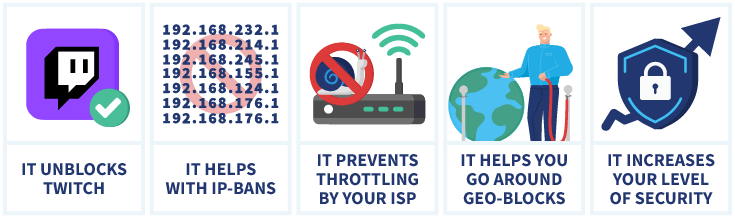
So, why would you need one of these best VPNs for Twitch in the first place? You might already know that a VPN can help you unblock content on Twitch and increase your online security. We listed the most popular reasons to use a Twitch VPN for you below.
Twitched unblocked: watch Twitch at school
Network blocks are mainly imposed by businesses, workplaces, and schools to limit the number of sites users of those networks can visit. You might come across this when you try to access Twitch from your school’s Wi-Fi, for example.
Like with geographical blocks, a good VPN like NordVPN is the solution here. A VPN can conceal your IP address, encrypt your internet traffic and redirect it through a remote server where it won’t be detected or blocked. This will allow you to access Twitch streams even in places where the website is banned.
IP bans
When Twitch finds that a user is violating their terms of service, they might ban that user’s IP address. This means that anyone using that IP address to watch Twitch will find themselves unable to access the platform. This can be inconvenient, especially when the ban wasn’t placed on the right IP or the right person.
Those with a Twitch-imposed IP ban can get around this with the use of a VPN. VPNs provide private internet access via a new IP address when connecting to a server.
The VPN’s IP isn’t banned, so you can use it to access Twitch. This way, users who’ve been wrongfully banned on the platform can still enjoy their favorite streams.
ISP throttling
Video streaming takes up a considerable amount of bandwidth. This can put a great deal of stress on an ISP’s servers. In order to ease the stress caused by the data-intensive website, ISPs may introduce throttling, meaning they allocate the Twitch site to a slower connection. This could mean more lag during streaming and longer waiting times.
If your Twitch experience gets notably worse, it could be due to ISP throttling. You can use a VPN to find out whether this is actually the case. With a VPN, your Twitch visits are essentially hidden from your ISP’s prying eyes. Now you can access Twitch either as a streamer or viewer without your ISP diminishing the quality.
Geo-blocks
It’s not uncommon for Twitch to impose geo-blocks on videos based on licensing issues. Some videos and streams might not be available to you because you’re in a certain location. If you encounter this problem, you’ll get an error saying “the premium content is not available in your region (error #1)“.
To get around geographical content blocks, you can simply connect to a VPN server in a different country. Your best bet would be to pick a server in the US or the UK, where Twitch is freely available to all.
Increased security measures
Aside from helping you unblock content, a VPN also provides essential online security by keeping you safer and more anonymous. A VPN encrypts your traffic and gives you a different IP address. This will hide your Twitch viewing from prying eyes.
A VPN can also protect you from DDoS attacks. With a masked IP address, DDoS attacks can’t locate your netwerk. This makes it significantly harder to target you.
Bypass Twitch age verification in Australia
From December 10, Australia requires strict age checks on Twitch, blocking anyone under 16 unless they verify their age with government-approved ID or a biometric scan. If you prefer not to complete the ID check or you’ve been mistakenly flagged, a VPN can help by routing your traffic through a country where Twitch still uses the standard 13+ age policy. Connecting to a server in regions like the US, Japan, Canada, or Ireland lets you access Twitch normally without triggering the Australian verification prompt.
Why Free VPNs Don’t Always Work for Twitch
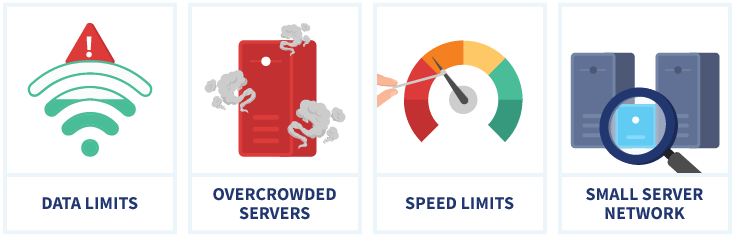
“Free” doesn’t necessarily mean “good.” In fact, when dealing with VPNs, free options are more likely to be limited in scope and features. Here are a few reasons why you might wish to use a better VPN for Twitch instead.
- Data limits: If you use a free VPN for Twitch with a data limit, you might find it runs out in no time. If you frequently use Twitch for viewing streams, and especially if you want to stream yourself, having uncapped data is crucial.
- Overcrowded servers: Free VPNs attract a lot of users and usually have a small available server network with only a handful of servers. This can lead to crowded servers and complications with connections, connection speed, and stability. This results in a terrible Twitch viewing experience.
- Speed limits: Some free VPNs even work with speed limits, meaning you won’t be able to stream very well no matter how busy the servers are.
- Small server network: Most free VPN service providers limit the number of server locations to which a user can connect. This can be a serious problem if the location of the server you need is not available. You might not be able to unblock the content you want or reach the speeds you desire.
Get the best Twitch streaming experience!
With a free VPN your stream might lag or take a long time to load, meaning you won’t be able to enjoy Twitch to its full extent.
For the best Twitch streaming experience we advice to use a premium VPN like NordVPN. With no data caps, reliable speeds, and a sprawling global network of servers, we can recommend NordVPN for Twitch. You can take advantage of the NordVPN free trial and use NordVPN for 30 days for free.
Final Thoughts
A free VPN service will help you get around geo-blocking restrictions, circumvent IP bans and network blocks, and avoid ISP throttling. Due to limitations and a lack of features, choices are limited. Thankfully, there are a few good free VPNs available:
- Proton VPN: Best choice for frequent Twitch users from the US or Europe.
- PrivadoVPN: Tremendous choice with 10 GB data and more servers outside the US
- Hide.me: Good free VPN with 10 GB data and a working kill switch for extra security.
If you get serious about your Twitch streaming and viewing, you’re likely much better off choosing a paid VPN service with an unlimited data cap.
For that, we’d suggest a premium service like NordVPN. The connection speeds are lightning quick, with thousands of different server locations, and best of all, no data caps.
Have questions about the best free VPNs for Twitch? Check out our FAQ section below. Just click a question to view the answer.
In some cases, it can be beneficial to use a VPN for Twitch. First of all, a VPN can allow you to unblock pages and streams on Twitch that you wouldn’t otherwise be able to visit from your location. On top of that, regardless of your current location, a VPN will not only hide your Twitch viewing from prying eyes, but also provide a potentially faster streaming experience, if you’re dealing with ISP throttling.
In some cases it can be beneficial to use a VPN for streaming, for example to unblock content. You can also use a VPN for Twitch to unblock content that’s not available in your region.
To stream on Twitch with a VPN, you’ll first need to select the VPN service. Once this step is complete, all you need to do is connect to the VPN server closest to the server location you’re looking to access. This is often the server that is closest to you. Following this, you can use whichever streaming software (OBS, Xsplit, etc.) you prefer to access and stream to Twitch.
No, a VPN cannot prevent a person from being swatted. However, it’s a great tool to have in the overall plan you need to prevent it. Since swatting requires the swatter to know your physical address, using a VPN can help you remain anonymous. It will still require more effort on your end to keep your identity secret from the public: make sure you don’t share too much personal information online and keep your streaming location secret.