

Can’t access certain websites at school, work, or while traveling abroad? You’re not alone. Network administrators often block popular sites like Netflix, TikTok, and YouTube, while streaming platforms and websites impose geo-restrictions based on your location. The only reliable way to unblock websites easily and effectively is by using a VPN.
A VPN hides your real IP address, encrypts your internet traffic, and makes it look like you’re browsing from another country. This allows you to unblock websites on any device, no matter where you are. However, while there are many VPN providers, not all of them are suitable for unblocking websites. I found that NordVPN is the best VPN that successfully unblocks websites. With servers in 149 countries, high-speed connections, and strong privacy protection, NordVPN consistently bypasses restrictions on streaming sites, social media platforms, and more.
How to use a VPN to unblock websites:
- Choose and subscribe to a reliable VPN provider. I recommend NordVPN, now 75% off.
- Download and install the VPN app on your device.
- Connect to a VPN server in a location where the website is available.
- Clear your browser’s cache and cookies.
- Enjoy visiting websites without any restrictions!

Apart from using a VPN, there are other methods that can help you access your favorite websites without restrictions. Below, I provide 9 methods that you can use to access websites from anywhere. These methods include using a proxy server, changing your DNS settings, using the Tor browser, using Google Translate, and other solutions. Continue reading and learn how to unblock websites on any device.
How to unblock websites from anywhere
Many websites are not available for all users, especially if you’re using a work or school device. For example, scholars who use their school’s network or devices are unable to visit some websites, especially those that could be considered harmful. Most schools block access to different sites to guarantee online safety, ensure that students are not distracted, and comply with regulations such as the Children’s Internet Protection Act (CIPA).

Even if you’re not using workplace or school devices or your device doesn’t have parental controls, you might still be unable to access all websites. Some websites are also being blocked on Chrome because of the browser’s security warnings. Such security warnings indicate that the site might be unsafe, which is why Chrome blocks it. Luckily, there are 9 ways that can help you unblock websites from anywhere:
Method 1. Use a VPN service
The easiest and most secure way to unblock websites is by using a VPN (Virtual Private Network). A VPN works by rerouting your internet traffic through a secure server, giving you a new IP address and making it appear as if you’re browsing from a different location. When you connect to a VPN server in Paris, for example, any website you visit will assume you’re in France. This makes it possible to access blocked websites.
A VPN also encrypts your internet traffic, masking your private information and allowing you to bypass censorship and geo-restriction. Here’s how to unblock websites on any device with a VPN:
- Choose a reliable VPN provider. For the best experience, I recommend NordVPN, as it has servers in 149 countries, which successfully bypass geo-restrictions and unlock websites from anywhere. Additionally, it delivers fast speeds, so you’ll have no issues while browsing the internet.
- Download a VPN on your device.

- Connect to a VPN server. If the website you’re trying to visit is unavailable in your country, connect to a server in another country where it’s available.

- Open an Incognito or private browsing tab in your browser. This ensures the website data and cookies on your browser don’t reveal your location.

- Head to the website you’re trying to unblock. You should be able to access it now.

NordVPN has a 30-day money-back guarantee. So, you can use it to unblock websites for an entire month, risk-free.
Method 2. Try a proxy server
Another way to unblock websites by masking your IP address is by using a proxy. Similar to a VPN, by using a proxy, you can bypass certain content restrictions, as it will help to make it look like you’re browsing from another location. However, it will only work on a single browser tab or device. Additionally, unlike a VPN, a proxy will not encrypt your traffic, which means that it will not safeguard your digital footprint. While it’s not suitable for online security, a proxy will help to unblock websites that your government, school, or workplace blocks. Here are the steps on how to unblock websites with a proxy:
- Choose a reliable web proxy service, such as Hide.me.
- Enter the URL of the blocked website that you’re trying to access.
- Select a server location, one where the website is available.
- Connect to the proxy by pressing the Go or Connect buttons.
- Visit the website and enjoy browsing without restrictions.
Method 3. Change your DNS settings
By using Smart DNS to unblock websites, you can trick websites into believing you’re in a different location. It does this by masking the origin of your DNS queries. While Smart DNS does not change your IP address, it blocks any traffic that could reveal your location. Ultimately, this allows you to unblock websites from anywhere.
Smart DNS doesn’t provide extra security through encryption. It also doesn’t anonymize your connection or safeguard your privacy online, like a VPN.
- Go to your browser’s Settings tab.
- Head to the Privacy & Security or Security section.
- Scroll until you find the Secure DNS option.
- Enable Secure DNS and select a public provider, such as Cloudflare (1.1.1.1).
- Restart your browser to complete the changes.
- Go to your device’s Network & Internet settings or Network and Sharing Center.
- Select your network and go to its Properties.
- Locate the IP settings section (e.g., IPv4).
- Insert public DNS addresses, such as Cloudflare (1.1.1.1).
- Save your changes and restart your device for them to take effect.
Method 4. Turn URL into IP
Some websites are blocked by URL and not their IPs, so you can also unblock websites by turning the URL into an IP address. A URL is the text-based address that you see in your browser, while an IP address is the numbered sequence. If your government, school, or workplace blocked the website’s URL, you might still be able to access it by entering the IP address directly into the search bar. Here are the steps on how to unblock websites by turning a URL into an IP address.
- Open the Command Prompt on your device by typing cmd.
- Enter ping and the website URL that you want to access (e.g., ping www.google.com)
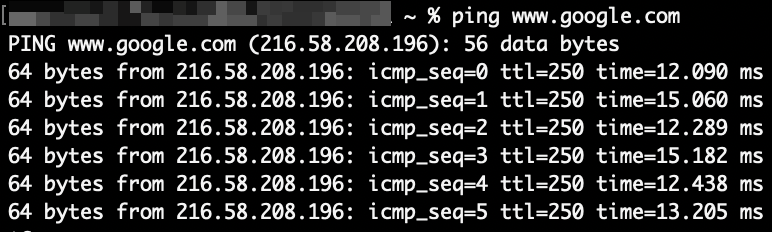
- Press Enter to get the website’s IP address.
- Paste the IP address into the search bar.
- Open the site and browse it without restrictions.
Method 5. Use the Tor Browser
If you want to unblock websites anonymously, you can also do that by using the Tor Browser. Tor Browser is an open-source and completely free software that is meant to enhance anonymity online. By using the Tor Browser, your traffic will be routed through volunteer servers, which will hide your IP address and the website’s IP from your ISP (Internet Service Provider). This will not only safeguard your privacy but also allow you to access websites that might be blocked otherwise.
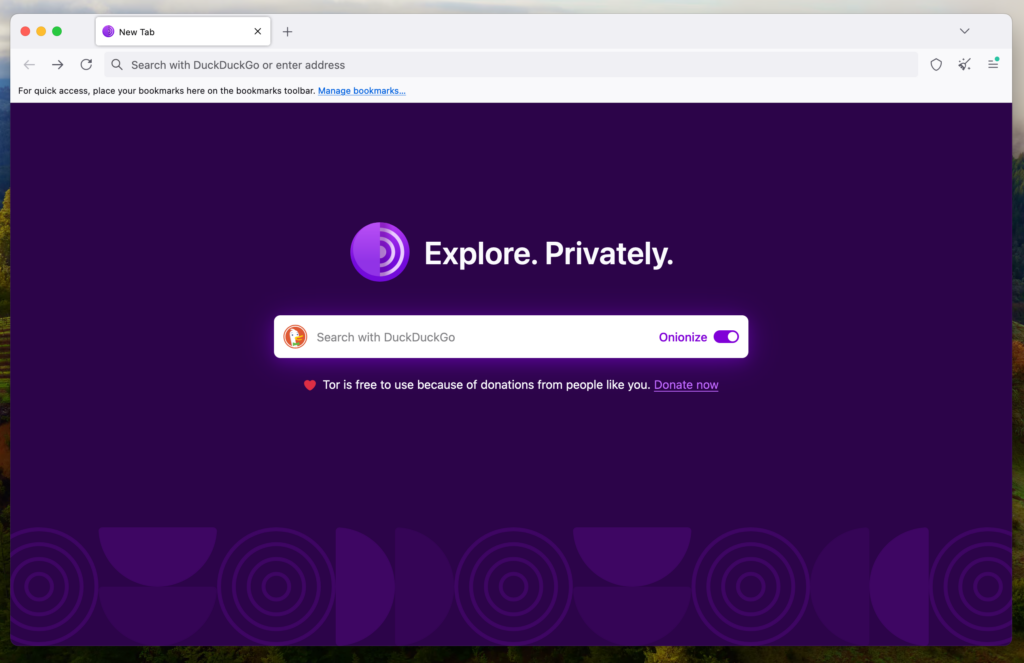
To unblock websites with Tor Browser, simply download and install it on your device. Once that is done, click Connect to join Tor Browser. After that, you can use Tor Browser as a normal browser and access sites that might be blocked on regular browsers.
Method 6. Use Google Translate
Another unexpected yet simple way to unblock websites is by using Google Translate. By inserting the website into Google Translate, it might work as a proxy that you could use to access the website without using its domain directly.
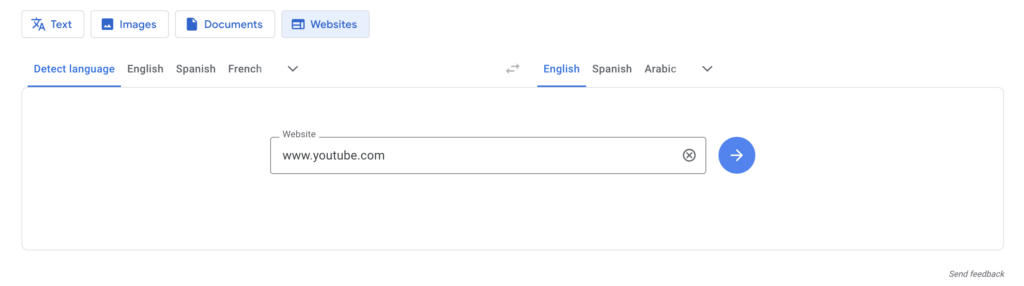
To do so, simply insert the website that you want to access into the translator field and translate it. Once that is done, click on the translated version on the link to access the website. However, it’s important to note that this might not always work.
Method 7. Use a dynamic IP address
If your network provider provides you with a dynamic IP address, you can also use it to unblock websites online. Some websites might be blocking your IP address, which is very common in countries with internet restrictions and censorship. To access such sites, you’ll need to change your IP address, which is possible if you have a dynamic IP address. To do so, simply restart your router (this should assign you the dynamic IP address) and try to visit the site that you want to unblock.
Method 8. Convert HTML into PDF
If you only want to read the content available on the blocked website, you could also try to unblock the website’s content by converting HTML into a PDF. This might be useful if you’re trying to access news sites, online journals, or similar publications. To do so, you can use online HTML to PDF converter tools like Soda PDF. Simply enter the URL into the converter, and it will generate a PDF file, which you’ll be able to view or download. However, keep in mind that images or similar elements will not be converted.
Method 9. Use a URL shortener
One last method that can help you unblock websites is by using a URL shortener, such as ShortURL. Sometimes, while the full article’s domain is blocked, using a URL shortener might get around these restrictions, as it will theoretically change the URL address. To do this, simply paste the website’s address into the shortener, create a shorter link to the site, and try to access the website through the new link. But just like other methods, it is not guaranteed to work with all websites, and it will not safeguard your privacy like a VPN would.
The 3 best VPNs for accessing blocked websites from anywhere
I conducted extensive tests to find the best VPNs for unblocking websites from anywhere. The three VPN providers below can unblock websites regardless of the reason they’re blocked. They also come with solid security and privacy features.
Top 1. NordVPN: best VPN for unblocking websites and streaming

- Excellent unblocking capabilities
- 8900 servers in 149 countries, so you can unblock websites from different parts of the world
- Fastest speeds on the market
- Obfuscated servers hide your VPN traffic and allow you to access blocked sites undetected
- 30-day money-back guarantee
Based on our tests, NordVPN is the best VPN to unblock websites from anywhere. With 8900 servers in 149 countries, it can bypass all kinds of restrictions, like geographical blocks on websites such as Netflix or barriers put up by your government on news sites. NordVPN’s obfuscated servers allow you to access blocked sites freely without being detected by your network admin.
Besides providing access to blocked websites and services, NordVPN boasts fast speeds with an average download speed of 779Mbps, thanks to the in-house NordLynx protocol. You can stream TV shows or movies and play games online without lags or delays. Additionally, it offers a robust security toolkit for extra protection, which includes features like Threat Protection (ad blocker), kill switch, and Meshnet, which allows you to safely access your devices from anywhere. NordVPN has apps for different devices, allowing you to access blocked sites on desktop or mobile. You can even install this VPN on your router, and access blocked sites on any device of your choice.
NordVPN is quite affordable, too. And, if you act now, you can get a massive limited-time 75% discount and drive the price further down to just $ 3.49 per month. If you want to test it first, NordVPN has a 3-day free trial and offers a 30-day money-back guarantee.
Interested in learning more about NordVPN and its features? Check out our in-depth NordVPN review.
Top 2. Surfshark: affordable VPN to bypass website restrictions

- One of the most affordable VPNs for unblocking websites
- Offers an unlimited number of simultaneous connections with a single subscription
- Robust security toolkit
- Camouflage mode allows you to use a VPN without being detected
- 30-day money-back guarantee
Surfshark is the best VPN to unblock websites because it offers fast servers, strong encryption, and unlimited device connections for seamless global access. It can easily unblock websites such as Disney+, thanks to its wide network of 4500 servers in 100 countries.
Like NordVPN, Surfshark uses strong AES 256-bit encryption to protect your data, a strict and audited no-logs policy, and offers obfuscation via its Camouflage mode. Surfshark allows you to unblock websites even in countries, schools, or workplaces that crack down on VPN use. You will have no issues when browsing online as Surfshark delivers reliable speeds (average download speed is 466Mbps). It also offers features like CleanWeb, which will block malicious ads and trackers, or IP Rotator, which will change your IP address every 5 to 10 minutes.
You can even share your Surfshark account with family and friends, as this VPN supports unlimited connections.
Surfshark is one of the cheapest VPNs available today that offers an 85% discount, meaning that you can get it for only $ 2.49/month. You can also take advantage of Surfshark’s 30-day money-back guarantee and the 7-day free trial.
For more information about this VPN service, including details of how it performed in our tests, read our full Surfshark review.
Top 3. Proton VPN – secure VPN for accessing blocked sites at school

- 20700 servers worldwide for geo-restrictions bypassing
- Operates in a privacy-friendly jurisdiction
- Stealth protocol provides obfuscation
- 30-day money-back guarantee
Proton VPN is another reliable VPN to unblock websites from anywhere with 20700 servers in 149 countries that successfully bypass geo-restrictions. The provider heavily focuses on security, so it’s a perfect choice for privacy-oriented users who are looking for secure VPN solutions. It also has a free version, which can be used for simple everyday browsing.
You will stay anonymous with Proton VPN as it offers Swiss privacy, has a reliable no-logs policy, and uses robust AES-256 encryption. There are also quite a few additional features, such as a kill switch, split tunneling, and NetShield Ad-blocker, which will block malicious ads, trackers, and websites. Proton VPN also has a Stealth protocol, which is a must when unblocking websites online, as it offers obfuscation. My in-house tests revealed that the average download speed of Proton VPN is 428Mbps, which is less than NordVPN or Surfshark offer, but still enough for an uninterrupted browsing experience.
If you’re interested in a paid Proton VPN service, you can get it for $ 2.99/month. The provider also has a 30-day money-back guarantee, which allows you to test the service first.
Read our Proton VPN review to find out what our VPN experts think of this VPN and how they rate its performance.
How to unblock websites on a school computer
Schools may block particular websites to protect students from harmful content, comply with regulations such as CIPA, minimize distractions in the classroom and workplace, and preserve network bandwidth. However, you may need to access these websites for legitimate reasons, such as school/product research. While there are a few methods that could work, using a VPN is the most effective way to unblock websites on a school device. Here’s how to unblock websites on a school or work computer:
- Get a reliable VPN subscription. I recommend NordVPN, now 75% off.
- Download the VPN app on your device.
- Launch the app and sign in to your VPN account.
- Connect to a VPN server in a location where the website is available.
- Access content online from anywhere without restrictions.
Can I unblock websites with a free VPN?
If you want to cut costs, you may consider using a free VPN to access blocked websites. While some top-rated free VPNs are great for everyday browsing, I don’t recommend using one to unblock websites. Free VPNs usually have several limitations. For example, their weak security may leave you exposed if your school, employer, ISP, or government is monitoring the IP addresses of anyone trying to access blocked sites. They’re not ideal for anonymous activities, like getting Pornhub unblocked.
And, even when free VPNs work, there’s a limited number of websites you can unblock, as they usually have significantly smaller server networks. Free VPNs are also more likely to have data caps and bandwidth limits, which can make it impossible to stream or download content online.
There’s also a privacy risk to free VPNs. Many free VPN services have been accused of logging and selling users’ data to advertisers for profit. It’s not worth putting your privacy at risk. Grab NordVPN now for $ 3.49 — less than a cup of coffee — and access restricted content safely.
Why are websites blocked?

Websites can be restricted for a few reasons.
- Workplaces and schools may block particular websites to prevent unproductive activities such as streaming or gaming. They may also do this to restrict the amount of bandwidth being used.
- Oppressive governments may block websites, like news portals or social media, to curb dissent, as it could expose citizens to ideas that are contrary to the official narrative. For example, China’s “Great Firewall” blocks websites that go against the country’s censorship guidelines.
- ISPs sometimes block access to sites that violate local laws. For example, they may block access to free streaming, torrenting, or porn sites.
Final thoughts: unblocking websites from anywhere
Internet users who use restricted networks or devices, such as those provided by their workplace or school, are often unable to access all websites freely. Many websites are blocked due to geo-restrictions or simply to stop users from accessing some specific content. Luckily, you can bypass these restrictions and unblock websites on any device from anywhere by using a VPN, a proxy, changing your DNS addresses, using the Google Translate method, or a few other solutions.
After investigating all the ways how to unblock websites, I found that using a VPN is the most effective way to do so. NordVPN proved to be the best VPN to unblock websites as it offers servers in 149 countries, delivers fast speeds, and successfully bypasses geo-restrictions. Additionally, it offers many advanced features, including obfuscation, which will ensure a secure experience when unblocking websites online.
If you would like to find out more about unblocking websites with a VPN, check out the articles below:
- How to Unblock Porn From Anywhere
- Best VPNs for Streaming
- Best VPN for BBC iPlayer
- How to change your country on Netflix
- Best ESPN+ VPNs
- Best VPN for online gambling
- Best Betfair VPNs
- VPN for Roobet
- 5 best VPNs for Grindr
- How to get around blackout restrictions on Sling
FAQ
Do you have questions about how to unblock websites from anywhere? Check out the FAQ below for quick answers.
To access blocked sites in Chrome, use a VPN, a proxy server, change DNS settings, or try pasting the URL address into Google Translate. While all these methods should work, using a VPN is the most efficient way to unblock websites online. However, if the website is blocked on Chrome, you should change permissions and allow access to the website via Chrome’s settings.
To unblock a website on a school Chromebook, use a robust VPN provider, such as NordVPN. School devices usually don’t allow access to harmful or inappropriate websites. A VPN will change your IP address and encrypt your traffic, which will grant you access to blocked websites. NordVPN additionally offers obfuscation, which will help you to bypass restrictions without the sites knowing that you’re using a VPN in the first place.
To unblock websites on iPhone, be sure to disable restrictions via the Web Content. To find it, go to your device’s settings, find Screen Time, and select Content & Privacy Restrictions. If the website is not restricted, but you’re still unable to access it, it might be that it’s unavailable in your location or on your device specifically. To solve this, use a robust VPN provider, such as NordVPN.
You can unblock a website blocked by an administrator using a VPN or proxy service, the Tor browser, Google Translate method or other methods. While there are various ways to unblock websites that are restricted by administrators, using a VPN is the most efficient way. By using a robust VPN you’ll be able to hide your identity and bypass restrictions, which will help you to access your favorite websites on any device.
Both VPNs and proxy servers route your internet connection through third-party servers. However, a VPN also encrypts your traffic to protect your privacy. A premium VPN, like NordVPN, has an extensive network of servers spread out globally, letting you access content from many different locations. On the other hand, proxy servers tend to have small server networks, limiting your ability to access blocked sites.
A VPN gives you a different IP address and allows you to access VPN servers from across the globe. VPNs also encrypt your internet traffic and generally improve your online safety. Smart DNS, on the other hand, tricks websites and services into thinking that your DNS queries are coming from a different location. They don’t offer the added security and privacy benefits of a VPN.
NordVPN successfully unblocks websites as it offers stable connections, fast speeds, and servers worldwide. NordVPN also has obfuscated servers, which will help you to unblock websites even if you’re using restricted networks or devices, such as your school’s or workplace’s. Additionally, the provider offers more advanced features that will add an extra layer of security when browsing online.

