- How to get around Sling TV blackout restrictions using a VPN
- Our recommended VPNs to bypass Sling TV blackout restrictions in 2026
- Why does Sling TV have blackout restrictions?
-
Best VPNs to bypass Sling TV blackouts: a detailed overview
- Top 1. NordVPN – best overall VPN for Sling TV blackouts
- Top 2. Surfshark – affordable VPN for Sling TV streaming on multiple devices
- Top 3. Proton VPN – reliable Sling TV VPN with strong privacy features
- Top 4. IPVanish – US-based VPN watching Sling TV live sports without restrictions
- Top 5. ExpressVPN – fast VPN for Sling TV streaming outside the US
- How to bypass Sling TV blackouts on different devices
- Sling TV blackout games: how to watch NFL, MLB, NBA, NHL, and NCAA games
- Our VPN testing methodology
- Final tips for using a VPN to watch Sling TV online
- FAQ
Not a lot of things are more frustrating than launching Sling TV to watch your favorite sports team only to find a blackout restriction blocks you out. The Sling TV blackouts most often occur due to broadcasting rights and local licensing agreements, which affect sports fans hoping to stream NFL, NBA, MLB, NHL, and NCAA games on Sling TV. Understandably, such blackouts are particularly frustrating for cord-cutters relying on Sling TV instead of cable TV.
Luckily, a reliable VPN (Virtual Private Network) allows sports fans to bypass Sling TV blackout restrictions by changing their virtual location. Anyone can easily mask their real location simply by connecting to a VPN server outside the blackout zone, gaining access to previously restricted live streams on Sling TV. This guide will cover why Sling TV blackouts happen, how a VPN helps to bypass them, and recommend the best VPNs for Sling TV blackouts in 2026.

How to get around Sling TV blackout restrictions using a VPN
-
- Choose a reliable Sling TV VPN with plenty of US servers. My choice is NordVPN, now 75% off.
- Download the VPN app and install it on your device.
- Connect to a server in the US where the game you want to see is available. For example, I used the NY server to stream blackout Dallas Cowboys games.
- Open up the Sling TV app or head to its browser version and log in.
- Stream blackout games on Sling TV!
Our recommended VPNs to bypass Sling TV blackout restrictions in 2026
Why does Sling TV have blackout restrictions?
A Sling TV blackout happens when a specific live sports event is unavailable in your area due to broadcasting rights and restrictions. To make it clearer, even though Sling may have the channel on which your game is broadcast, it may still be blocked because another network or league controls who can watch in that region.
There are several reasons for Sling TV blackouts, including:
- Regional Sports Networks (RSNs) restrictions. Local games are always tied to specific broadcasters. This means that if you’re located in the team’s home market, the game may not be available on Sling TV.
- National exclusivity. Big networks like ESPN, FOX, or CBS can secure the national rights to some games, causing blackout restrictions on all other services.
- League restrictions. Major leagues, such as MLB, NBA, NFL, and NHL, can enforce blackout zones to protect ticket sales and local broadcast agreements.
So, for example, if you’re located in Chicago, a Cubs game on Sling TV may be blacked out because a local RSN, like Marquee Sports Network, holds rights to air it in the region. However, Cubs fans outside Chicago can stream the game on Sling TV without any blackout restrictions.

Luckily, if you run into Sling TV blackout restrictions, you can use a reliable VPN to bypass it. With a VPN, you can change your IP address to a different US state, which will allow you to bypass Sling TV blackouts and stream the games unavailable in your current area.
Best VPNs to bypass Sling TV blackouts: a detailed overview
To find the best VPNs to bypass Sling TV blackouts, I looked for services with strong US server presence, fast connection speeds, and solid geo-restrictions unblocking capabilities. I performed real speed tests, checked their security features’ reliability, and did hands-on research on Sling TV restriction bypass capabilities for over 20 different VPNs. Ultimately, I found my top 5 Sling TV VPNs:
Top 1. NordVPN – best overall VPN for Sling TV blackouts
- Rating: 9.3⭐⭐⭐⭐⭐
- Servers in the US: 1970+ servers in 16 states
- Can bypass Sling TV blackouts? ✅Yes
- Current deal: 75% OFF
NordVPN is the best VPN for Sling TV blackouts, thanks to its incredibly fast connection speeds and 1970+ high-quality servers in 16 US states for easy IP address change according to the games you want to stream on Sling TV.
I tested NordVPN’s capabilities at bypassing Sling TV blackouts by connecting to a server in New York to stream blackout Dallas Cowboys games, and it worked perfectly and without any issues. The new secure IP address allowed me to bypass Sling TV blackouts and stream the restricted games. Similarly, NordVPN can be used to access La Liga matches from abroad, letting you watch Spanish football even when it’s geo-restricted. I also tried other NordVPN US servers for different blackout games, always getting the same excellent unblocking results and smooth streaming experience.
NordVPN works so great at bypassing Sling TV detection because of its advanced security features, strong AES-256 encryption, modern tunneling protocols, like NordLynx, and strong IP/DNS/WebRTC leak protection. The service’s fast speeds don’t hurt either – during my tests, NordVPN kept a huge 94% initial speed retention rate, which meant I could stream all games live in HD without any interruptions.
NordVPN subscriptions start at $ 3.49/month – a great price-to-feature ratio, considering you can use it on up to 10 devices at the same time. You can test out NordVPN during the 3-day free trial for Android devices, or you can subscribe immediately risk-free thanks to the 30-day money-back guarantee.
What I liked
- Over 1970 servers in 16 US states
- The fastest connection speeds in the industry
- Works faultlessly at bypassing Sling TV blackouts
What I didn’t like
- Some services offer more simultaneous connections
Top 2. Surfshark – affordable VPN for Sling TV streaming on multiple devices
- Rating: 9.0⭐⭐⭐⭐⭐
- Servers in the US: 600+ servers in 19 states
- Can bypass Sling TV blackouts? ✅Yes
- Current deal: 85% OFF
Surfshark is an excellent choice for bypassing Sling TV blackout restrictions, thanks to its affordable subscriptions and unlimited device connections. Additionally, Surfshark is the only VPN on my list with a GPS spoofing feature for Android devices, which can be very useful if you plan on streaming blackout games on your smartphone.
Surfshark offers a smaller server count in the US, around 600, but covers more US states than NordVPN – 19 in total. However, even with the smaller availability of servers, I had no issues bypassing the blackout Las Vegas Raiders games on Sling TV by using Surfshark servers.
Surfshark showed great Sling TV restrictions bypass capabilities during my tests, mostly thanks to solid IP leak protection, obfuscated servers, and overall great quality of its RAM-only fleet. I also did speed tests for Surfshark and got similar results to what I had with NordVPN. Ultimately, Surfshark kept a 93% initial speed retention rate, allowing me to stream blackout NFL games in full HD quality.
Despite its great performance and advanced features, Surfshark is a very affordable VPN with subscriptions starting at $ 2.49/month. You can check if Surfshark is the right service for you during a 7-day free trial or subscribe straight away without any risk, thanks to the 30-day free trial.
What I liked
- Over 600 servers in 19 US states
- Works great at bypassing Sling TV blackout restrictions
- Affordable subscriptions with unlimited device connections
What I didn’t like
- Some features cost extra
Top 3. Proton VPN – reliable Sling TV VPN with strong privacy features
- Rating: 8.9⭐⭐⭐⭐
- Servers in the US: 3,500+ servers in 19 states
- Can bypass Sling TV blackouts? ✅Yes
- Current deal: 70% OFF
Proton VPN is a great VPN to bypass Sling TV blackout restrictions with a massive US server fleet, higher-than-average connection speeds, and a strong focus on privacy, which helps bypass VPN detection methods. It operates a massive number of US servers – 3,500+ servers in 19 US states. This meant Proton VPN was always easy for me to find the necessary server to bypass Sling TV blackout restrictions. And every time I changed my IP address, I was easily granted access to all the NHL games I otherwise couldn’t access.
Because Proton VPN offers such strong essential and advanced features, like Secure Core servers, obfuscation, and military-grade encryption, Sling TV had no idea I was using a VPN to access its restricted games. Additionally, live streaming with Proton VPN is a smooth experience, thanks to the 88% initial speed retention rate I verified during my speed tests.
Proton VPN is a bit more expensive than average, with subscriptions starting at $ 2.49/month. Instead of a free trial, Proton VPN offers a completely free version you can use to test out the service. However, the free version is not suitable for bypassing Sling TV blackout restrictions due to slower speeds and no advanced features available with it. That said, all your Proton VPN purchases are protected with a 30-day money-back guarantee.
What I liked
- Massive US fleet – 3,500+ servers in 19 states
- Robust essential and advanced features to bypass Sling TV restrictions
- Good speeds for smooth streaming
What I didn’t like
- Slightly pricier subscriptions
Top 4. IPVanish – US-based VPN watching Sling TV live sports without restrictions
- Rating: 8.5⭐⭐⭐⭐
- Servers in the US: 1,020+ servers in 17+ states
- Can bypass Sling TV blackouts? ✅Yes
- Current deal: 84% OFF
IPVanish is a reliable VPN service for bypassing Sling TV blackouts that offers a solid US server count and unlimited device connections. With good connection speeds and solid essential features, it’s a good choice for streaming blackout games.
IPVanish has 1,020+ servers in around 17 US states, which makes it easy to find the right server in accordance with Sling TV blackout games. For instance, I used the IPVanish New York server to stream Philadelphia Phillies blackout games on Sling TV and got a good overall performance and experience. However, there were a couple of times when I had to switch to another server in the same location before Sling TV granted me access to the games I wanted to watch.
While IPVanish does not offer as many advanced features as NordVPN or Surfshark, it covers all the ground bases nicely with solid IP leak protection, OpenVPN Scramble feature for obfuscation, and strong encryption. All of these features ensured Sling TV would not detect my VPN usage to bypass blackout restrictions. As for connection speeds, I got an average initial speed retention rate of 92% during my tests, which allowed me to stream live games in full HD.
IPVanish is very reasonably priced at $ 2.39/month if you choose the 2-year plan. The provider offers a 7-day free trial for you to test out the service. If you like it, you can subscribe risk-free with a 30-day free trial.
What I liked
- 1,020+ servers in around 17 US states
- Good for bypassing Sling TV restrictions
- Unlimited device connections
What I didn’t like
- Does not always work with Sling TV on the first try
Top 5. ExpressVPN – fast VPN for Sling TV streaming outside the US
- Rating: 8.5⭐⭐⭐⭐
- Servers in the US: 3,000+ servers in 50 states
- Can bypass Sling TV blackouts? ✅Yes
- Current deal: Get 4 months free with a 2-year subscription
ExpressVPN is a good choice to bypass Sling TV blackout restrictions and is the only VPN on my list with servers in all 50 US states. This alone makes it very easy to switch your IP address according to where the games you want to stream are available.
During my tests, ExpressVPN easily bypassed Sling TV blackouts. For example, I used the New York server to stream a Cowboys game, and the service unblocked it with no error messages at all. I also checked other ExpressVPN servers in Los Angeles, Miami, and Chicago, and got the same great results for bypassing Sling TV blackouts.
ExpressVPN is great for Sling TV restrictions thanks to its TrustedServer technology of RAM-only servers, AES-256 encryption, leak protection, and its use of modern tunneling protocols, like Lightway. I also got great speed test results with ExpressVPN, which kept a nice 91% initial speed retention rate, meaning I could stream my games without any interruptions. ExpressVPN subscriptions start at $ 2.99/month, and it may be worth it if you need a VPN with full server coverage in all US states. You can also try it with a 3-day free trial on iOS and Android, while first-time customers get a 30-day money-back guarantee when subscribing directly.
What I liked
- Server fleet covers all 50 US states
- Reliably bypasses Sling TV blackout restrictions
- High connection speeds for smooth streaming
What I didn’t like
- Short 3-day free trial on mobile
How to bypass Sling TV blackouts on different devices
Sling TV mainly uses your IP address to determine your geographical location. The service, like many other websites, can easily check your IP address to figure out where you are trying to access it from. Additionally, Sling TV may use your billing information and GPS location (mostly applicable to mobile devices) to establish your location. Once the service determines your location, it can easily impose blackout restrictions on specific games you may want to watch.
If you run into blackouts, a Sling TV VPN can help you bypass them by changing your IP address. To do that, you will only need to connect to a server in a location where the game you want to watch is available, and the connection will make it appear as though you’re located in another place. So, if you’re in the home market of the Detroit Lions or any other team, changing your virtual location through a VPN connection will allow you to bypass Sling TV restrictions.
One thing to remember is that while using a VPN in the US is perfectly legal, using it to bypass Sling TV blackouts might violate the Terms of Service, resulting in a temporary account suspension. To avoid this, choose only a very reliable VPN, like NordVPN, capable of keeping your real IP address well-hidden and bypassing Sling TV VPN detection methods.
Get around Sling TV blackout restrictions on desktop
Bypassing Sling TV blackout restrictions on desktop is usually easier than on mobile devices for several reasons. For one, Sling TV also uses GPS data to determine your location on mobile devices, meaning you will need a GPS spoofer in addition to a VPN service to bypass Sling restrictions on mobile. Plus, desktop VPN apps usually allow for more setting flexibility, making them easier to configure based on your specific needs. So, if you’re looking for consistent performance in bypassing Sling TV blackouts, I recommend using a desktop browser.
Here’s how to get around Sling TV blackouts on desktop:
1. Subscribe to a reliable Sling TV VPN with plenty of US servers. I recommend NordVPN, now 75% off, as it worked the most consistently during my tests.
2. Download and install the VPN app on your device.
3. Launch the VPN and connect to a server outside the Sling TV blackout restriction area. For instance, if you want to watch restricted New England Patriots games, choose a server outside the area, like Texas or New York.

4. Head to the browser version of Sling TV and log in to your account.
5. That’s it! Now you can stream all your favorite teams’ games without Sling TV restrictions!
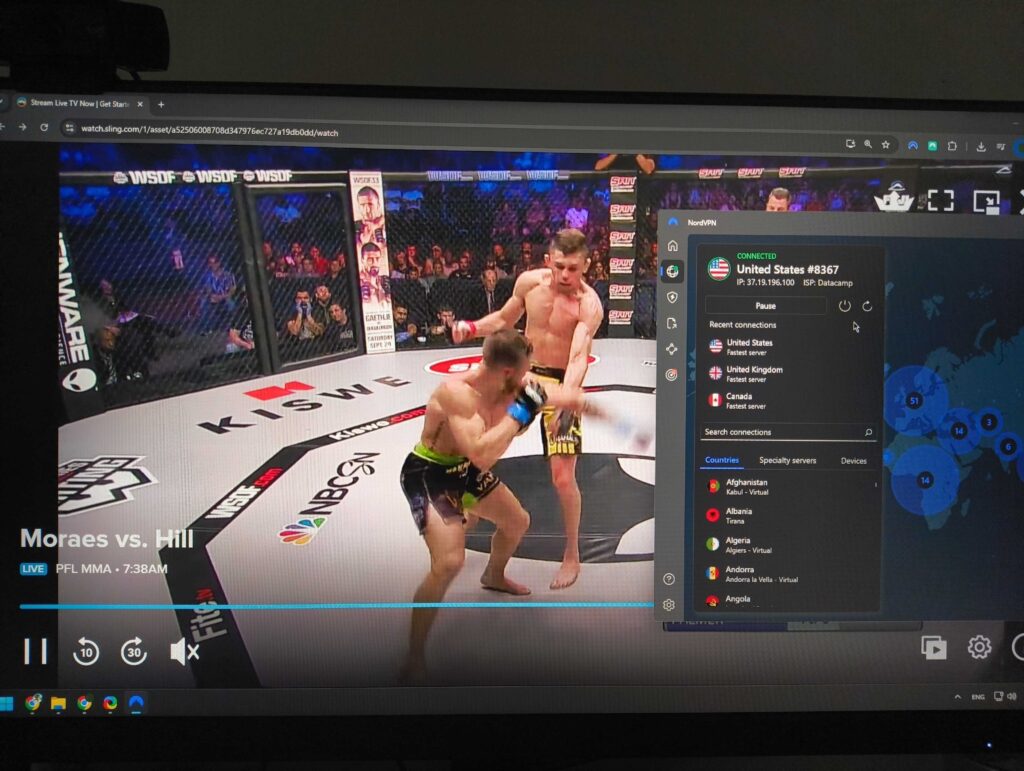
As a preventative measure, I recommend using the Incognito or Private mode when trying to bypass Sling TV blackout restrictions. Using the private browser mode prevents stored cookies and cache from exposing your real location. To access this mode, head to your browser settings and select New Incognito Window for Chrome or New Private Window for Edge or Firefox.
Get around Sling TV blackout restrictions on phone
Unblocking Sling TV on mobile devices is more complicated than on desktop, because Sling TV requires smartphone users to turn on GPS location tracking to verify their position. This allows Sling TV to provide only geographically available streams and restrict others. The GPS tracking technology is unrelated to IP addresses, meaning VPNs cannot mask the smartphone location in order to bypass Sling TV blackouts. However, it is possible to combine a VPN with a GPS spoofer to change your phone’s physical location and virtual address to stream blackout games. I found using Surfshark the most convenient in this case, as the service has a built-in GPS spoofer for Android devices.
Here’s how to get around Sling TV blackouts on phone:
- Install a reliable GPS spoofer on your phone or use Surfshark VPN with a built-in GPS spoofer.
- Open the GPS spoofer, select a location outside the Sling TV blackout area, and turn it on to override your actual location.
- Now, open your VPN app and connect to a server in the same location as the GPS spoofer to change your IP address.
- As an additional precaution to mask your real IP address, you can clear your device’s cache.
- Launch your Sling TV app and log in.
- Enjoy live streams without Sling TV blackout restrictions!
Sling TV blackout games: how to watch NFL, MLB, NBA, NHL, and NCAA games
Sling TV blackouts are mostly influenced by broadcasting rights and legal agreements between various sports leagues, local teams, and regional networks. Such Sling restrictions most commonly occur for home market or out-of-market games across the biggest leagues, like MLB, NFL, NBA, NHL, and NCAA.
Here’s how the Sling TV blackouts usually work and how to watch different restricted games:
- MLB and NFL. These two sports leagues have the hardest home market rules. For example, if the Chicago Cubs are playing at Wrigley Field, a Sling TV MLB blackout will block local viewers. That’s because the broadcast rights will belong to a regional sports network like Marquee Sports. The same applies to the NFL – if the Dallas Cowboys are on FOX in Texas, viewers will see an Sling NFL network blackout when trying to stream it outside the coverage zone. If MLB is what you want to stream on Sling, then our MLB blackout workaround guide might be of help, and if you’re a football fan, we have a similar guide on how to watch out-of-market NFL games.
- NBA and NHL. Basketball and hockey games are also subject to Sling TV blackout as they are the live streams are tied to regional sports networks. For instance, you may encounter Sling blackout restrictions for the NBA if you want to stream New York Knicks games locally on Sling, as the broadcast rights there will belong to MSG Network. The exact same situation is with the NHL, with local fans finding themselves behind an Sling TV NHL blackout every time they try to stream local games. For a more detailed guide on how to watch NBA games everywhere, you can refer to our guide. We have also compiled our tips on how to watch out-of-market NHL games.
- NCAA. College games, especially high-profile matchups between the nation’s favorite teams like Notre Dame or Ohio State, are not exempt from Sling TV blackouts either. Such games are frequently blacked out locally, as the teams sell rights to bigger networks like ESPN or the Big Ten Network.
The simplest solution that I discovered, which works every time at bypassing Sling TV blackouts, is to use a reliable VPN service, like NordVPN. A simple IP address change can help you unlock otherwise restricted NBA, NFL, MLB, NHL, and NCAA games and stream them without any blackouts or error messages.
Our VPN testing methodology
To find the best Sling TV VPNs, I tested over 20 services focusing on these main points:
- US server availability (35%). To bypass Sling TV blackouts, a VPN service must have plenty of US servers in at least several US states. Ultimately, I prioritized the services with the most US servers and a consistent performance at bypassing Sling TV restrictions.
- Speed (25%). Speed was an important criterion for my ultimate choice, as high connection speeds ensured a smooth streaming experience. For my tests, I used the Ookla tool and selected only the VPNs with the best metrics.
- Security features (20%). I only chose the VPNS with strong encryption, functional kill switches, and IP/DNS/WebRTC leak protection features, as such services are the only ones capable of bypassing Sling TV VPN detection methods and keeping your data safe.
- Price and value (20%). Price was an important factor in my ultimate choice, but I focused more on the right balance between cost and available features. So, I included only those VPNs that get the most for your money, without compromising on performance quality or security.
Final tips for using a VPN to watch Sling TV online
Plenty of NFL, NBA, MLB, NHL, and NCAA home market or out-of-market games are subject to blackout restrictions on Sling TV. This means you may not be able to watch all of your favorite team games, even if you have a Sling TV subscription. The blackout restrictions are particularly frustrating to cord-cutters, who rely on services like Sling TV instead of cable TV.
Luckily, sports fans can use a VPN service to change their virtual location and access restricted Sling TV games in their area. During my research and hands-on testing, I found that NordVPN works the best for bypassing Sling TV blackouts, thanks to its high-quality US servers, fast connection speeds, and robust security features to avoid VPN detection.
You may also want to read:
- How to watch NBC Sports online
- How to watch college football without cable
- How to watch the Super Bowl for free
- How to watch NFL Thursday Night football for free
- How to watch MBL World Series from anywhere
- How to watch Made in Chelsea outside the UK with a VPN
FAQ
No, Sling TV does not work internationally. The service is geo-locked to the US, and if you want to stream it abroad, you will have to use a VPN to change your IP address to a US one. From my experience, NordVPN works the best for it, thanks to its 1970+ servers in the US, high connection speeds, and impeccable security.
No, Sling TV is not available in Canada, as the service is restricted to the US only. To access Sling TV in Canada, you will need to use a VPN to change your virtual location. I had the best experience when using NordVPN to bypass Sling TV restrictions, thanks to its offered servers in the US, the fastest connection speeds for smooth streaming, and robust security features to hide my real IP address.
Yes, Sling TV has blackout restrictions with NFL, NBA, MLB, NHL, and NCAA home market or out-of-market games, subject to them. To bypass Sling TV blackouts, you can use a VPN, like NordVPN, to change your virtual location. All you need to do is connect to a VPN server outside the blackout area and access the games you want without restrictions.
To watch blackout NFL games on Sling TV, you will need to use a VPN service. First, select a reliable Sling TV VPN, like NordVPN, and download the app. Install and launch the app. Now, connect to a server outside the NFL Sling TV blackout zone, launch the Sling TV service, log in, and enjoy all NFL games with restrictions.
Some live streams on Sling TV are subject to blackout restrictions due to various broadcast and licensing agreements between teams, leagues, and national broadcasters. If you run into such Sling TV blackouts, you can use a VPN to change your virtual location and use this workaround to access the restricted games. From my experience, NordVPN works the best for Sling TV, thanks to its huge US server fleet and reliable restriction bypass capabilities.
To get around blackout restrictions on Sling, you will need to use a VPN. With a VPN, like NordVPN, you can connect to a server outside the Sling TV blackout area, which will change your virtual location. This will make Sling TV think you’re accessing it from a location where the blackout restrictions do not apply, allowing you to stream the previously unavailable games.