- How to Watch Hulu Worldwide With a VPN
- The Best VPN for Hulu: NordVPN
- How to Watch Hulu in Canada
- How to Watch Hulu in Australia
- How to Watch Hulu in the UK
- How to Watch Hulu in Mexico
- Why Is Hulu Not Working With My VPN?
- How to Get a Hulu Account From Anywhere
- How to Watch Live TV on Hulu
- Why Is Hulu Not Accepting My Payment?
- How to Unblock Hulu on All of Your Devices
- What’s Available to Watch on Hulu
- Conclusion: How to Access Hulu Worldwide
Are you getting an error message while trying to access Hulu or Hulu+ Live TV? This might well be because you’re not in the ‘right country’. Hulu is only available in the US and Japan, although the latter has its own Hulu version: Hulu Japan.
Despite these geo-restrictions, you can watch Hulu from anywhere as long as you have a premium VPN. In this article, we will explain how you can access Hulu from anywhere.
How to Watch Hulu Worldwide With a VPN
If you are in a location where you get the error message “Hulu is not available in your region,” don’t worry as you can still catch your favorite shows and movies. You can change your IP address to one from the US and continue watching Hulu from anywhere in the world.
To get Hulu unblocked with a VPN, follow the steps below:
- Subscribe to a good streaming VPN. We personally like NordVPN, as it allowed us to reliably unblock Hulu. Also, it’s the fastest streaming VPN we’ve tested.
- Download and install the VPN software.
- Open the VPN app and log in.
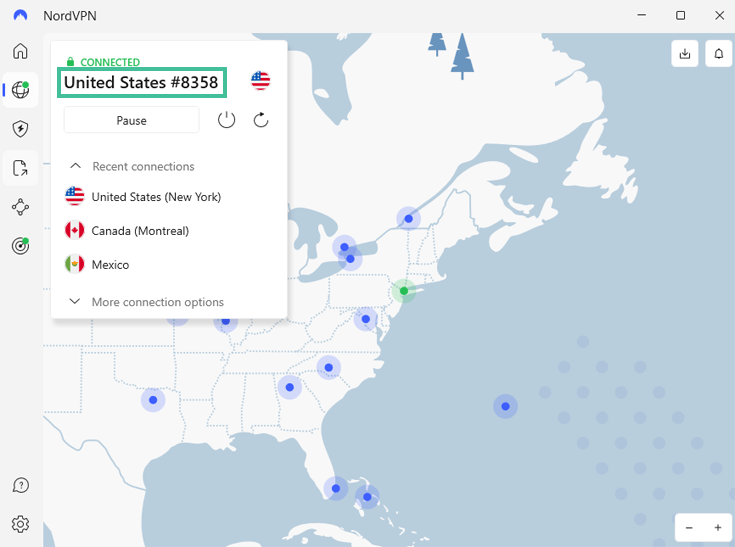
- Connect to a server in the US. Pick one as close to you as possible to limit loading times.
- Go to the Hulu website or app and find your favorite content.
- Enjoy your show or movie!
NordVPN is a great choice to stream Hulu as it has 1,970+ US servers and 130 Japanese servers. Moreover, NordVPN is one of the fastest VPNs we’ve tested! NordVPN is currently offering a fantastic 75% discount on its subscription plans.
Afraid of commitment? Don’t worry as NordVPN offers a 30-day money-back guarantee!
The Best VPN for Hulu: NordVPN

We have tested NordVPN and its US servers extensively, and they easily unblocked Hulu for us. NordVPN offers 1,970+ servers in the US giving you many US IP addresses to choose from. If NordVPN’s regular servers won’t unblock Hulu, you can also try the obfuscated servers, which hide VPN usage.
NordVPN is one of the fastest VPNs we have tested. The lightning-fast servers will allow you to stream Hulu’s movies and shows in high quality without buffering, even if you are on the other side of the world.
You can use NordVPN on ten devices simultaneously. That means you can protect all your devices with NordVPN’s military-grade encryption, and even share your account with friends and family if necessary. You can try NordVPN risk-free due to its 30-day money-back guarantee.
Pros
- 1,970+ US servers to unblock Hulu
- Obfuscated servers to avoid VPN blocks
- Lightning-fast connection speeds
- Military-grade encryption
- Ten simultaneous connections
- 30-day money-back guarantee
Cons
- Desktop app needs you to log in in browser

Do you want to know more about Hulu VPNs? Check out our article about the best VPNs for Hulu.
How to Watch Hulu in Canada

We know that plenty of Canadians are disappointed that they’re so close to getting Hulu, yet so far away. Fortunately, you won’t have make the trip down south to the US to get Hulu. You can simply use a good streaming VPN to change your Canadian IP to a US IP address.
To do the above, all you need to do is connect to a Hulu-compatible VPN server in the US. This is how it’s done:
- Get a good Hulu VPN. Our favorite option is NordVPN due to its outstanding streaming speeds and flawless Hulu compatibility.
- Download and install NordVPN on your streaming device.
- Open the NordVPN app and log in with your credentials.
- Connect to a server in the US, especially a server close to you for better streaming speeds. For instance, if you live in Vancouver, try a server in Seattle.
- Go to Hulu and enjoy your favorite show or movie!
How to Watch Hulu in Australia

Did you know you can watch Hulu from the land down under as well? Whether you’re an Aussie native or just traveling, you can simply use a good VPN to change your Australian IP to a US one and unblock all of Hulu’s great shows and series! This is how it works:
- Get a good VPN with a wide range of US servers, such as NordVPN.
- Download and install NordVPN on the device you want to use.
- Open the NordVPN app and log into your account.
- Connect to a US NordVPN server.
- Navigate to Hulu’s website or the app and enjoy your movie or show!
How to Watch Hulu in the UK

Are you getting blocked while trying to watch the American streaming service Hulu? Don’t worry, as with our quick guide below, watching Hulu is no longer just for those living across the pond! Just follow these steps to get an American IP and watch Hulu from the UK:
- Opt for a good streaming VPN. We strongly recommend NordVPN due to its super-fast speeds and great Hulu compatibility.
- Download the right NordVPN app for your device and install it.
- Open the NordVPN app and log into your account.
- Connect to a NordVPN server in the US using the handy map interface.
- Browse Hulu’s website and look for your favorite movie or show!
How to Watch Hulu in Mexico

Unfortunately, Hulu’s geographical restrictions are enforced very strictly, meaning that even the US’ neighbors to the South normally can’t get access. A VPN with US servers can change your Mexican IP address to a US IP, giving you access to Hulu. All you need to do is follow these steps:
- Get a top streaming VPN. We recommend NordVPN as it has thousands of US servers to access Hulu and great speeds.
- Get the NordVPN app that will work with your device.
- Open the NordVPN app and access your account by filling out your user credentials.
- Use the handy map interface to connect to a server in the US.
- Go to Hulu, click on your favorite movie or show, and stream away!
Why Is Hulu Not Working With My VPN?
There could be various reasons why Hulu may not be working properly or at all with your VPN provider. These are the most common reasons and easy fixes:
- Hulu recognizes the VPN server you’re on. Sometimes, streaming platforms can flag VPN servers as a proxy and block access from them. To fix this, just connect to a different server, and you should be able to access Hulu now.
- Your browser might have your location. Through cookies and browser fingerprinting, your browser might be sending accurate location data to the sites you visit, regardless of your IP address. In this case, either open a new Incognito window or use a different browser.
- The VPN is continuously disconnecting. If your VPN disconnects frequently, it’s likely your firewall is blocking your VPN. Check your firewall settings and make sure the VPN is permitted.
- The Internet Protocol version 6 (IPv6) is leaking. Your VPN might not be good at hiding IPv6, the most recent internet protocol. To avoid any leaks, disable IPv6 on your device.
- Your VPN software might be outdated. Your VPN will malfunction if it’s outdated. Check your VPN app or device App Store for available updates.
- Hulu uses different methods to determine if you’re using a VPN. Hulu may flag your DNS address or get accurate location data from your device. If you still run into issues, contact your VPN provider, and they will help you unblock Hulu.
Ultimately, the best solution is to use a reliable VPN service like NordVPN. We have been testing NordVPN for quite some time, and we never had any issues with the software while streaming on popular platforms.
How to Get a Hulu Account From Anywhere
Getting a Hulu subscription from abroad isn’t always easy. However, with a good VPN, it is more than doable. You’ll need a US credit card (or a Japanese one if you want to sign up for Hulu Japan), a US PayPal account, or a Hulu gift card. We’ll walk you through on how to do that in the steps below.
- Get a solid Hulu VPN. We prefer NordVPN because we always have an easy time unblocking Hulu with it, and it offers lightning-fast streaming.
- Download the VPN software and connect to a server in the US (or Japan).
- Go to the Hulu homepage.
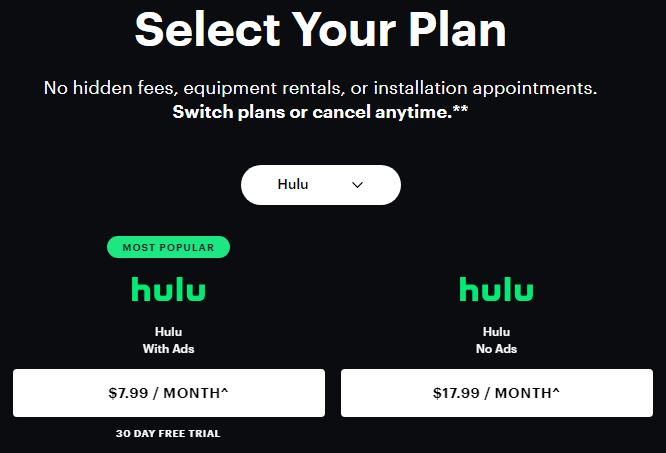
- You can choose the subscription you want.
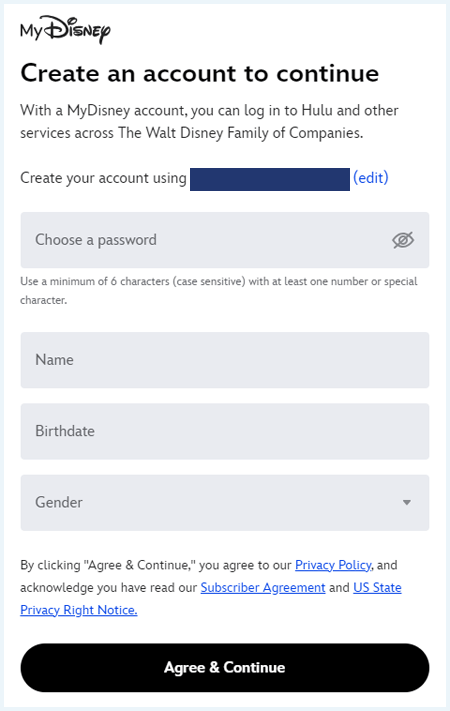
- You will be prompted to create a MyDisney account with which you can sign in to Hulu.
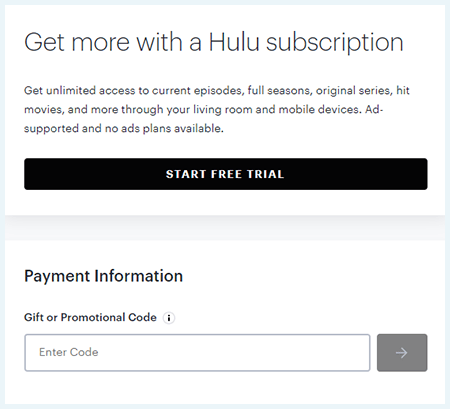
- Fill out your payment information and click on “Submit.”
In case you want to pay for Hulu with a gift card, you’ll have to log into your account after signing up and fill out your gift card code in the box at the bottom of your account page.
How to Watch Live TV on Hulu
Hulu also gives you the chance to access more than 90 live TV channels, including Bravo, E!, Comedy Central, MTV, and many more. The process to subscribe for Hulu’s Live TV is quite straightforward. All you have to do is follow the steps below:
- Visit the Hulu+ Live TV page in your browser.

- Add your personal information, including your name and email address. Note that you’ll have to enter a US zip code.
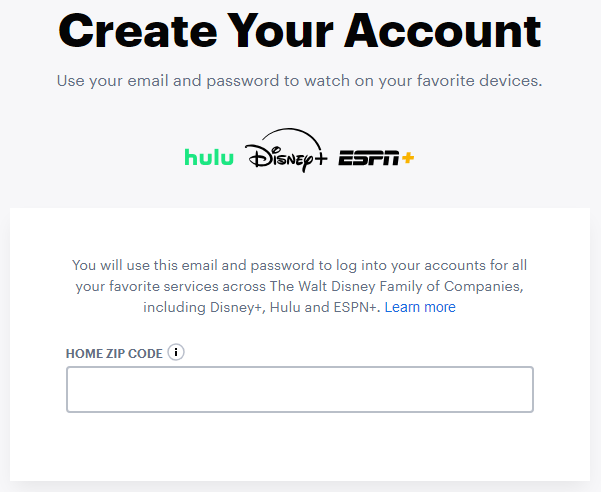
- Fill out your payment information.

- Submit your details, and you should be able to access Hulu+ with your account details.
If you’re outside the US or Japan, you’ll need to use a fast and reliable Hulu VPN to change your location and stream live content without interruptions.
Why Is Hulu Not Accepting My Payment?

Hulu will ask for a US-based payment method when you sign up, which you can’t provide if you live outside the US. We’ve tested multiple ways to subscribe to Hulu, and we found that the best way is to pay using a Hulu gift card.
Unlike most streaming platforms, you don’t need to struggle to pay with mobile gift cards. Hulu actually lets you redeem gift cards directly on their website.
Here’s a step-by-step guide to getting a Hulu subscription from anywhere with a gift card:
- Subscribe to a good VPN provider. NordVPN is the best option to unblock Hulu as it offers a smart DNS feature that hides your true location.
- Download and install the VPN app.
- Connect to a server in the US.
- Open an Incognito window of your regular browser. This is important to avoid being identified by your browser fingerprint.
- Navigate to a site that sells Hulu gift cards. G2A, Amazon, and MyGiftCardSupply are all good options, but make sure the seller you’re buying from has decent reviews.
- Buy a gift card that can cover at least one month of subscription.
- Sign up for a Hulu account with your Hulu gift card.
- Enjoy Hulu TV shows and movies worldwide!
If you don’t want to (or can’t) pay with a gift card on Hulu’s website, you can get a Google Play or Apple iTunes gift card and sign up for a Hulu subscription from your mobile phone. However, that process is a bit more complicated, so we recommend sticking to the guide above.
Check Your User Agreement and Local Regulation:
Hulu is not happy about users circumventing its geographical restrictions. Make sure you check your user agreement and local regulation to make sure everything is above board in your jurisdiction.
How to Unblock Hulu on All of Your Devices
While you are away from home or traveling, there are ways to get Hulu unblocked, whether you are using your mobile phone or tablet or just want to access Hulu on your smart TV at home.
Check out our detailed step-by-steps below to unblock Hulu on any device.
How to watch Hulu on your smart TV
If you use a smart TV like an Android TV or Samsung smart TV, here are the steps to follow if you want to watch Hulu:
- Get a VPN service with US server locations, such as NordVPN.
- Install the VPN on your computer to use it as a mobile hotspot (you cannot install the VPN directly on your smart TV, so you have to download it on your computer).
- Connect your smart TV to your computer’s Wi-Fi network.
- Choose a server in the US from your computer.
- Install the Hulu app on your smart TV.
- Log in with your Hulu account details. You can create an account if you don’t have one yet.
- Start streaming your favorite Hulu movies or livestreams.
You can use other devices, like your router, to install a VPN for your smart TV, but that process is a bit more complicated.
Hulu unblocked on Apple TV
You can use the Hulu app on Apple TV models 4th generation and later. Here are the steps to follow to watch Hulu with a VPN on your Apple TV:
- Subscribe to a good VPN provider for Apple TV. We recommend NordVPN.
- Download and install the VPN onto your computer.
- Set up a hotspot on your computer.
- Connect your Apple TV to your computer’s Wi-Fi hotspot.
- Visit the Apple App Store.
- Search for the Hulu app and click to download.
- Enter your Apple ID and start downloading.
- Open the Hulu app, log in, and start streaming.
With Apple’s tvOS 17 you can also install a VPN on Apple TV.
How to get Hulu on Roku
If you have Roku and you want to watch Hulu from abroad, the easiest way to do that would be to buy a pre-flashed router. These types of routers already have a VPN installed.
Otherwise, you’ll have to use alternate ways to install a VPN on Roku and watch Hulu, such as using a Windows or Mac device as a virtual router or installing a VPN on your router.
The above methods can be a bit challenging for beginners, so we recommend just buying a pre-flashed router like the ASUS RT-AX86U.
How to stream Hulu on Firestick
To use Hulu with a VPN on your Firestick, follow the steps below:
- Download the VPN app directly onto your Firestick (ExpressVPN, another one of our top providers, has an app for the Firestick).
- Download and install the VPN software on your Firestick.
- Choose a server in the US.
- Search for Hulu by voice or text in the main menu sidebar.
- You can also go to Apps and Games to find the Hulu app and click to download it.
- After the download process, the app will appear on the Apps page.
- Open the Hulu app and start streaming.
What’s Available to Watch on Hulu
Hulu has added a lot of popular titles in the past few years, and it has also launched its own originals that have made quite a big splash too.

Here are some of the best shows and movies on Hulu:
- Dune
- Dune: Part Two
- Alien
- Poor Things
- Parasite
- Portrait of a Lady on Fire
- Anatomy of a Fall
- All of Us Strangers
- The Last of Us
- Tell Me Lies
- Dexter
- The Bear
- Shogun
- Lost
Hulu also has Hulu+ Live TV, which lets you watch live TV and on-demand channels. It’s the perfect place to find live sports, breaking news, and major event coverage. Channels on Hulu+ Live TV include:
- ABS
- ESPN
- Disney+
- CBS
- National Geographic
- Disney Channel
- FOX
- NBC
- Discovery Channel
- Nickelodeon
Note that you’ll have to pay $76.99/month to access Hulu+ Live TV.
Conclusion: How to Access Hulu Worldwide

Hulu is one of the most popular streaming services, thanks to its massive content library, including some great originals. Moreover, Hulu+ Live TV allows you to watch live and on-demand content from your device.
Unfortunately, Hulu is only available in the US and Japan. Don’t worry, though, as you can circumvent geo-restrictions with a Hulu VPN. The best VPN for Hulu is NordVPN. This provider offers the highest streaming speeds of any VPN we’ve tested and unlocks Hulu effortlessly.
NordVPN also offers a 30-day money-back guarantee. This gives you plenty of time to catch up with your favorite Hulu content.
If you want to know more about how to unblock popular streaming services from anywhere in the world, check out our articles below:
- How to Watch Disney Plus From Anywhere
- How to Watch Netflix With a VPN: A Step-by-Step Guide
- How to Watch HBO Max From Anywhere: A Quick Guide
- How to Watch American TV From Abroad Online
- How to watch Love Island UK in the US
If you still have questions about watching Hulu when you aren’t in the US or Japan, read our FAQ down below!
You can watch Hulu outside the US and Japan, but you’ll need a VPN. This is how you can watch Hulu from anywhere:
- Subscribe to a reliable VPN provider. We have tested NordVPN with Hulu and discovered it can unblock the platform easily.
- Download and install the VPN app onto your device.
- Connect to a US server.
- Log into Hulu (or create an account).
- Enjoy your favorite Hulu movie or TV show.
You can get a Hulu account from outside the United States and Japan. If you’d like to get a Hulu subscription when you’re in Europe, for example, you can use Hulu gift cards. These gift cards allow you to get a paid Hulu account from outside the US and Japan.
We don’t know when Hulu will expand to more countries (if ever). Luckily, there is a workaround to be able to watch Hulu in Europe, which requires using a VPN. This tool can change your IP address, making Hulu think you’re accessing it from the US.
Hulu is only available in the US and Japan. If you are outside of these countries you will need a VPN to get access to Hulu. We prefer NordVPN to access Hulu from anywhere. NordVPN offers a large network of US servers with excellent speed.
Hulu is only available in the US and Japan. The streaming service doesn’t have broadcasting rights outside of these countries. However, with a VPN you can get an American IP address anywhere. We recommend NordVPN to unblock Hulu abroad.