- Top 5 best IPTV VPNs
- Do you need a VPN for IPTV?
- Best VPNs for IPTV – Detailed Overview
- Is IPTV legal in the USA?
- How to use a VPN with IPTV
- IPTV is not working with a VPN
- Best VPN country for IPTV
- How to stop ISP from blocking IPTV
- Best VPN protocol for IPTV
- Recap: Best VPN for IPTV
- FAQ
- y do you need a VPN for IPT
Based on my tests, the best VPNs for IPTV are NordVPN for top speeds and minimal buffering, Surfshark as a budget-friendly option, and Proton VPN for its strong privacy and security features. These options helped me prevent ISP throttling during live TV streaming.
A VPN isn’t required for IPTV, but it can protect your privacy by hiding your streaming activity from your ISP and may help reduce throttling and buffering caused by network restrictions. It can also be useful when traveling abroad, allowing you to connect to a server in your home country and access your usual IPTV service, where permitted.
Unfortunately, IPTV services don’t have built-in VPNs, so you will have to install a separate VPN service on your IPTV device or home router. After testing 23 providers, NordVPN, Surfshark, Proton VPN, TotalVPN, and Norton VPN stood out as the best IPTV VPNs. All of these services offer consistently fast connection speeds and robust security features for smooth and private streaming.
In this article, I’ll share tips on how to use a VPN with IPTV and deliver my in-depth reviews of the best providers.

Top 5 best IPTV VPNs
-
1.NordVPN: best VPN for buffer-free IPTV streaming in 2026
-
2.Surfshark: affordable IPTV VPN with unlimited connections
-
3.Proton VPN: privacy-focused VPN for IPTV with a free version
-
4.TotalVPN: beginner-friendly IPTV VPN with impressive speeds
-
5.Norton VPN: reliable VPN for IPTV UK streaming services
Do you need a VPN for IPTV?
A VPN for IPTV can be useful for protecting your privacy, reducing the impact of ISP throttling, and accessing region-restricted content while traveling. It encrypts your internet traffic and masks your IP address, helping keep your streaming activity private and providing a more flexible IPTV experience:
- Avoid speed throttling. Your ISP might reduce your speed if you are engaged in bandwidth-heavy streaming, such as IPTV streaming. With a reliable streaming VPN, your traffic is encrypted, and your ISP doesn’t know what you are doing online. This reduces the risk of having restricted internet speeds.
- Protect your privacy. Since a VPN encrypts your internet traffic, using a VPN prevents your IPTV activities from being monitored. Due to the fact that a VPN hides your actual IP address, your online identity will be protected at all times.
- Access IPTV while traveling. If your IPTV service is available in your home country but restricted abroad, connecting to a VPN server in your home country may help you access it while traveling, where permitted.
- Access region-restricted content. Some legitimate IPTV services offer different channels and content depending on your location because of licensing and broadcasting rights. A VPN can change your apparent location by assigning you an IP address from another country, where permitted.
Note:
This article is intended for informational purposes only. The VPNOverview team does not endorse the use of illegal IPTV services that don’t have the required copyright permissions. All the IPTV streaming services mentioned in this article are fully licensed and legal. However, you should investigate the legitimacy of each IPTV service yourself before using it.
Best VPNs for IPTV – Detailed Overview
I have extensively tested more than 80 VPN providers. Based on that research I have concluded, the following VPN providers are most suited for IPTV services.
| IPTV VPN provider | Rating | Works with IPTV? | Why it’s recommended | Servers | Speed | Price | Free trial |
|---|---|---|---|---|---|---|---|
| 1. NordVPN | 9.3 ⭐⭐⭐⭐⭐ | ✅ Yes | Best overall IPTV VPN | 8900 servers in 149 countries | 468Mbps | $ 3.49/month | ✅ Yes, 3-day free trial |
| 2. Surfshark | 9.0 ⭐⭐⭐⭐⭐ | ✅ Yes | Fast and affordable VPN for IPTV | 4500 servers in 100 countries | 466Mbps | $ 2.49/month | ✅ Yes, 7-day free trial |
| 3. Proton VPN | 8.9 ⭐⭐⭐⭐⭐ | ✅ Yes | Secure VPN for privacy-focused IPTV users | 20700 servers in 149 countries | 428Mbps | $ 2.99/month | ✅ Yes, free version |
| 4. TotalVPN | 7.0 ⭐⭐⭐⭐ | ✅ Yes | Cheapest IPTV VPN | 1800 servers in 90+ countries | 398Mbps | $ 1.59/month | ✅ Yes, 7-day free trial |
| 5. Norton VPN | 7.0 ⭐⭐⭐⭐ | ✅ Yes | Beginners-friendly IPTV VPN | 2000 servers in 65 countries | 407Mbps | $ 3.33/month | ✅ Yes, 30-day free trial |
To select the best IPTV VPNs, I looked at the following features:
- Speed: an IPTV VPN needs to have excellent speed to allow you to stream IPTV without lag. During my tests, NordVPN proved to be the fastest IPTV VPN with an average download speed of 468Mbps.
- Server network: VPNs with many servers have better speed, since fewer customers use the same server. Having more server locations also gives you greater flexibility when streaming IPTV services. After the extensive testing, it seems NordVPN and Surfshark have the largest server fleet.
- Easy to use: I expect an IPTV VPN to be easy to use, even by people who’ve never used a VPN before.
- Privacy: The most important job of a VPN is to protect your privacy. All VPNs mentioned here have 256-bit encryption and a no-logs policy.
- Price and money-back guarantee: the selected VPNs are affordable and have a 30-day money-back guarantee. However, after reviewing each VPN, I found that Surfshark is the cheapest yet still a reliable and secure IPTV VPN.
Top 1. NordVPN: best VPN for IPTV streaming in 2026
- Rating: 9.3 ⭐⭐⭐⭐⭐
- Speed: 468Mbps
- Pricing: From $ 3.49/month
NordVPN is the best IPTV VPN, offering a wide selection of servers and fast speeds for a smooth and lag-free streaming experience. I have tested this VPN from the Netherlands, and I was able to use American IPTV services such as Peacock TV without any trouble or noticeable slowdowns.
During my NordVPN speed tests, I got an average connection speed of 468Mbps with an 82% initial speed retention rate. This meant I could stream on any IPTV app with no buffering or lagging, and I can attest to NordVPN being definitely the fastest VPN currently available.
I was also impressed by its unblocking skills. NordVPN offers obfuscated servers that disguise VPN traffic, which can help IPTV users access services that restrict or limit VPN connections based on location. For example, during my tests, I was able to unblock Netflix US, Netflix UK, and Netflix Canada.
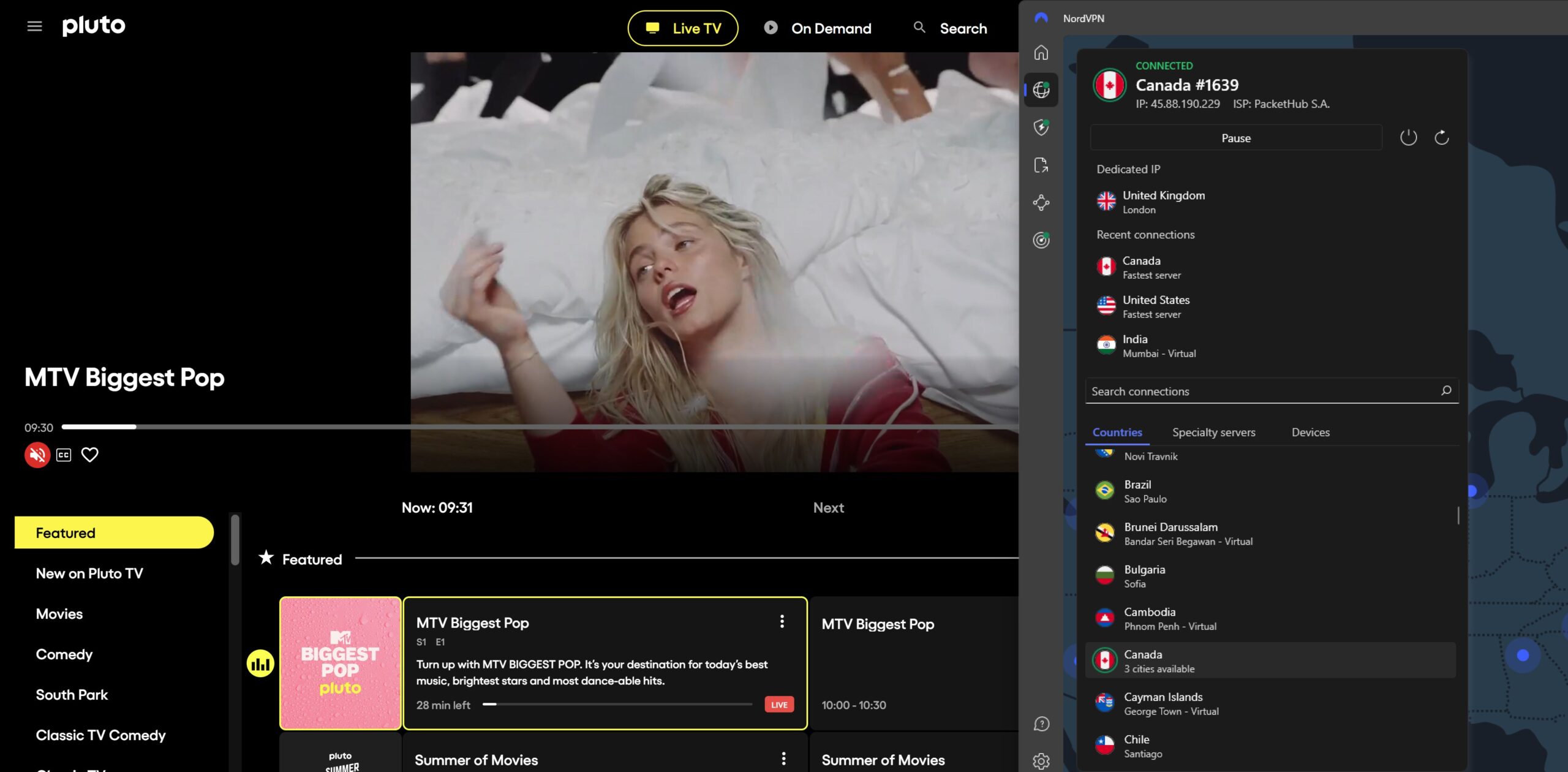
If privacy is your main concern, NordVPN is a great choice. Due to its no-logs policy, the company has no information to share with the authorities or other companies. Thanks to its AES-256 encryption, NordVPN helps hide your streaming activity from your ISP, which can reduce the risk of throttling, help overcome certain network restrictions, and enhance your privacy.
Additionally, there are many extra security features that you get with NordVPN. With its kill switch feature, you will be protected even if your VPN connection drops accidentally. I especially liked the Threat Protection feature, which blocks malicious ads and websites, so you can enjoy streaming IPTV without interruptions.
NordVPN is the best overall VPN for IPTV, and its prices start from $ 3.49/month with a 30-day money-back guarantee. You can also test it by taking advantage of the 3-day free trial. Click on the button below to profit from a 78% discount.
NordVPN pros:
- Successfully unblocks IPTV services
- No logs policy to protect your privacy
- Excellent speed to watch IPTV without lag
- 8900 servers in 149 countries ensure reliable connections
- Obfuscated servers to help overcome VPN restrictions
- 30-day money-back guarantee
NordVPN con:
- Only up to 10 simultaneous device connections
Do you want to know more about NordVPN? Check out our in-depth NordVPN review.
Top 2. Surfshark: affordable IPTV VPN with strong unblocking capabilities
- Rating: 9.0 ⭐⭐⭐⭐⭐
- Speed: 466Mbps
- Pricing: From $ 2.49/month
Surfshark is another top IPTV VPN that grants you access to premium services for an affordable price. For just $ 2.49 per month, you can stream on an unlimited number of devices. This makes Surfshark a great VPN subscription to share with your family. Even if every family member wishes to watch a different show, Surfshark has got you covered. During my testing, I had no issues streaming Peacock TV and different libraries of Netflix.
When I performed my Surfshark speed test, I got very similar results to NordVPN. For example, the average connection speed was around 466Mbps with an 81% initial speed retention rate. Overall, Surfshark dealt nicely with IPTV buffering, granting me a very smooth streaming experience.

Surfshark’s IP rotation function is great for IPTV. Many IPTV providers block IP addresses as soon as they know they belong to a VPN provider. Surfshark can rotate your IP automatically. If you need a VPN for streaming only, Surfshark’s split tunneling allows you to choose which traffic to route through the encrypted VPN tunnel. I also tried its CleanWeb feature, which worked well as it blocked harmful ads when browsing the internet.
Combined with the excellent speed, I can state that Surfshark VPN is one of my favorite VPNs for watching IPTV. You can try Surfshark now with 85% discount. The starting price for Surfshark is only $ 2.49/month. You can also use it risk-free for 30 days by taking advantage of the 30-day money-back guarantee. Additionally, there is a 7-day free trial that you can use for testing.
Surfshark pros:
- IP rotation for smooth IPTV streaming
- Excellent speed
- Unlimited simultaneous connections
- Good value for money
- 30-day money-back guarantee
Surfshark con:
- Some features cost extra
Not sure yet? Check out our Surfshark review to discover more benefits.
Top 3. Proton VPN: secure VPN for IPTV with a free plan
- Rating: 8.9 ⭐⭐⭐⭐
- Speed: 428Mbps
- Pricing: From $ 2.99/month
Proton VPN is one of the best VPNs for IPTV as it guarantees total privacy online and even has a secure free version. It offers 10Gbps servers in over 127 countries and has the fast WireGuard protocol. When connected to Proton VPN, I had no issues accessing BBC iPlayer and various Netflix libraries.
Proton VPN showed a bit slower average connection speeds than my top two IPTV VPN choices, with 428Mbps and a 78% initial speed retention rate. However, the service still delivered a smooth streaming experience, and I did not run into any buffering while streaming on IPTV apps.
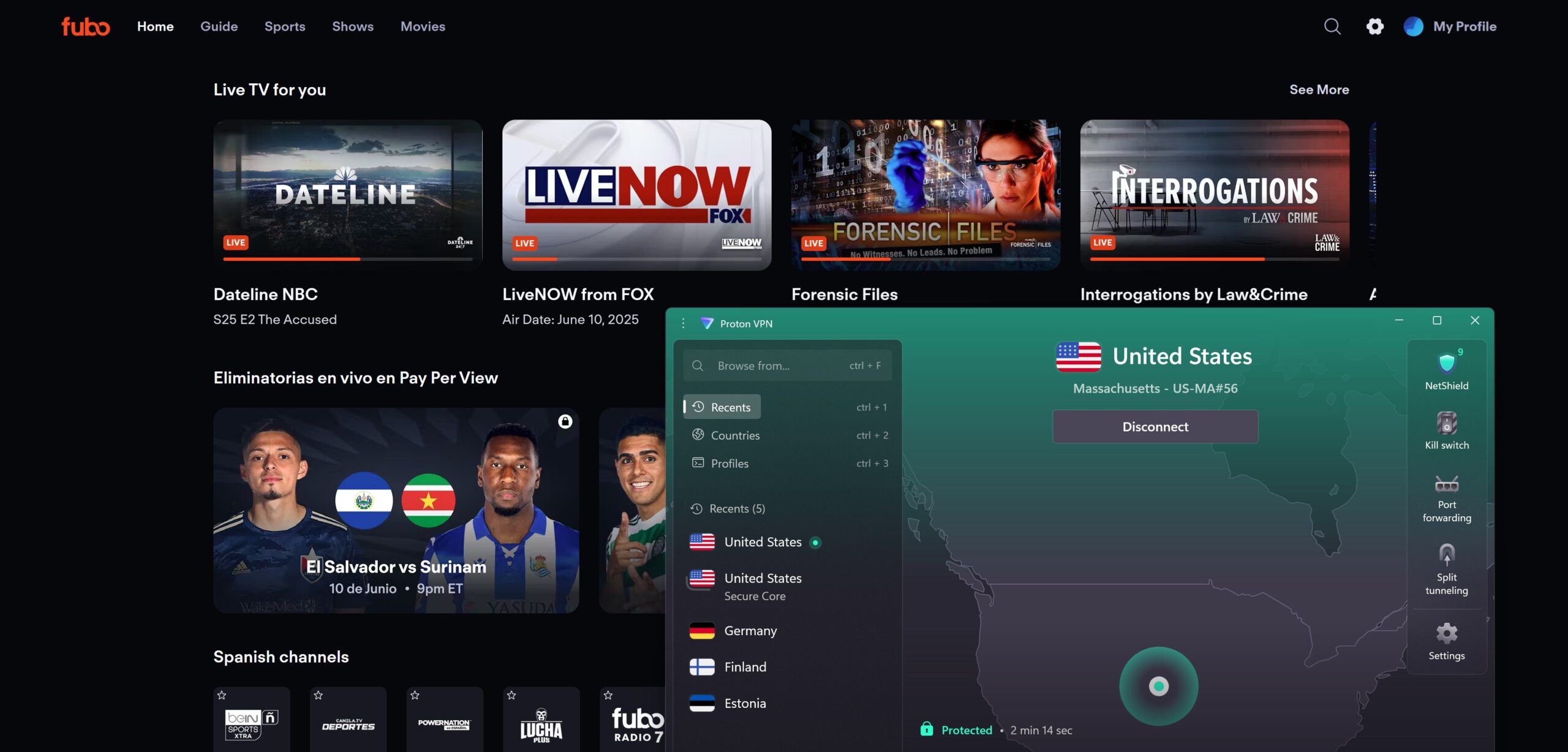
Proton VPN is a safe IPTV VPN as it uses the military-grade AES-256 encryption and has a strict no-logs policy. With the NetShield Ad-blocker feature, you will be able to avoid malicious websites, trackers, and ads when streaming IPTV. Just like other best VPNs, Proton VPN also has the kill switch and split tunneling features, which will add an extra layer of security when streaming content online.
Interested in trying Proton VPN? You can get a Proton VPN subscription for $ 2.99/month, and it comes with a 30-day money-back guarantee. While a free trial is unavailable, you can use the free Proton VPN version to test it out first.
Proton VPN pros:
- Unblocks IPTV services
- Wide selection of servers worldwide
- Reliable no-logs policy
- Fast 10Gbps servers
- Has a free version
Proton VPN con:
- Slower connection speeds with the free version
Want to learn more? Read our Proton VPN review.
Top 4. TotalVPN: budget VPN for private IPTV streaming
- Rating: 7.0 ⭐⭐⭐⭐
- Speed: 398Mbps
- Pricing: From $ 1.59/month
TotalVPN is a budget-friendly IPTV VPN for streaming content from worldwide platforms without any restrictions. It offers a network of 1800 servers, which gives you the opportunity to unblock many international IPTV services. During my last test, I was able to watch Netflix, Disney Plus, the BBC iPlayer, and many other streaming services without getting blocked or experiencing lag.
However, TotalVPN is significantly slower than my top IPTV VPN choices and showed an average connection speed of around 398Mbps with a 72% initial speed retention rate during my tests. If your internet speed is good, then you will still be able to stream IPTV buffer-free with TotalVPN, but if your connection is on the slower side, you may run into occasional buffering and lagging.
Since TotalVPN offers very inexpensive subscriptions, it’s a good choice if you’re a budget-conscious user. It is also a secure VPN for IPTV that uses AES-256 encryption and has a strict no-logs policy. There are also quite a few additional features, like a kill switch, split tunneling, and an ad blocker, which will hide the fact that you are using a VPN and grant an overall smoother streaming experience.
You can purchase TotalVPN for $ 1.59/month with a discount of 80%. All your purchases are protected with a 30-day money-back guarantee.
TotalVPN pros:
- Thousands of servers worldwide to access IPTV from anywhere
- Good speed for streaming
- Works with a lot of IPTV and streaming services
- Up to 5 simultaneous connections
- 30-day money-back guarantee
TotalVPN cons:
- Slower than competitors
- Fewer advanced features
Curious about this VPN provider? Our extensive TotalVPN review answers all your questions.
Top 5. Norton VPN: IPTV VPN with optimized streaming servers
- Rating: 7.0 ⭐⭐⭐⭐
- Speed: 407Mbps
- Pricing: From $ 3.33/month
Norton VPN is an easy-to-use IPTV VPN that guarantees access to your favorite content from anywhere. The provider offers 2000 servers worldwide, meaning it will unblock legal IPTV services such as BBC iPlayer no matter your location. Norton VPN also utilizes the fast and stable WireGuard protocol, which guarantees a smooth and lag-free streaming experience.
I was pleasantly surprised with the results of my Norton VPN speed tests, as I got an average of 407Mbps with a 72% initial speed retention rate. I also liked that the averages were quite consistent, no matter which server I used. So, overall, I was happy with Norton VPN’s streaming performance and enjoyed my shows on IPTV apps without buffering.
Even though Norton VPN is a user-friendly VPN, it still guarantees security as it uses the standard AES-256 encryption and has a trustworthy no-logs policy. You get multiple features with Norton VPN, such as its ad blocker, which blocks malicious ads, and split tunneling if you need a VPN for specific websites only. What I liked the most was the streaming-optimized servers, which only allow streaming traffic for extra speed.
For IPTV streaming, the Norton VPN price starts at $ 3.33 with an 54% discount. The subscription comes with a 60-day money-back guarantee. If you want to try it before committing to a paid plan, Norton VPN has a 60-day trial available.
Norton VPN pros:
- Unblocks IPTV services
- Streaming-optimized servers
- Robust AES-256 encryption
- Easy-to-navigate app
- 60-day money-back guarantee
Norton VPN con:
- Pricier subscriptions
Is IPTV legal in the USA?
Yes, IPTV is legal in the US, but not all IPTV services are. There are completely legal IPTV providers, such as YouTube TV, Fubo TV, and Tubi TV. These providers have the necessary broadcasting rights, meaning that they don’t break copyright laws. However, there are quite a few services that do not have such rights, making them illegal. Using such services might lead to legal consequences, including fines or even felony charges under the Protecting Lawful Streaming Act.
Important notice:
Some IPTV providers don’t have the licenses for the content they provide. I do not recommend using these illegal IPTV services, with or without a VPN. A VPN might protect your privacy, but it does not make illegal things legal.
How to use a VPN with IPTV
If you want to add an extra layer of security and access content that may be restricted in your region when streaming IPTV services, a reliable VPN provider can help. Below, you can find the steps on how to use a VPN with IPTV:
- Choose a robust VPN with servers worldwide. I recommend NordVPN, now 78% off.
- Download and install the VPN app on your preferred device.
- Connect to a VPN server in a region where the IPTV service is available (e.g., the US).
- Launch your preferred IPTV service and enjoy your favorite content.
IPTV is not working with a VPN
If your IPTV is not working with a VPN, the problem may be related to the VPN server, protocol, IPTV app, or your local network. A VPN can help reduce the impact of ISP throttling, access region-restricted content where permitted, and protect your privacy, but it can also interfere with an IPTV connection in some cases.
Before changing your settings, use these quick tests to identify the source of the problem:
- Test IPTV without the VPN. Turn off your VPN and check the IPTV service. If it works normally, the VPN server or settings may be causing the issue.
- Test another streaming app. Try YouTube or another legitimate streaming service on the same device. If it also buffers, the problem is more likely related to your home network.
- Try a different network. Connect your device to a mobile hotspot. If IPTV works normally, your home network or ISP may be contributing to the problem.
If IPTV works only when the VPN is off
- Change the VPN server. Your IPTV provider may block or restrict the VPN server’s IP address. Try another nearby server or a server in the required country, where permitted.
- Switch VPN protocols. Try WireGuard or OpenVPN (UDP) in your VPN app. WireGuard is generally a good choice for fast, low-latency streaming.
- Check the kill switch. A VPN kill switch can cut your internet connection if the VPN disconnects. Temporarily disabling it can help determine whether it is causing the problem.
If IPTV still buffers or doesn’t work with the VPN
- Restart your devices. Reboot your router and streaming device to refresh the network connection.
- Clear the IPTV app cache. On supported devices, clear the app’s cache and restart the app. Avoid clearing app data unless you’re prepared to sign in again.
- Try an Ethernet connection. If possible, connect your streaming device directly to your router. Ethernet can provide a more stable connection than Wi-Fi, particularly for HD and 4K streaming.
- Change the playback decoder. If your IPTV player offers hardware and software decoding options, try switching between them. Some devices handle particular video streams better with one decoder than the other.
Best VPN country for IPTV
Since the most popular IPTV providers are based in the US, you should ideally connect to a US server when using a VPN with IPTV. For example, if you want to watch Peacock TV, the best VPN country for IPTV is the US. If you want to unblock the BBC iPlayer, you should choose a VPN server in the UK.
For the best speed, I recommend using servers that are geographically close to you. For example, if you want to watch Peacock TV from Europe, you have the best speed if you choose a VPN server on the East Coast of the USA.
How to stop ISP from blocking IPTV

If you run into ISP-level blocks when using IPTV services, a trusted VPN can help resolve the issue. A reliable VPN for IPTV can help overcome network restrictions while providing a smoother, more private streaming experience. Remember to use a reliable IPTV VPN provider to encrypt your online traffic and change your IP address, such as NordVPN or Surfshark. This can help you access services that may be limited by location while making it harder for your ISP to identify your IPTV streaming activity.
To further enhance your IPTV experience, speed, and privacy, connect to a VPN server closer to your actual location, enable obfuscated servers, and use private DNS addresses. It is also wise to avoid ISP-issued routers as they usually have built-in filters that are not very compatible with VPN services.
Best VPN protocol for IPTV
The best VPN protocols for IPTV are WireGuard, IKEv2, and OpenVPN. While all three VPN protocols are reliable choices for IPTV, they have different benefits. WireGuard is a relatively new protocol that provides the fastest speeds, making it ideal for lag-free streaming. IKEv2 guarantees stability and is an excellent choice if you are using a VPN on mobile devices. On the other hand, OpenVPN works effectively on all gadgets and ensures total security.
Recap: Best VPN for IPTV
A VPN for IPTV can help with location-based restrictions, ISP throttling, and privacy, while a fast, reliable VPN connection can also improve streaming stability and reduce buffering in some cases. By encrypting your internet traffic and masking your IP address, a VPN adds an extra layer of privacy while you stream.
After testing and reviewing multiple VPN services, I found NordVPN to be the best overall VPN for IPTV. It delivered fast speeds for smooth HD and 4K streaming, performed well when accessing region-restricted content where permitted, and offered strong security features to help protect your online privacy.
Related articles:
- Best Kodi VPNs
- Magis TV VPNs
- VPN for Roku
- VPN for Chromecast
- Peacock VPNs
- Fox Sports VPNs
- FuboTV VPNs
FAQ
Do you have a question about the best VPNs for IPTV? Check our FAQ below.
IPTV (Internet Protocol Television) delivers TV channels and on-demand content over the internet instead of cable or satellite. It works by streaming video data through IP networks, allowing users to watch live TV, replays, or movies on smart TVs, apps, or streaming devices. To ensure your privacy and security while using IPTV apps, remember to use a trusted VPN, such as NordVPN.
You don’t technically need a VPN for IPTV, but it can help with accessing region-restricted IPTV apps, reducing the impact of ISP throttling, and protecting your privacy. Some IPTV services are only available in certain regions, and a VPN can change your IP address to access content available in another location, where permitted. It can also help reduce buffering caused by ISP throttling while encrypting your connection and keeping your streaming activity more private.
y do you need a VPN for IPT
, while slow DNS resolution or an inefficient VPN setup can also contribute. To troubleshoot, try changing your DNS server, switching to a faster VPN protocol such as WireGuard, or connecting to a nearby, less crowded VPN server; you can also clear your IPTV app’s cache or use split tunneling if your VPN supports it.
IPTV can buffer on Firestick because of slow or unstable Wi-Fi, ISP throttling, network congestion, limited device resources, or problems with the IPTV service itself. A VPN may help if your ISP is slowing or restricting IPTV traffic, but it won’t fix buffering caused by weak Wi-Fi or an overloaded IPTV server. For the best results, try a nearby VPN server with a fast protocol such as WireGuard, move the Firestick closer to your router, or use an Ethernet connection if possible.
Yes, a VPN can help with IPTV buffering if the issue is your ISP throttling streaming traffic or routing it properly. For the best experience and a significant help to lessen IPTV buffering, choose only a reliable IPTV VPN. From my experience, NordVPN does this job the best, thanks to its fast servers and reliable security features to hide your online activities and bypass ISP bandwidth throttling.
You don’t technically need a VPN to use IPTV in Canada, but it can be useful for reducing ISP throttling, overcoming network restrictions, and protecting your privacy. Canadian ISPs may slow down high-bandwidth streaming during busy periods, while some networks may restrict certain IPTV connections. A VPN encrypts your traffic and hides your IP address, making it harder for your ISP to monitor your streaming activity or selectively slow your connection.
Based on my tests, the best IPTV VPN is NordVPN. It offers fast speeds for smooth IPTV streaming, while its obfuscated servers can help access services that restrict VPN connections. NordVPN also includes a 30-day money-back guarantee, allowing you to try the service with a refund option.
The best VPNs for IPTV in the UK are NordVPN, Surfshark, and Proton VPN. They offer fast connection speeds to help reduce live-stream buffering, can help minimise the impact of ISP throttling, and provide reliable UK server locations. NordVPN is the best overall IPTV VPN for speed and streaming performance, Surfshark is a budget-friendly option with unlimited simultaneous connections, while Proton VPN is a strong choice for IPTV users who prioritise privacy and security.
The best free VPN for IPTV streaming is Proton VPN. Proton VPN has a free version that still guarantees privacy and security online as it uses robust encryption and has a strict no-logs policy. Additionally, Proton VPN provides stable connections, so you should not experience any connectivity issues. However, free VPNs usually have major limitations, including Proton VPN as the free version only allows access to 5 server locations on one device.
The best VPN for IPTV on Firestick is NordVPN, thanks to its fast speeds, extensive server network, and strong security features. It can help you access region-restricted content on legitimate IPTV services where permitted, while its robust encryption and no-logs policy provide added privacy for streaming. Its fast, stable connections also make it a strong choice for smooth HD and 4K IPTV playback.
To install a VPN on an IPTV Box, first choose and subscribe to a robust VPN provider, like NordVPN. Once you have a subscription, download and install it on your IPTV Box from the Google Play Store or via an APK file from the official website. Once you have it installed, all you have to do is log in to your account, connect to a server, and enjoy streaming IPTV services without restrictions.