
- Key differences between NordVPN, Surfshark, and ExpressVPN
- NordVPN, Surfshark, and ExpressVPN price comparison 2026
- Global server coverage: which VPN has more servers and countries?
- Which VPN is more secure: ExpressVPN, Surfshark, or NordVPN
- Privacy features compared: NordVPN vs Surfshark vs ExpressVPN
- Feature comparison: what sets NordVPN, Surfshark, and ExpressVPN apart?
- Torrenting: which VPN is best for safe and fast downloads?
- Streaming performance: NordVPN vs Surfshark vs ExpressVPN
- Ease of use: comparing apps and user experience across VPNs
- What Reddit users say about NordVPN, Surfshark, and ExpressVPN
- Final verdict: Which is better, NordVPN or ExpressVPN vs Surfshark?
- FAQ
NordVPN, Surfshark, and ExpressVPN are all popular VPN services that provide encrypted internet connections to enhance user privacy, security, and access to geo-restricted content. However, based on my testing, they differ noticeably in performance, pricing, and feature focus.
- NordVPN has advanced security features and the largest server network for the best overall speed and reliability.
- Surfshark is the cheapest option and allows unlimited connections for maximum value.
- ExpressVPN is easy to use and includes a built-in password manager for added convenience.
That made me question the trio: in 2026, which of these VPNs actually delivers the best overall value? To find out, I teamed up with the VPNoverview research team and put all three services to the test. We compared everything, from connection speed and privacy protections to streaming access and everyday usability. After digging into the results, one provider came out on top: NordVPN edged out both Surfshark and ExpressVPN. Here’s a full breakdown of how we reached that conclusion, and which VPN might be the best option for you.
| VPN provider | Rating | Servers | No-logs policy | Torrenting | Streaming support | Simultaneous connections | Price |
| 1. NordVPN | 9.3⭐⭐⭐⭐⭐ | 8900 servers across 149 countries | ✅ Yes, audited | ✅ Yes (P2P-specialized servers and SOCKS5) | 15+ Netflix libraries, Disney+, Hulu, Amazon Prime Video, BBC iPlayer, HBO Max, ESPN+, Peacock | 10 | From $ 3.49/month |
| 2. Surfshark | 9.0⭐⭐⭐⭐⭐ | 4500 servers across 100 countries | ✅ Yes, audited | ✅ Yes (supported on many servers) | 15+ Netflix, Disney+, Amazon Prime Video, HBO Max, Hulu, BBC iPlayer, Crunchyroll, VRV, 9Now, 10Play | Unlimited | Starting $ 2.49/month |
| 3. ExpressVPN | 8.5⭐⭐⭐⭐ | Undisclosed servers across 113 countries | ✅ Yes, audited | ✅ Yes (supported on all servers with P2P apps) | 15+ Netflix libraries, Amazon Prime Video, Hulu, HBO Max, Disney+, BBC iPlayer, YouTube TV, Crunchyroll, Rai Play, Zatto, 7plus | 10-14 | Starting $ 2.99/month |
Surfshark is the best affordable VPN, NordVPN has better performance and security, and ExpressVPN is the easiest to use across devices.
Key differences between NordVPN, Surfshark, and ExpressVPN
NordVPN, Surfshark, and ExpressVPN are all top-tier VPN services, but they each excel in different areas. From my hands-on testing, NordVPN came out as the best service overall, with its fast speeds, larger global server fleet, and strong set of advanced privacy features like Threat Protection and Meshnet. However, that doesn’t mean Surfshark and ExpressVPN aren’t worth considering.
Surfshark is perfect for budget-conscious users who still want top-notch performance, unlimited simultaneous connections, and a clean, modern app design that’s pleasant to deal with. On the other hand, ExpressVPN is the best fit for those who value simplicity and consistent speed (especially while traveling) and don’t mind paying extra for a polished and reliable experience.
- NordVPN is the fastest VPN. In 2026 tests, it outperformed Surfshark and ExpressVPN in both local and long-distance connections, maintaining stable, high speeds ideal for 4K streaming and gaming.
- NordVPN has the largest global network. With 8900 servers in 149 countries, this gives users the widest choice of connections. By comparison, Surfshark has around 4500 servers in around 100 countries, and ExpressVPN offers an undisclosed number of servers in over 113 countries.
- All three VPNs ensure strong privacy, using AES-256 encryption and trusted no-logs policies. However, NordVPN has an edge with advanced tools like Threat Protection Pro, Double VPN routing, and Dark Web Monitoring.
- Surfshark is the cheapest VPN, especially with multi-year plans costing just a few dollars per month. NordVPN offers solid value for its features, while ExpressVPN is the priciest, positioning itself as a premium, privacy-focused option.
- Surfshark allows unlimited devices on one account – perfect for families and power users. NordVPN supports up to 10 devices, while ExpressVPN allows between 10 and 14 devices, depending on the plan.
- ExpressVPN is the easiest to use. The VPN features an intuitive interface, quick setup, and a convenient built-in password manager on some plans. NordVPN remains the most feature-rich, with in-depth customization options for advanced users, while Surfshark offers a clean and modern design.
NordVPN, Surfshark, and ExpressVPN price comparison 2026
Surfshark is the cheapest VPN, starting at just $ 2.49/month on its 2-year plan – more affordable than NordVPN’s $ 3.49/month and ExpressVPN’s $ 2.99/month for the same subscription period.
Surfshark also leads on the 1-year plan, starting at $3.19/month, compared to NordVPN’s $4.59/month and ExpressVPN’s $3.99/month for the same 12-month period.
That said, Surfshark’s 1-month plan is pricier, starting at $15.45, compared to $12.99 for both NordVPN and ExpressVPN. While NordVPN and ExpressVPN are more affordable for short-term use, Surfshark delivers the best value for longer-term subscribers.

- NordVPN 24 months $ 3.49mth Deal View offer
- NordVPN 12 months $ 4.99mth View offer
- NordVPN Monthly $ 12.99mth View offer
Find exclusive NordVPN discounts and deals here.

- Surfshark 24 months $ 2.49mth Deal View offer
- Surfshark 12 months $ 3.39mth View offer
- Surfshark 1 month $ 16.45mth View offer

- ExpressVPN 2 Years $ 2.99mth Deal View offer
- ExpressVPN 1 Year $ 4.99mth View offer
- ExpressVPN Monthly $ 14.99mth View offer
In terms of what you get for the price, all three VPNs deliver the essentials, such as strong encryption, a kill switch, and split tunneling. However, NordVPN and Surfshark both include built-in ad and malware blockers, which add extra value at no extra cost. ExpressVPN lacks built-in blockers but includes a password manager called ExpressVPN Keys – something that costs extra with the other two providers.
NordVPN allows you to test the service out with a 3-day free trial on Android, ExpressVPN offers a 3-day free trial for iOS and Android users, while Surfshark has a 7-day free trial on up to 3 devices. In addition, all three offer 30-day money-back guarantees, so you can try each provider with less financial risk before deciding which one suits you best.
Global server coverage: which VPN has more servers and countries?
NordVPN offers the largest server network, with 8900 servers in 149+ countries. Surfshark runs 4500 servers across 100 countries, and ExpressVPN covers around 113 with an undisclosed number of servers. While NordVPN clearly leads in both total servers and geographic spread, ExpressVPN and Surfshark provide similar country-level reach, with Surfshark being more transparent with its server numbers. ExpressVPN covers slightly more countries, but without public statements on server count, it’s harder to assess performance potential or capacity.
Here’s how it looks side-by-side:
| VPN provider | Total servers | Countries covered | Server types | Specialized servers |
| 1. NordVPN | 8900 | 149 | RAM-only for most locations; obfuscated servers; P2P-optimized servers | Yes (Double VPN, Onion over VPN, Dedicated IP, P2P) |
| 2. Surfshark | 4500 | 100 | RAM-only; obfuscated-like “Camouflage Mode”; P2P-friendly servers | Yes (Static IP, MultiHop, Rotating IP) |
| 3. ExpressVPN | Undisclosed | 113 countries | RAM-only (“TrustedServer”); obfuscated traffic on many servers; P2P allowed on all servers | No distinct specialty categories (uses general-purpose servers for all tasks) |
For users, more servers typically mean less congestion and better speeds, especially during peak times. A wider spread of countries, as with NordVPN, gives more reach for region-locked content or international streaming. Specialized servers also matter. For example, NordVPN and Surfshark offer added privacy and control with tools like Double VPN and MultiHop.
Which VPN is more secure: ExpressVPN, Surfshark, or NordVPN
NordVPN, Surfshark, and ExpressVPN are some of the most secure VPNs out there, checking all the key boxes: kill switch, DNS and IP leak protection, and independently audited no-logs policies. That said, NordVPN pulls ahead in overall security. It offers more flexibility with VPN protocols, including its own fast NordLynx (based on WireGuard), OpenVPN, and IKEv2. ExpressVPN takes a different route with its proprietary Lightway protocol, which is fast and lightweight but not open-source across all platforms. Surfshark supports the most common protocols (WireGuard, OpenVPN, and IKEv2) and performed well in leak protection tests, though it doesn’t offer the same level of depth as NordVPN.
| Security aspect | NordVPN | Surfshark | ExpressVPN |
|---|---|---|---|
| Jurisdiction | Panama (privacy-friendly) | Netherlands (14 Eyes alliance) | Virgin Islands (privacy-friendly) |
| Encryption | AES-256 and Perfect Forward Secrecy | AES-256 and Perfect Forward Secrecy | AES-256 and Perfect Forward Secrecy |
| Protocols supported | NordLynx (WireGuard), OpenVPN, IKEv2 | WireGuard, OpenVPN, IKEv2 | Lightway, OpenVPN |
| No-logs policy | ✅ Yes, audited | ✅ Yes, audited | ✅ Yes, audited |
| Kill switch | ✅ Yes | ✅ Yes | ✅ Yes |
| Leak protection | ✅ Yes | ✅ Yes | ✅ Yes |
From my testing, I liked how easy NordVPN made it to switch protocols and how well it handled kill switch failures – something Surfshark slightly struggled with on mobile. ExpressVPN’s Lightway protocol was smooth, but I wish it offered more transparency and customization.
Privacy features compared: NordVPN vs Surfshark vs ExpressVPN
NordVPN and ExpressVPN are headquartered in privacy-friendly jurisdictions. NordVPN operates out of Panama, which is outside the 5/9/14 Eyes surveillance alliances and has no mandatory data retention laws. ExpressVPN is based in the British Virgin Islands, another strong location for privacy. Surfshark, however, is located in the Netherlands, which is part of the 14 Eyes Alliance, which may raise some concerns for strictest privacy advocates. However, Surfshark has taken steps to mitigate any associated risks, keeping data privacy in thorough check.
All three providers follow a strict no-logs policy, with independent audits backing it up. NordVPN’s no-logs policy has now been independently verified five times, with the most recent Deloitte assurance engagement carried out between November and December 2024 and published in early 2025. Surfshark’s no-logs policy was independently audited by Deloitte in 2023 and as recently as June 2025. ExpressVPN also passed a few third-party audits, including a detailed PwC audit of its TrustedServer technology, although no brand-new audit engagements have been widely reported.
In my testing, every provider passed IP, DNS, and WebRTC leak tests, meaning none exposed my real location or identity during regular use. NordVPN and ExpressVPN also offer RAM-only servers, which automatically wipe all data on reboot, which is a strong privacy safeguard.
Feature comparison: what sets NordVPN, Surfshark, and ExpressVPN apart?
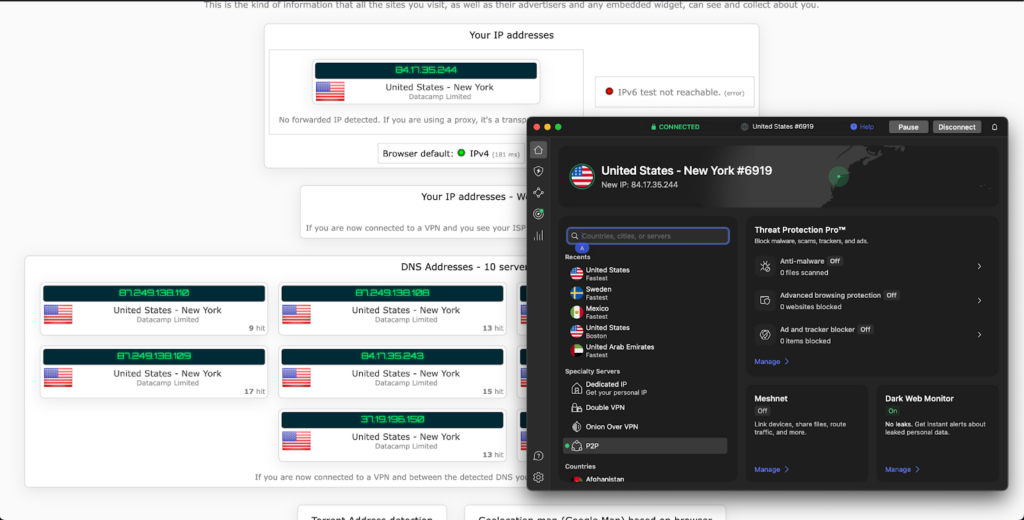
After my hands-on testing, it’s clear that NordVPN offers the most robust and well-rounded feature set compared to Surfshark and ExpressVPN. While all three VPNs deliver secure encryption, kill switch, split tunneling, and support across platforms, NordVPN goes further with extras like Threat Protection, Meshnet, and specialty servers for privacy and speed.
I looked closely at each VPN’s features to see which provider truly adds value beyond just fundamental protection. This includes things like ad-blocking, unique connection tools, and streaming capabilities. Surfshark impressed with its simple yet aesthetic design and unlimited devices, while ExpressVPN delivered a smooth, user-centered experience with high reliability. But overall, NordVPN packed in the most advanced tools.
Here’s what my testing revealed:
| Feature | NordVPN | Surfshark | ExpressVPN |
|---|---|---|---|
| Ad & malware blocker | ✅ Yes (Threat Protection) | ✅ Yes (CleanWeb) | ❌ No |
| Split tunneling | ✅ Yes | ✅ Yes | ✅ Yes (only on some platforms) |
| Speciality servers | ✅ Yes (Double VPN, Onion, P2P) | ✅ Yes (MultiHop, Static IP) | ❌ No |
| Device limit | 6 | Unlimited | 8 |
| Mesh networking | ✅ Yes (Meshnet) | ❌ No | ❌ No |
| Password manager | ❌ Extra cost | ❌ Extra cost | ✅ Included (ExpressVPN Keys) |
| Streaming support | Excellent | Very good | Very good |
Specialized servers
During my testing, I found NordVPN to be the most versatile when it comes to specialized server options. It offers a wide range of options, including P2P servers optimized for torrenting, Double VPN for enhanced privacy, Onion over VPN for accessing the Tor network safely, and obfuscated servers for countries with tight censorship. I frequently used the P2P servers for file sharing and noticed consistently strong speeds.
Surfshark does offer some specialty modes (MultiHop and static IP), but it lacks the variety NordVPN provides. Still, their dedicated P2P support worked smoothly in my testing.
ExpressVPN, while reliable, doesn’t offer separate categories for different uses. Instead, all servers are general-purpose, and the app automatically chooses the best option. This approach is convenient, but for power users like me who want more control (especially for torrenting or added anonymity), NordVPN’s specialized servers have more advantages.
Kill switch
After thoroughly testing each VPN’s kill switch, I found NordVPN’s approach to be the smartest. On both desktop and mobile, it immediately cut off internet traffic when I simulated the VPN drop, preventing any IP leaks. Surfshark’s kill switch also performed reliably, but it’s always on or off, so there’s no flexibility to apply it per app. ExpressVPN includes a kill switch too, which it calls “Network Lock,” and it worked well in my tests, too.
If you want total leak prevention, all three VPNs do the job reliably, with NordVPN having more adjustability, Surfshark being straightforward and functional, and ExpressVPN being effective. I’d still recommend NordVPN for those who want more control, especially when switching networks often or using torrents.
Split tunneling
Split tunneling is a feature I rely on often, especially when I need to route only select apps through the VPN. Here, ExpressVPN offered the smoothest experience. I liked that I could easily exclude specific apps on Windows and Android, and it worked flawlessly when I kept my streaming services outside the tunnel for better speeds.
Surfshark also supports split tunneling, but during my test, it sometimes struggled with streaming platforms, resulting in brief connection drops. NordVPN offers split tunneling as well, but currently only on Windows and Android, and it lacks the intuitive interface, like that of ExpressVPN.
If you’re juggling multiple apps or want to game without lag while keeping your browsing traffic secure, ExpressVPN is the easiest and most stable option I’ve tested. Surfshark is functional but a bit glitchy, while NordVPN still feels clunky for this specific feature.
Ad & malware blocker
When it comes to ad and malware blocking, all three providers offer some form of built-in protection, but the effectiveness varies. NordVPN’s Threat Protection really impressed me. It not only blocks ads and trackers on websites but also scans downloads for malware before they finish. The tool did that even when I wasn’t connected to the VPN.
Surfshark’s CleanWeb feature is good at blocking ads, but doesn’t go as deep in terms of scanning downloads. Still, it’s fast and didn’t cause any slowdowns.
ExpressVPN doesn’t include an ad blocker, which feels like a missed opportunity compared to the others.
My tests showed that NordVPN’s blocker caught the most trackers and even stopped pop-ups mid-load. So, for anyone concerned about digital hygiene or phishing risks, NordVPN’s Threat Protection is the best option.
Meshnet (device linking)
NordVPN has a unique advantage with its Meshnet feature, which I used a lot to link my devices securely over the internet. Essentially, it creates a private network between my own gadgets, which is convenient for file transfers or hosting a private game server. The experience was smooth, with minimal latency even across continents.
Surfshark doesn’t have a direct equivalent, and neither does ExpressVPN. I found this to be a notable disadvantage with both, especially as remote collaboration and device accessibility become more popular.
Setting up Meshnet took just a few clicks in NordVPN’s app, and it worked without any port forwarding or technical setup. If you want to connect remote devices or access your home computer remotely, NordVPN allows you to do that. ExpressVPN and Surfshark simply don’t offer anything comparable as of now.
Obfuscation
When testing servers in countries with VPN restrictions, I paid close attention to obfuscation. NordVPN offers specialty Obfuscated Servers that automatically hide VPN traffic, making it look like regular HTTPS traffic. These worked well with geo-restrictions without compromising speed much.
Surfshark uses something called Camouflage Mode, which kicks in automatically as soon as you use the OpenVPN protocol. It performed adequately, but I had to manually select OpenVPN to activate it, which is slightly less intuitive than NordVPN’s approach.
ExpressVPN’s stealth capabilities rely on its proprietary Lightway protocol, which doesn’t advertise itself as obfuscation, but in practice, it bypassed censorship quite reliably during my tests. However, Lightway lacks user control because you can’t enable or disable obfuscation manually.
NordVPN gives the most deliberate, transparent control over this feature. If you’re looking for a VPN that avoids detection, NordVPN might be your best pick. Surfshark is decent with some effort, while ExpressVPN is effective but more hands-off.
Multi-hop routing
For extra privacy, I tested the multi-hop (or double VPN) options each provider offers. NordVPN offers dedicated Double VPN servers, which route traffic through two different countries. I liked being able to pair separate servers, like Canada to the Netherlands, and speeds were impressively stable.
Surfshark has a similar feature called MultiHop, and I appreciated the number of options they gave me to mix and match entry and exit locations. It also let me create custom routes, which was surprising for a budget-friendly VPN.
ExpressVPN doesn’t currently offer multi-hop routing in its standard app. While their servers are secure, there’s no option to layer connections for extra anonymity.
For users looking to obscure their traffic path or minimize the risk of traffic correlation attacks, NordVPN and Surfshark deliver. Personally, I’d give Surfshark a slight edge for customization, while NordVPN balances performance and privacy. ExpressVPN, though excellent in other areas, skips this feature entirely.
Torrenting: which VPN is best for safe and fast downloads?
All three VPNs perform well for torrenting, but NordVPN and Surfshark have a slight edge over ExpressVPN. NordVPN is the most torrent-friendly VPN thanks to its many P2P-optimized servers, consistently fast and stable download speeds, and the option to use a built-in SOCKS5 proxy for more advanced, app-level routing.
Surfshark does not use separate P2P servers but supports torrenting on most of its network, delivering reliably good speeds and an interface that is simple to work with, even for beginners. ExpressVPN allows P2P traffic on all servers, which is convenient, but it lacks torrent-focused extras like a SOCKS5 proxy that power users may want.
Here’s a P2P summary for all three providers:
| P2P specifications | NordVPN | Surfshark | ExpressVPN |
|---|---|---|---|
| Allowed on | Specific servers | Most servers | All servers |
| Free SOCKS5 proxy | ✅ Yes | ❌ No | ❌ No |
| Split tunneling | ✅ Yes | ✅ Yes | ✅ Yes |
| Port forwarding | ❌ No | ❌ No | ❌ No |
Streaming performance: NordVPN vs Surfshark vs ExpressVPN
When streaming, NordVPN consistently delivered the fastest speeds overall, Surfshark was a close second, and ExpressVPN was slightly slower with more variable performance. In repeated tests on a 500Mbps baseline connection, NordVPN typically lost only around 8% of speed, keeping 4K and live sports streams smooth and buffer‑free. Surfshark’s WireGuard-based connections usually dropped about 10%, staying very close behind NordVPN and easily handling UHD streaming across multiple devices. ExpressVPN mostly came in with roughly an 11% reduction, still fast enough for high-quality streaming, but with more noticeable fluctuations between servers during peak times.
In terms of content access, here’s what I can confirm based on my testing:
| Streaming service | NordVPN | Surfshark | ExpressVPN |
|---|---|---|---|
| Netflix | ✅ US, UK, Canada, Japan, Australia+ | ✅ US, UK, Canada, Japan, Australia+ | ✅ US, UK, Canada, Japan, Australia+ |
| BBC iPlayer | ✅ Yes | ✅ Yes | ✅ Yes |
| ITVX | ✅ Yes | ✅ Yes (via UK servers) | ✅Yes, but inconsistent |
| Disney+ | ✅ Yes (US, UK, AU, NL) | ✅ Yes (worldwide access) | ✅ Yes |
| Amazon Prime Video | ✅ Yes | ✅ Yes | ✅ Yes |
| Hulu | ✅ Yes | ✅ Yes | ✅ Yes, but sometimes failed |
| HBO Max | ✅ Yes | ✅ Yes | ✅ Yes |
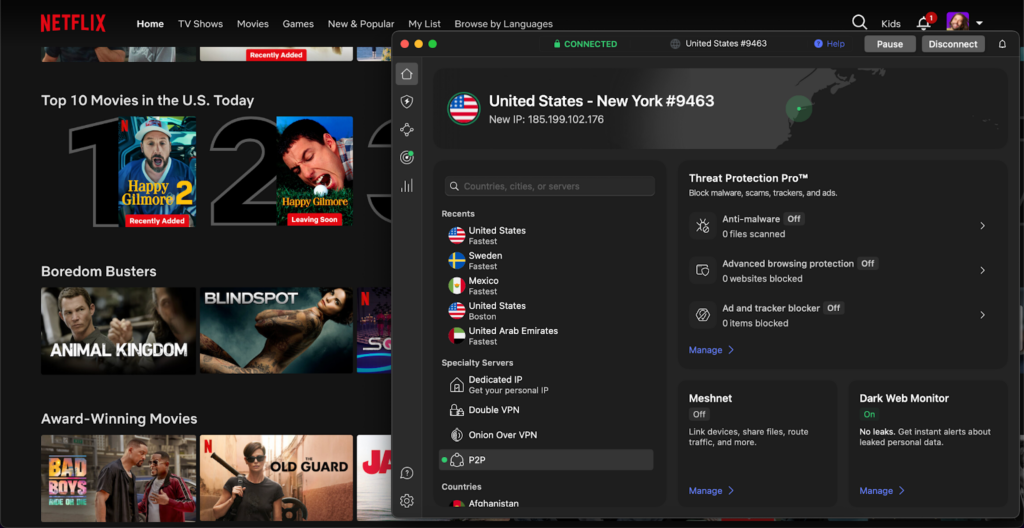
Streaming libraries. NordVPN reliably unlocked Netflix from the US, UK, Canada, Japan, Australia, and beyond. I used SmartPlay and easily accessed at least 15 libraries from around the world. Surfshark also supports 15+ Netflix regions, including the US, Japan, the UK, France, and Canada, though libraries sometimes require switching servers. ExpressVPN proved to be consistent and stable, with access across over 20 Netflix countries in my trials, which is impressive.
Ease of use: comparing apps and user experience across VPNs
As far as my experience goes, setting up NordVPN, Surfshark, and ExpressVPN was straightforward on all platforms, but there were some subtle differences. NordVPN’s installation felt the most effortless. A quick download, and I was greeted by its signature map-based server selection, which I found engaging and even fun to use. ExpressVPN’s setup was just as fast, though its interface is more minimalist. There’s a large connect button and a clean server list, which some users might prefer for simplicity. Surfshark took only a few minutes to install, and its interface is sleek and modern-looking. It offers helpful quick-connect options and built-in tools like ad-blocking and GPS spoofing right off the bat.
All three VPNs support Windows, macOS, iOS, Android, Linux, and even smart TVs and routers. However, I noticed that ExpressVPN’s native router app gave it a slight edge for whole-home coverage, whereas NordVPN required a bit more manual setup. Surfshark stood out with unlimited device connections, which felt powerful when I tried it across multiple gadgets. Overall, each app is user-friendly, but the experience depends on your personal preference for layout and features.
What Reddit users say about NordVPN, Surfshark, and ExpressVPN
As far as I recently read on Reddit, most discussions show that NordVPN and Surfshark are often tied for the lead in popularity among users, with many highlighting Surfshark’s affordability and generous device limits as key selling points. Redditors appreciate that Surfshark doesn’t cut corners despite its lower price, offering solid speeds, reliable unblocking for streaming, and strong encryption.
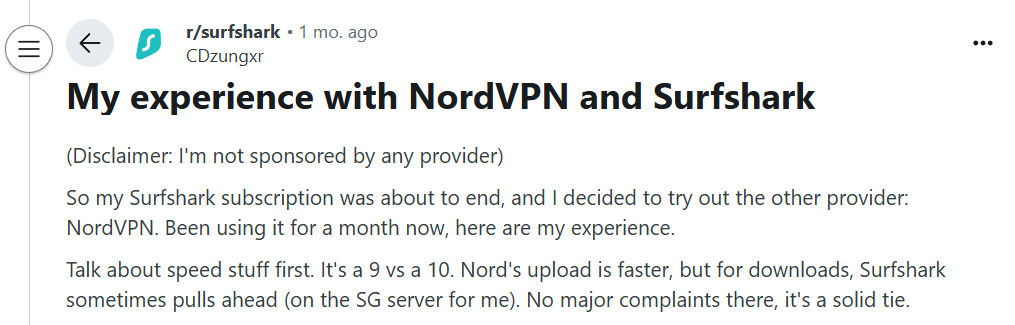
Still, NordVPN tends to gain a slight edge in more technical threads, where users point out its larger server network, advanced privacy tools like Double VPN and Onion-over-VPN, and consistent performance across regions.
When it comes to NordVPN vs ExpressVPN, the Reddit consensus leans clearly toward NordVPN. People cite its more attractive pricing, better feature set, and comparable, if not better, speeds. ExpressVPN is still respected, particularly for its polished, beginner-friendly interface and reliable service, but the higher price tag tends to draw some criticism.

Meanwhile, debates about Surfshark and ExpressVPN usually favor Surfshark, with Redditors arguing it offers “90% of what Express does” for a fraction of the cost, plus perks like unlimited device connections.

While all three are seen as premium VPNs, I picked up that NordVPN is often recommended as the best all-rounder, Surfshark as the best value VPN, and ExpressVPN as a solid alternative for those prioritizing simplicity and ease of use, and don’t mind paying more for it.
Final verdict: Which is better, NordVPN or ExpressVPN vs Surfshark?
NordVPN, Surfshark, and ExpressVPN are among the most popular VPN providers in 2026, each offering strong privacy protections, excellent security, and fast global connections. While all three deliver reliable performance, they cater to slightly different needs – from speed and security to affordability and usability.
After extensive testing, NordVPN emerges as the best VPN overall, thanks to its unmatched balance of speed, advanced security tools, and expansive global network. Surfshark comes in a close second, offering unbeatable value with unlimited device connections at a budget-friendly price. ExpressVPN ranks third, falling behind in pricing and server network transparency, but still excelling in ease of use, interface design, and premium privacy – ideal for users who prioritize simplicity and trusted audit history.
| Category | Winner | NordVPN | Surfshark | ExpressVPN |
| Speed | 🥇NordVPN | Ultra-fast on local and long-distance connections | Consistent speeds, slightly behind NordVPN | Great overall, but slower under load |
| Privacy & security | 🥇NordVPN | AES-256 encryption, Threat Protection Pro, Double VPN, Dark Web Monitoring | AES-256 encryption, CleanWeb ad blocker | AES-256 encryption, RAM-only uniform servers, audited privacy |
| Server network | 🥇NordVPN | 8900 servers in 149 countries | 4500 servers in 100 countries | Undisclosed servers in 113 countries |
| Streaming & unblocking | 🥇NordVPN | Works with Netflix, Disney+, Hulu, and most other popular platforms globally | Excellent performance and unlimited devices | Very reliable but slightly fewer supported libraries |
| Ease of use | 🥇ExpressVPN | Advanced interface, customizable | Clean and modern apps | Most intuitive design, fastest setup |
| Value for money | 🥇Surfshark | Balanced feature-to-price ratio | Cheapest long-term plan, plus added value with unlimited devices | Most expensive, premium-tier pricing |
Final verdict:
If you want the best overall VPN performer, go with NordVPN. If you’re after premium privacy and simplicity, ExpressVPN is still a great choice. And if budget is your main concern, Surfshark delivers the most value for money of the three.
You may also want to read:
- NordVPN vs Surfshark
- Norton VPN vs NordVPN
- Proton VPN vs NordVPN
- ExpressVPN vs NordVPN
- NordVPN vs CyberGhost
- Is Surfshark better than Proton VPN?
- Is NordVPN better than Bitdefender VPN?
- Mozilla VPN or NordVPN
- McAfee VPN vs NordVPN
- NordVPN vs Windscribe
- Surfshark vs IPVanish comparison
- ExpressVPN vs IPVanish comparison
- Compare ExpressVPN vs Surfshark
- ExpressVPN vs PIA
- ExpressVPN pricing 2026
FAQ
In 2026 tests, NordVPN proved to be the fastest VPN overall, delivering exceptional speeds on both local and mid-range servers thanks to its NordLynx protocol, which optimizes the WireGuard standard for secure and fastest performance. While ExpressVPN’s Lightway protocol maintained stable speeds globally and Surfshark remained swift for most uses, NordVPN still consistently outperformed both rivals in raw performance and responsiveness.
NordVPN offers the most complete security suite, featuring Threat Protection, Dark Web Monitoring, and Double VPN encryption for advanced privacy. It operates on mostly diskless (RAM-only) servers and undergoes regular independent audits for transparency. While Surfshark and ExpressVPN remain secure choices, NordVPN’s layered protection tools and proactive threat-prevention systems make it the top pick for maximum online safety.
NordVPN stands out for its comprehensive security toolkit, combining Threat Protection, Meshnet, specialty servers, and advanced split tunneling into a single VPN powerhouse app. Surfshark focuses on affordability with unlimited devices and privacy add-ons like CleanWeb and NoBorders mode, while ExpressVPN prioritizes simplicity and reliability through its Lightway protocol and strong obfuscation. NordVPN ultimately delivers the most advanced and feature-rich VPN overall.
Surfshark is the most affordable option, offering one of the lowest-priced longer-term plans in 2026, costing about half of ExpressVPN’s rate, all while supporting unlimited connections across all devices. NordVPN provides strong value for its robust features at a mid-range price, while ExpressVPN remains the priciest for longer subscriptions, catering to those willing to pay more for premium branding rather than tangible additional performance.
ExpressVPN is based in the British Virgin Islands, a privacy-friendly jurisdiction with no data retention laws, while NordVPN and Surfshark are based in Panama and the Netherlands, respectively. While all three offer strong privacy, NordVPN’s and ExpressVPN’s jurisdictions are generally considered safer due to minimal government surveillance and strong legal protections.
Choose NordVPN if you prioritize advanced security features like Double VPN, faster speeds for streaming or gaming, and a proven no-logs policy. It’s ideal for users who want strong performance, a large server network, and robust privacy, especially if you value Panama’s privacy-friendly jurisdiction and independent audits.