
- Key differences between Surfshark and Proton VPN
- Surfshark vs Proton VPN price comparison
- Which has more global servers: Surfshark vs Proton VPN
- Which is more secure: Surfshark or Proton VPN
- Which VPN has stronger privacy policies: Surfshark or Proton VPN
- Which is better for streaming: Surfshark or Proton VPN
- Should I choose Proton VPN or Surfshark for torrenting
- Should I choose Proton VPN or Surfshark for gaming
- Which VPN is easier to use: Surfshark or Proton VPN
- Surfshark or Proton VPN Reddit comparison
- Final verdict: Is Surfshark better than Proton VPN in 2026?
- FAQ
Both Surfshark and Proton VPN are leading VPNs, each offering unique features and advantages. While Proton VPN is known for its strong focus on privacy and its secure Swiss jurisdiction, Surfshark is recognized for its speed, affordability, and unlimited device connections.
I compared both VPNs side-by-side to find out which is better. Together with the VPNOverview research team, I reviewed their speed, security and privacy, streaming performance, app interface, and ease of use. In my tests, Surfshark provided faster speeds and smoother streaming, while Proton VPN impressed me with its free version and advanced security features.
After putting them through test trials, Surfshark came out on top as the stronger all-around option. Continue reading to see the full breakdown and why Surfshark is the best choice in 2026.
| VPN provider: | Surfshark | Proton VPN |
|---|---|---|
| Website: | https://surfshark.com/ | https://protonvpn.com/ |
| Rating: | 9.0⭐⭐⭐⭐⭐ | 8.9⭐⭐⭐⭐⭐ |
| Servers: | 4500 servers in 100 countries | 20700 servers in 149 countries |
| Speed performance: | Very fast (~780Mbps) | Fast (~770Mbps) |
| Simultaneous connections: | Unlimited | 10 |
| Encryption: | AES-256, ChaCha20 | AES-256, ChaCha20 |
| Streaming: | Netflix, Hulu, Disney+, BBC iPlayer, HBO Max, Roku, Prime Video, and more | Netflix, Hulu, Disney+, BBC iPlayer, HBO Max, DAZN, Crunchyroll, Prime Video, and more |
| Torrenting support: | ✅ Yes, supports P2P optimized servers | ✅ Yes, supports P2P optimized servers |
| Starting price: | $ 2.49 | $ 2.99 |
| Money-back guarantee: | 30-day money-back guarantee | 30-day money-back guarantee |
Key differences between Surfshark and Proton VPN
Both Surfshark and Proton VPN are high-quality VPN services, but they differ in speed, server coverage, streaming performance, and pricing. In my testing, I ran speed checks, unblocked major streaming sites, and evaluated security features to see which one performs better.Surfshark and Proton VPN are both solid choices, but Surfshark proved to be the stronger option. It retained over 93% of my base speed with the WireGuard protocol and, thanks to its larger server network, offered better global coverage for smooth 4K streaming of Netflix, Hulu, and Disney+. Although Proton VPN is slower for streaming, it excels in terms of privacy. It’s based in Switzerland, uses Secure Core servers for extra protection, and all of its apps are open-source and independently audited. If speed, streaming, and unlimited device connections are important, Surfshark is the best option, while Proton VPN provides stronger security and privacy. Hence, there are several advantages and disadvantages to both providers:
| Surfshark pros and cons | Proton VPN pros and cons |
| ✅ Unlimited device connections. Surfshark is one of the few advanced VPNs that allows unlimited devices on a single account. | ✅ Privacy-first VPN. Proton VPN has a strict no-logs policy and Swiss jurisdiction, making it an ideal choice for privacy-conscious users. |
| ✅ Fast speeds. Surfshark consistently delivers 93% retention speed thanks to WireGuard protocol. | ✅ Robust security package. It offers top-tier encryption, secure protocols like OpenVPN and WireGuard, as well as advanced features like Secure Core servers and NetShield ad blocking. |
| ✅ Packed with features. Surfshark offers a range of advanced features, including CleanWeb for ad-blocking, MultiHop for double VPN connections, and the Bypasser, a split tunneling feature, that allows you to choose which apps and websites are protected by the VPN. | ✅ Powerful at bypassing censorship. Proton VPN consistently unblocks streaming platforms and bypasses geo-restrictions and censorship. |
| ✅ Bypasses geo-restrictions. Unblocks the most popular streaming services, including Netflix, Hulu, and BBC iPlayer. | ✅ Huge server network. With 20700 servers in 149 countries, users face less crowding, enjoy more location options, and benefit from more stable connections. |
| ❌ No free plan. While Surfshark offers a 7-day free trial and a 30-day money-back guarantee, it does not have a permanent free version, unlike Proton VPN. | ❌ Limited free version. In the free plan, you cannot access all server features, higher speeds, or the full network of servers. |
| ❌ Higher price. Proton VPN’s premium plans are higher than Surfshark’s. |
Here are the main differences between Surfshark and Proton VPN:
- Surfshark is cheaper. Its long-term plans are significantly cheaper than Proton VPN’s.
- Proton VPN boasts a much larger server network with over 20700 servers across 149 countries, while Surfshark offers 4500+ servers in 100 countries.
- Surfshark is better for streaming. Surfshark reliably unblocks Netflix, Disney+, Hulu, and more with smooth HD/4K playback and unlimited device connections. While Proton VPN provides solid privacy, but streaming is less consistent, with frequent server switching and slower speeds.
- Proton VPN is more reliable for torrenting. With port forwarding and a larger server network, peer-to-peer transfers run smoother and more stable.
- Surfshark is better for gaming. Its low ping delivers smoother gameplay, while built-in DDoS protection and unlimited bandwidth ensure stable matches and uninterrupted sessions.
- Proton VPN offers a free version. Unlike Surfshark, Proton VPN has a free plan that provides unlimited data, making it a great option for users on a tight budget.
- Surfshark offers unlimited device connections. Surfshark is more versatile for households with multiple devices, as Proton VPN is limited to a maximum of 10 connections.
- Proton VPN focuses on privacy. Its Secure Core servers and open-source apps provide strong protection for privacy-conscious users.
- Surfshark is faster. In my tests, Surfshark consistently retained over 93% of base speed, while Proton VPN retained 82% of base speed for streaming.
Surfshark vs Proton VPN price comparison
As of January 2026, Surfshark is a cheaper VPN than Proton VPN on yearly and long-term plans, while Proton VPN is slightly cheaper if you only want a monthly subscription.
Surfshark’s Starter plan costs $3.19/month for 12 months, while Proton VPN’s annual plan is $4.99/month. For the long-term deal, Surfshark’s Starter plan is $1.99/month for 24 months, while Proton VPN’s 24-month plan is $4.49/month. Plus, Proton VPN offers a limited free version, and its paid monthly plan is $9.99, which is more affordable than Surfshark’s $15.45 monthly subscription.
Moreover, Surfshark offers multiple plans with additional features, such as antivirus protection and data breach alerts, while Proton VPN keeps it simple with one paid plan for all durations.
That said, Proton VPN is only cheaper if you pay monthly, and its free version is a huge bonus. However, Surfshark beats Proton VPN with lower rates and more flexibility. Below is a table comparing their prices and policies:
| Subscription plans | Surfshark | Proton VPN |
|---|---|---|
| 1-month plan: | $15.45/month | $9.99/month |
| 1-year plan: | $3.19/month | $4.99/month |
| 2-year plan: | $ 2.49/month | $ 2.99/month |
| Free trial | ✅ Yes, 7 days (Android and iOS) | ✅ Yes |
| Money-back guarantee | 30-day money-back guarantee | 30-day money-back guarantee |
| Current deal: | Get Surfshark, now 85%! | Get Proton VPN, now 70%! |
When comparing trial and refund policies, Surfshark and Proton VPN take very different approaches. Surfshark offers a 7-day free trial (available through the Android or iOS app) that works on all devices once activated. On top of that, it includes a standard 30-day money-back guarantee when purchased directly from the website. Proton VPN, meanwhile, doesn’t provide a traditional trial but compensates with a permanent free plan. Unlike Surfshark’s time-limited trial, Proton’s free version never expires, though it’s far more restrictive – only 5 server locations, one device at a time, and no streaming or torrenting. This makes it suitable for basic browsing, but not for streaming platforms or heavy torrent usage.
Which has more global servers: Surfshark vs Proton VPN
Proton VPN boasts a vast global server network. It operates over 20700 servers in 149 countries, compared to Surfshark’s over 4500 RAM-only servers in 100+ countries. This large number of servers and countries means a better chance of finding an uncrowded server with a fast connection, especially in less common locations. It also offers more options for bypassing geo-restrictions. Here is a brief overview of Surfshark’s and Proton VPN’s server infrastructure:
| Feature | Surfshark | Proton VPN |
|---|---|---|
| Total servers | 4500 servers | 20700 servers |
| Countries covered | 100+ countries | 149+ countries |
| Server types | RAM-only, obfuscated, P2P | Secure Core, Tor over VPN, 2P |
| Specialized servers | ✅ Yes (MultiHop, static IP, dedicated IP) | ✅ Yes (streaming-optimized, static IP) |
| Server ownership | Fully owned | Fully owned |
Both VPN providers have invested in a modern infrastructure with unique, specialized servers. Proton VPN’s network focuses on privacy, with its unique Secure Core servers that route traffic through physically hardened data centers. It also features dedicated servers for Tor over VPN, providing maximum anonymity. On the other hand, Surfshark’s servers run on a RAM-only infrastructure, which is a major security benefit. It also offers MultiHop servers that add an extra layer of privacy by routing your traffic through two different locations, and its Camouflage Mode is solid for bypassing strict firewalls.
Which is more secure: Surfshark or Proton VPN
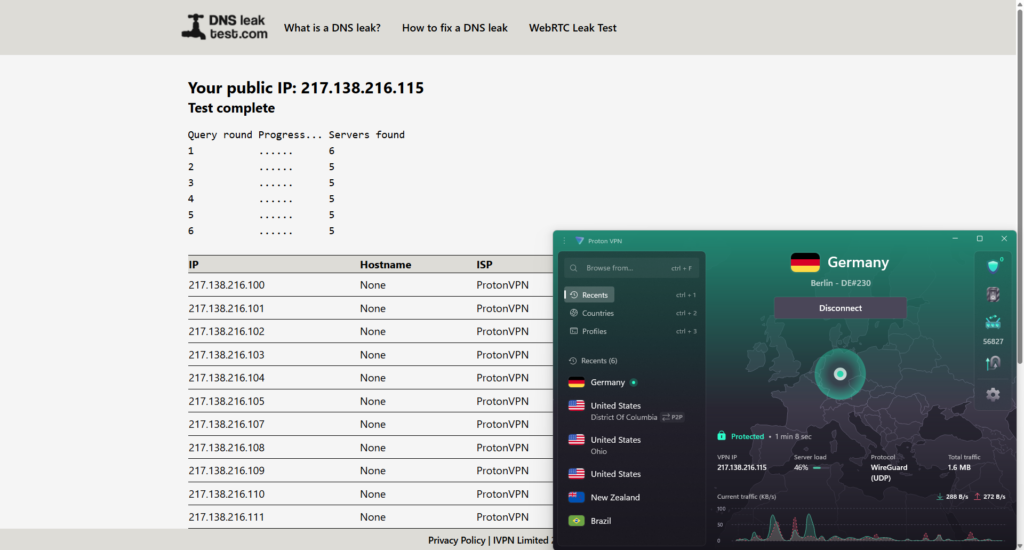
Both Surfshark and Proton VPN are secure VPN services that cover the essentials, including a kill switch, DNS/IP/WebRTC leak protection, and a strict no-logs policy. However, in my opinion, Proton VPN wins this category due to its strong commitment to privacy, including its open-source apps and unique security features, such as Secure Core and Stealth protocols. The following table compares both VPNs’ security features:
| Security aspect | Surfshark | Proton VPN |
|---|---|---|
| Jurisdiction | The Netherlands | Switzerland |
| Encryption | AES-256, ChaCha20 | AES-256, ChaCha20 |
| Protocols supported | WireGuard, OpenVPN, IKEv2 | WireGuard, OpenVPN, IKEv2, Stealth, Secure Core |
| No-logs policy | ✅ Yes, audited by Deloitte | ✅ Yes, audited by Securitum |
| Kill switch | ✅ Yes (system-wide and app-specific) | ✅ Yes (system-wide and app-specific) |
| Leak protection | DNS, IP, WebRTC | DNS, IP, WebRTC |
Based on my research, both providers use industry-standard AES-256 encryption by default, along with its ChaCha20 encryption for the WireGuard protocol. I appreciated that Proton VPN’s software is fully open-sourced and audited by an independent third-party security firm, Securitum. This level of transparency provides a lot of reassurance to privacy-conscious users.
I also looked into their jurisdictions and no-logs policies. Proton VPN is based in Switzerland, a country with some of the strongest privacy laws in the world and no data retention laws. This is a significant advantage over Surfshark’s jurisdiction in the Netherlands, which is part of the 9-Eyes intelligence-sharing alliance. While both providers have had their no-logs policies independently audited, Proton VPN’s location in Switzerland ensures strong legal privacy protections, meaning that user data is less likely to be shared with third parties.
Moreover, Proton VPN’s unique security features are a key differentiator. During my testing, I found its Secure Core servers to be an impressive feature, routing traffic through physically hardened data centers. Plus, its dedicated Tor over VPN servers are also a huge plus for those who need maximum anonymity.
Kill Switch
Both Surfshark and Proton VPN have a built-in kill switch. This is a critical security feature that protects your privacy by automatically cutting your internet connection if the VPN unexpectedly drops. This prevents your real IP address and unencrypted data from being exposed.
Surfshark’s kill switch is very straightforward. When you turn it on, it works in the background to protect your connection without any complicated settings. On the other hand, Proton VPN also provides a kill switch on all major platforms, including Windows, macOS, iOS, Android, and Linux. Its “always-on VPN” option reconnects automatically if the connection drops, protecting privacy-focused users. For instance, on Android, activate this feature in your device settings by turning on “Block connections without VPN” and “Always-on VPN.” On iOS, the always-on feature is built directly into the app, so you won’t have to do any extra setup.
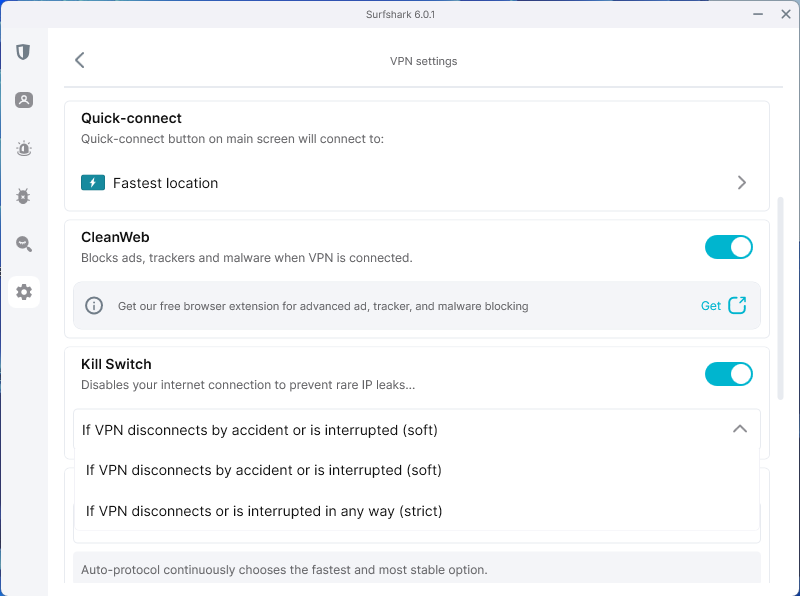
Overall, while both VPNs have an effective kill switch, Surfshark’s is more user-friendly for everyday use. Proton VPN’s more advanced options are a major plus for anyone who needs the highest level of security and control.
Split Tunneling
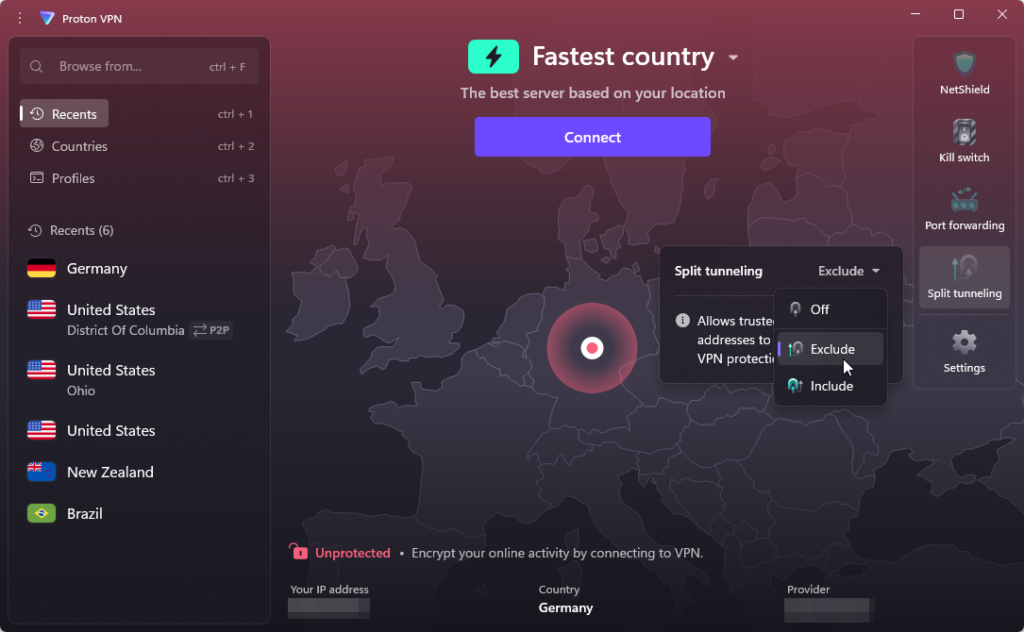
Surfshark and Proton VPN both offer split tunneling, so you can choose which apps use your VPN connection and which use your regular, unprotected internet connection. This method can help you maintain your internet speed, especially if your network is slow. It also ensures your regular internet browsing and access to geo-blocked content, even when your VPN is connected to a server in another country.
This feature, named Bypasser in Surfshark, is very intuitive and easy to use. It provides two options: you can either route specific apps and websites through the VPN (using a whitelist) or choose which ones bypass the VPN entirely (using a blacklist). During my tests, I connected to a US server to access FanDuel securely, without slowing down the betting process or triggering alerts for my ISP.
Moreover, Proton VPN also offers split tunneling with a similar whitelisting/blacklisting approach. However, while I found it to be a very effective feature, it’s not available in all apps. Proton VPN has split tunneling in its Windows, Android, and Android TV apps, but it’s not a standard feature on macOS or iOS.
Obfuscation
Obfuscation is a key feature for bypassing internet censorship. It works by disguising your VPN traffic to look like regular, unencrypted internet traffic, making it much harder for internet service providers (ISPs) and governments to detect and block your VPN use. This is especially important in countries with strict internet censorship, such as China, Russia, or Iran.
There are differences in how Surfshark and Proton VPN implement obfuscation. For example, Surfshark’s obfuscation feature is called Camouflage Mode. It works automatically when you connect using the OpenVPN protocol. During my testing, I found that I didn’t need to take any special steps; I simply selected the OpenVPN protocol and connected to a server.
Moreover, Proton VPN’s obfuscation is handled by its proprietary Stealth protocol. I was impressed that this feature doesn’t require specialized servers and can be used on any server in their network. You select the Stealth protocol in the app’s settings. While it’s not as automatic as Surfshark’s approach, I found it highly effective at bypassing network filters.
Both Camouflage Mode and the Stealth protocol worked well in my testing, but Proton VPN’s Stealth protocol was more robust and worked across all servers. For a user in a highly censored region, having a dedicated protocol for this purpose provides an extra layer of reassurance.
Specialty servers
Proton VPN and Surfshark VPN both have specialized servers, but they benefit users in different ways. For example, during my testing, I found that Surfshark’s entire network is P2P-friendly, and its servers are well-optimized for streaming. I could effortlessly access platforms like Netflix and Hulu, and the connections were fast enough for 4K streaming without buffering. Plus, Surfshark’s MultiHop servers added an extra layer of security by routing my traffic through two locations.
Proton VPN also offers strong streaming and P2P support. The network has high-speed P2P servers optimized for fast and secure torrenting. Moreover, its Secure Core server routes traffic through hardened data centers for maximum protection. A huge plus of this VPN is its Tor over VPN servers, which provide instant access to dark web sites.
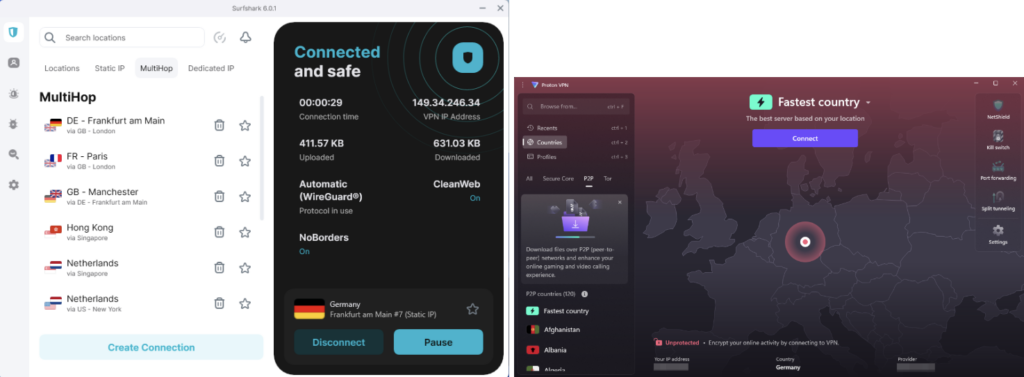
In summary, while both are excellent for P2P and streaming, Proton VPN focuses more on a privacy-first infrastructure, and Surfshark’s specialty servers are geared toward everyday convenience.
Ad and Malware Blocker
My testing revealed that Surfshark’s CleanWeb is a highly effective, all-in-one solution, while Proton VPN’s NetShield is a powerful DNS-based blocker. For instance, Surfshark’s CleanWeb blocks ads, trackers, and malicious websites. I found it to be very effective at blocking a broad range of ads, including those on video streaming sites. CleanWeb is also part of Surfshark’s browser extensions and you can use it without VPN connections on some platforms.
On the other hand, Proton VPN’s NetShield is a DNS-based ad blocker that blocks ads, trackers, and malware at the DNS level. This means it prevents your device from even connecting to known malicious or ad-related domains. While it doesn’t offer the file-scanning features of a full antivirus, I noted that it was highly effective at blocking a wide range of threats before they could even load.
In the end, both features boost your security and privacy. However, Surfshark’s CleanWeb feels more comprehensive with its ability to block video ads and work as a standalone extension. In contrast, Proton VPN’s NetShield is a powerful and efficient solution that works across your entire device.
Which VPN has stronger privacy policies: Surfshark or Proton VPN
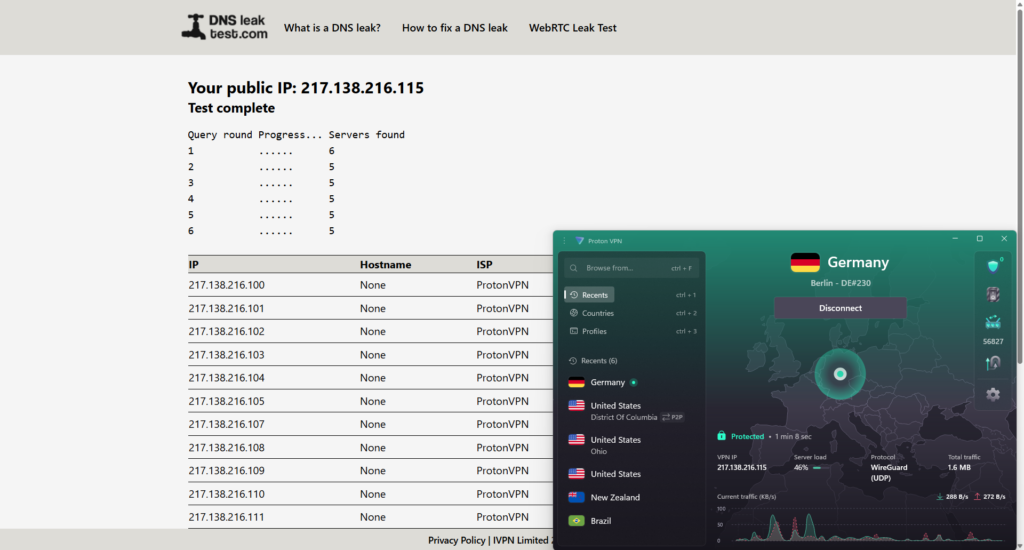
In my testing, I focused on three privacy features: no-logs policies, independent audits, and leak protection. Both Surfshark and Proton VPN passed my IP, DNS, and WebRTC leak tests, meaning neither exposed my real location or identity.Each company has undergone independent audits of its privacy policies. However, Proton VPN is based in Switzerland, a country with some of the strongest privacy laws in the worldand no mandatory data retention laws. However, Surfshark’s jurisdiction in the Netherlands is also privacy-friendly, but part of the “9 Eyes” intelligence-sharing alliance. As a result, Proton VPN has a significant legal advantage in terms of privacy.
No-logs policy
Each company has completed independent audits of its no-logs policy. Surfshark’s policy was audited by Deloitte, a well-known firm. However, Proton VPN’s no-logs policy was audited by Securitum and, more importantly, tested and proven in a legal case. In the real-world scenario, they were unable to provide user data to law enforcement because it simply didn’t exist. This level of verification gives Proton VPN a significant advantage in trustworthiness.
I also looked into their jurisdictions. Proton VPN is based in Switzerland, a country with some of the strongest privacy laws in the world and no mandatory data retention laws. On the other hand, Surfshark is based in the Netherlands, a privacy-friendly country but still part of the 9 Eyes intelligence-sharing alliance. As a result, this gives Proton VPN a significant legal and real-world advantage in terms of privacy with its no-logs policy and jurisdiction.
Independent audits and transparency reports
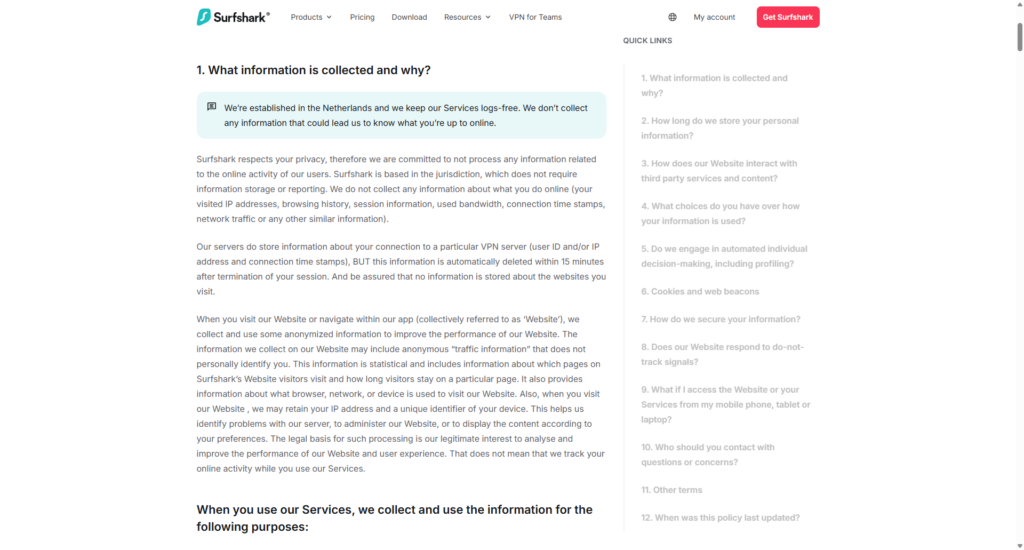
I explored the most recent independent audits and transparency reports for Surfshark and Proton VPN during my testing. Surfshark has undergone multiple independent audits verified by Deloitte, published in June 2025. Surfshark has also had its browser extensions and server infrastructure audited by Cure53, a reputable security firm. The transparency reports Surfshark produces reveal how it responds to legal and government requests, which is a great way to be open with users.
Proton VPN also has a strict no-logs policy, which has been audited multiple times by Securitum, and its applications are fully open-source. This commitment to transparency is a major selling point. Proton VPN also publishes regular transparency reports that detail legal requests and often include a Warrant Canary and information about their network.
Finally, while both VPNs have a solid history of independent audits, Proton VPN’s open-source apps and its public legal history of not having logs to hand over give it a slight edge in transparency and trust. It reassures users that its no-log policy is more than just a promise.
Which is better for streaming: Surfshark or Proton VPN
I examined both Surfshark and Proton VPN through comprehensive speed tests to benchmark their performance for streaming. After testing my baseline connection, I connected to both VPNs on the US, UK, France and Japan servers worldwide to see how they performed.
During my tests, Surfshark retained an impressive 93% of my original speeds, while Proton VPN retained 83%. Both of these speeds are sufficient for streaming HD and 4K quality without lag, but Surfshark provided a smoother experience with fewer buffering issues.
It’s important to note, however, that Proton VPN’s performance is boosted by its unique VPN Accelerator technology. This feature is designed to increase speeds by up to 400%, particularly over long-distance connections and on less reliable networks. It works by breaking up the connection path into shorter segments, which reduces latency and bypasses network congestion. As a result, even though Surfshark had higher overall speeds, Proton VPN’s speeds were incredibly stable and reliable, even on distant servers.
Beyond speed, a VPN’s ability to unblock content is a key factor. Streaming platforms around the world use geo-restrictions to limit content access. My tests showed that both providers bypass these blocks effectively and are solid VPNs for streaming. Below is a list of platforms that VPNs unblock:
| Streaming service | Surfshark | Proton VPN |
|---|---|---|
| Netflix | ✅ Yes | ✅ Yes |
| BBC iPlayer | ✅ Yes | ✅ Yes |
| Disney Plus | ✅ Yes | ✅ Yes |
| Hulu | ✅ Yes | ✅ Yes |
| HBO Max | ✅ Yes | ✅ Yes |
| Amazon Prime Video | ✅ Yes | ✅ Yes |
| ITVX | ✅ Yes | ✅ Yes |
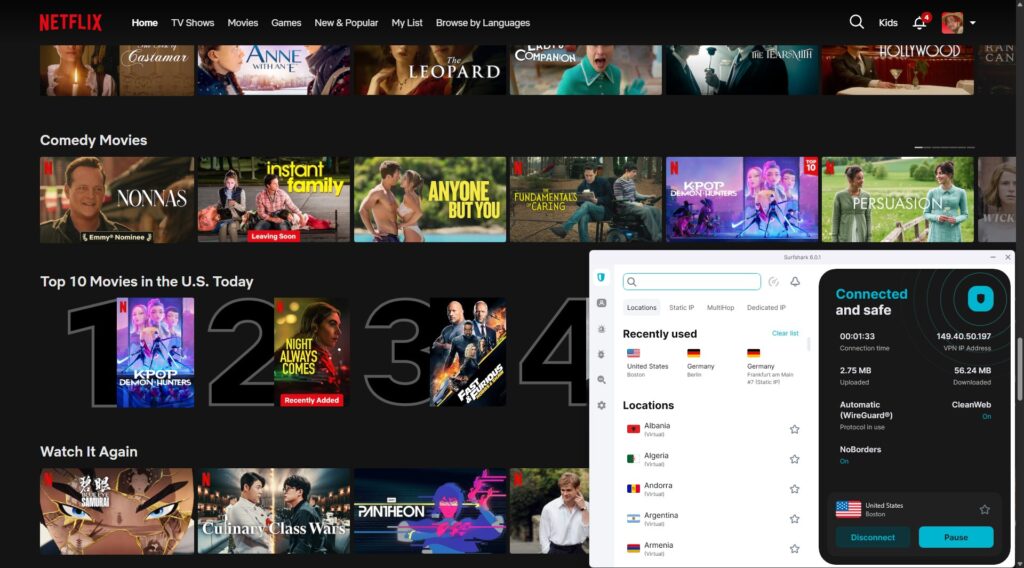
I was impressed to see both Surfshark and Proton VPN bypassed Netflix’s strict VPN block. With their strong privacy features, both VPNs allowed me to easily bypass blocks and watch Netflix US from anywhere in the world. I connected to a US server and got full access to Netflix US library and Netflix Japan. Both services also unblocked a wide range of other platforms, including BBC iPlayer, Hulu, and HBO Max.
Should I choose Proton VPN or Surfshark for torrenting
The use of a VPN while torrenting is essential since it protects you from the risks inherent in peer-to-peer file sharing. When you torrent, your IP address is exposed to everyone in the torrent swarm, leaving you vulnerable to tracking, ISP throttling, and other risks. I tested both Surfshark and Proton VPN to see if they could effectively hide my IP while torrenting and share files at a fast speed.Surfshark makes torrenting simple as its entire server network is P2P-friendly. This means you don’t have to select a special server, it automatically redirects your torrent traffic. However, it does not support port forwarding.
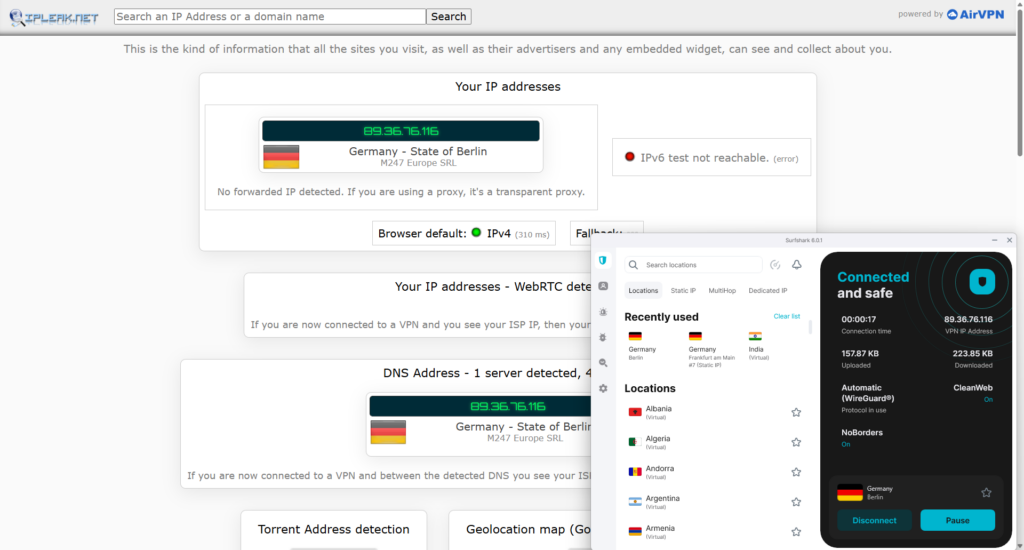
On the other hand, Proton VPN supports torrenting but only on select P2P servers, which are indicated by a double arrow symbol in the app. As I found during my tests, torrenting on the free plan blocks your connection, so this feature is only available for premium users. For me, Proton VPN is the better choice because it offers port forwarding, which can significantly increase your download speeds by connecting you to more peers in a torrent swarm.
Should I choose Proton VPN or Surfshark for gaming
The benefits of using a VPN for gaming include preventing ISP throttling, protecting against DDoS attacks, and ensuring a stable connection. I tested both Surfshark and Proton VPN with fast-paced games like CS2, Valorant, and GTA 5 across US, UK, and French servers. Both maintained stable connections, but Surfshark delivered a lower average ping (35ms) than Proton VPN (46ms), resulting in smoother gameplay with minimal lag.
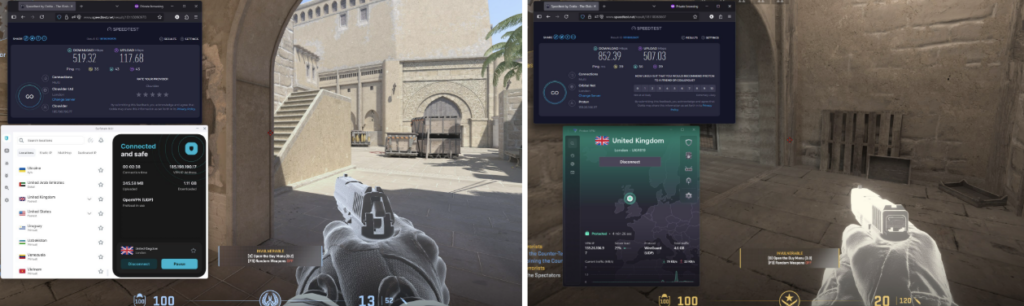
In both cases, during the tests, my IP was masked, preventing DDoS attacks and ensuring that my home network would not be targeted. Because both VPNs support router setups, I was able to play PlayStation and Xbox with no lag, as well as download game updates without any buffering. While neither offer dedicated gaming servers, Surfshark’s stronger speed retention and slightly lower ping give it the upper hand.
Which VPN is easier to use: Surfshark or Proton VPN
During my testing, I installed and configured both Surfshark and Proton VPN across Windows, macOS, iOS, and Android. Although both installations took only a few minutes, the overall user experience was very different.
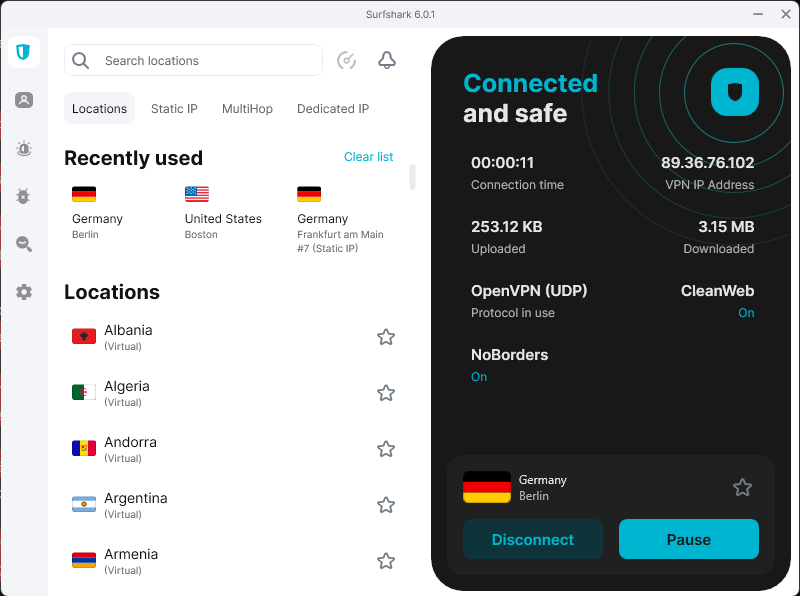
It was easy to set up both VPNs on all major platforms. For example, Surfshark’s app is minimalistic and clean. When you open it, you’re greeted with a Quick-Connect button that instantly connects you to the fastest server, making it incredibly convenient for beginners. Moreover, the server list is simple and easy to navigate, with a search bar and clear categories.
On the other hand, Proton VPN uses a more traditional, list-based approach. While it felt less flashy than Surfshark’s, I found its Profiles feature particularly useful during my testing. It let me save custom connection settings, like server, protocol, and features (like Secure Core or NetShield), into dedicated profiles that you can switch between depending on what you’re doing. This is great for someone who wants to quickly switch between a gaming and a privacy profiles.
Both VPNs are compatible with all major operating systems, including Windows, macOS, Android, iOS, and Linux. They also support browser extensions and can be set up on routers, smart TVs, and gaming consoles. Plus, Surfshark has unlimited simultaneous connections on a single account, while Proton VPN limits up to 10.
Surfshark or Proton VPN Reddit comparison
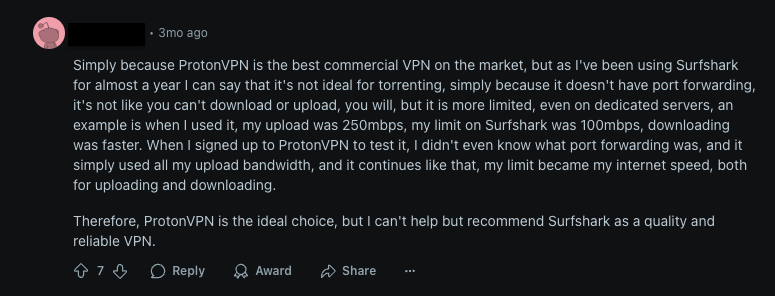
Based on my review of recent discussions on Reddit, a few key points aligned with my own testing of Surfshark and Proton VPN. One user recently highlighted how Surfshark isn’t ideal for torrenting because it lacks port forwarding. This mirrors my own testing, where I found that Proton VPN’s port forwarding feature significantly boosted download and upload speeds by connecting to more peers in a torrent swarm. Surfshark lacks this feature, which is a game-changer for anyone who torrents regularly.
Another Redditor complimented Proton VPN for its Switzerland jurisdiction and regularly audited its privacy policies. This aligns with my own analysis of Proton VPN’s commitment to security and transparency. While both VPNs have a no-logs policy, the community’s trust in Proton VPN’s legal and technical framework is a major selling point that my tests confirmed.
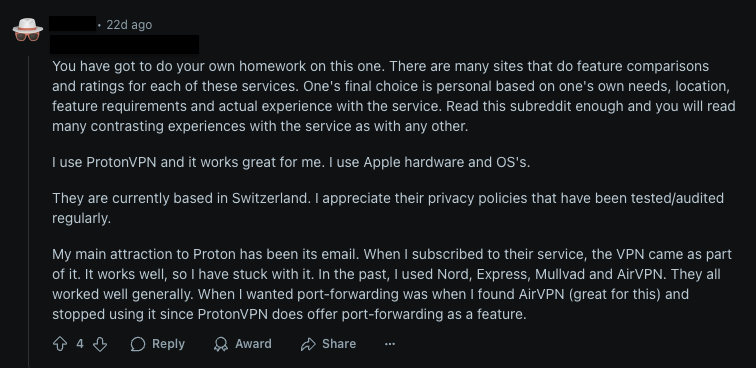
Based on my research and a review of user feedback on Reddit, I found that Surfshark and Proton VPN are both powerful VPNs, but they have different user bases. While Surfshark is an excellent all-around VPN for value and speed, Proton VPN’s specialized features for privacy and torrenting make it the ideal choice for those who need a more robust and secure solution.
Final verdict: Is Surfshark better than Proton VPN in 2026?
Based on my extensive testing and research, both Surfshark and Proton VPN are solid options. Nevertheless, after careful head-to-head comparison, I found Surfshark to be the better choice all around. In the end, the best choice still comes down to your own needs and priorities.
| When to choose Surfshark? | When to choose Proton VPN? |
| ✅ When you need faster speeds with WireGuard protocol | ✅ When you need robust and transparent privacy based on Swiss laws |
| ✅ When you need unlimited device connections | ✅ When you need reliable torrenting with port forwarding |
| ✅ When you need a user-friendly interface | ✅ When you need a massive server network and stability |
| ❌ When you torrent a lot and need port forwarding | ❌ When you want a cheaper version VPN |
Here are the main differences between Surfshark and Proton VPN:
Where Surfshark outperforms Proton VPN:
- Pricing. Surfshark offers better deals, with its long-term plans being cheaper than Proton VPN’s.
- Speed. My tests showed that Surfshark is consistently faster than Proton VPN, especially on long-distance connections. Surfshark retained an impressive 93% of its base speed, making it the better choice for bandwidth-intensive activities.
- Streaming. My tests confirmed that Surfshark consistently unblocks all major platforms with less trial and error than Proton VPN. Its faster speeds also provide a smoother, buffer-free viewing experience.
- Gaming. Surfshark has faster speeds, powered by the WireGuard protocol, leading to a lower average ping and less lag in fast-paced games. Its robust DDoS protection and 10 Gbps server ports ensure a stable, secure, and enjoyable gaming experience.
- Interface. Surfshark’s interface is clean and intuitive across both its desktop and mobile apps, making it easy to connect, switch servers, and adjust settings on any device.
Where Proton VPN outperforms Surfshark:
- Servers. Proton VPN has a larger server network, with over 20700 servers in 149 countries, compared to Surfshark’s 4500 servers in 100 countries. This massive network gives Proton VPN an advantage in terms of load balancing and stability.
- Torrenting. Although both VPNs support P2P, Proton VPN’s dedicated P2P servers and critical port forwarding feature provide a better torrenting experience.
- Privacy and security. Proton VPN has a slight edge in this category. Its Switzerland jurisdiction, open-source apps, and a no-logs policy that has been proven in a legal case provide a level of privacy that is difficult to match.
After careful testing, I concluded that Surfshark outperforms Proton VPN in 2026. While Proton VPN is a strong choice for privacy thanks to its Swiss jurisdiction and Secure Core servers, Surfshark delivers a better balance of speed, features, and usability. Moreover, it retained over 93% of my base internet speed with the WireGuard protocol, making it far more reliable for 4K streaming and gaming. On top of that, Surfshark allows unlimited device connections and includes Smart DNS for easy access to TVs and consoles, something Proton VPN lacks. If you want a VPN that combines excellent performance, global coverage, and strong security, Surfshark is the clear winner.
You may also like to read:
- Surfshark vs PIA
- ExpressVPN vs Surfshark vs NordVPN
- Proton VPN vs NordVPN
- NordVPN vs Surfshark
- Surfshark vs ExpressVPN
- Mullvad vs Proton VPN
FAQ
The main differences between Surfshark and Proton VPN are pricing, server network size, and privacy focus. Surfshark is cheaper, offers unlimited connections, and is faster, while Proton VPN stands out with its free plan, also strong in security and privacy, including unique features like Secure Core servers. It also offers a larger server network than Surfshark, which means better performance and less congestion.
It depends on what you value most. Surfshark is cheaper and offers unlimited device connections. Proton VPN, however, is the top choice if privacy is your main concern, offering open-source apps, Secure Core servers, and a free plan.
No, Surfshark is faster than Proton VPN. Its average download speed is 780Mbps, and its average upload speed is 380Mbps, compared to Proton VPN’s 770Mbps download and 315Mbps upload speeds. That makes Surfshark faster than Proton VPN.
Both Surfshark and Proton VPN are highly reliable for bypassing sports blackouts on streaming services like ESPN+, Paramount+, and MLB.TV. However, each VPN has a slight advantage. For example, Proton VPN has 3576 servers in the US across 19 cities, which provides a huge selection for finding a fast, uncongested server for live sports streaming. On the other hand, Surfshark is faster overall and offers unlimited device connections, which is ideal for households where multiple people want to stream different games simultaneously. As a result, both are excellent choices, and the best one for you depends on whether you prioritize a massive number of US server options or overall faster speeds and unlimited connections.