

- Top 3 best YouTube Premium VPNs
- How to get cheap YouTube Premium with a VPN?
- Best VPNs to get YouTube Premium cheaper: a detailed list
- Compare YouTube Premium VPNs
- YouTube Premium price by country
- YouTube Premium Family subscription price by country
- Final tips for using a VPN to get a cheaper YouTube Premium subscription
- FAQ
The best way to get YouTube Premium cheaper is by changing your location. YouTube Premium’s pricing varies by region, and in some areas, it offers a lower price than in the US.
During my testing, I compared subscription prices across more than a dozen countries using various VPN servers. I found that the cheapest country for YouTube Premium in 2025 is Pakistan, where the Individual plan costs just $1.68/month. It’s followed by India at $1.73/month, Brazil at $4.82/month, Kazakhstan at $5.13/month, and Algeria at $6.30/month.
To subscribe to these lower rates, you’ll need the best YouTube Premium VPN to change your virtual location to one of these cheaper regions. All you have to do is connect to a server in one of these countries, create or adjust your Google or Apple account region, and subscribe to YouTube Premium at the local rate. Here’s a quick look at the top 5 cheapest locations for YouTube Premium in 2025 and VPN server availability.
| Cheapest country for YouTube Premium | NordVPN servers | Surfshark servers | Proton VPN servers |
| Pakistan | ✅ Yes, 1 server in Karachi | ✅ Yes, 4 servers in Karachi | ✅ Yes, 28 servers in Karachi |
| India | ✅ Yes, 1 server in Mumbai | ✅ Yes, 50 servers in Delhi and Mumbai | ✅ Yes, 30 servers in Mumbai |
| Brazil | ✅ Yes, 1 server in São Paulo | ✅ Yes, 32 servers in São Paulo | ✅ Yes, 108 servers in São Paulo |
| Kazakhstan | ✅ Yes, 1 server in Astana | ✅ Yes, no specific server count in Oral (Uralsk) | ✅ Yes, 24 servers in Astana |
| Algeria | ✅ Yes, 1 server in Algiers | ✅ Yes, 4 servers in Algers | ✅ Yes, 28 servers in Algiers |

Pro tip:
While countries like Argentina and Turkey also have some of the lowest YouTube Premium prices, I found that the “This offer is not available” message appeared when trying to access it. YouTube recognizes your location (you will see the country code next to the YouTube logo), but the subscription page remains blocked. In my experience, the best way to get YouTube Premium cheaper is by connecting to Brazil or Kazakhstan using a reliable VPN for stable access and low prices.

Top 3 best YouTube Premium VPNs
How to get cheap YouTube Premium with a VPN?
If you are in the US, YouTube Premium starts from $7.99/month for an Individual plan and $22.99/month for a Family plan. However, you can change your location using a VPN, which gives you access to cheaper rates in other countries. During my testing, I found that with the right VPN server, the Individual plan can drop to around $1.68/month, and the Family plan to about $3.16/month.
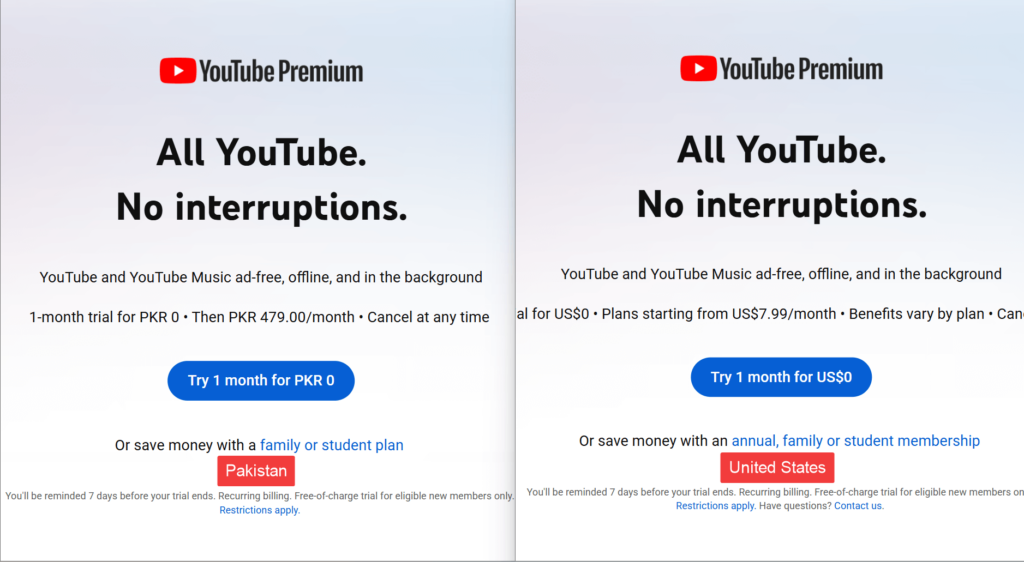
The following steps will guide you through the process:
Step 1. Get a reputable VPN
To get YouTube Premium cheaper, the first thing you need is a reliable VPN. My top choice is NordVPN, with over 8900 servers in 149 locations, offering fast speeds for smooth streaming, reliable geo-unblocking, and a strong privacy policy. Once you subscribe, download the VPN app on your device via the official website, Google Play Store, or Apple Store. Install it, log in, and create a new account.
Step 2. Connect to a server in the cheapest YouTube Premium country
To get the best deal, connect your VPN to the cheapest YouTube Premium country. As I tested several countries, Pakistan had the lowest price at $1.68/month. However, YouTube detected the region, and I saw a “This offer is not available” message. After retrying it a couple of times, it worked. India ($1.73/month) also showed the correct country code, but I couldn’t get past the same error. Nonetheless, Brazil displayed the local price of R$26.90/month, which is $4.82/month, but required a domestic card, which blocked the payment. Lastly, Kazakhstan ($5.13/month) and Algeria ($6.30/month)were the most reliable, local pricing showed up instantly, and most cards were accepted without issues. As a result, for smooth YouTube streaming, I recommend using a server in Kazakhstan or Algeria with NordVPN.
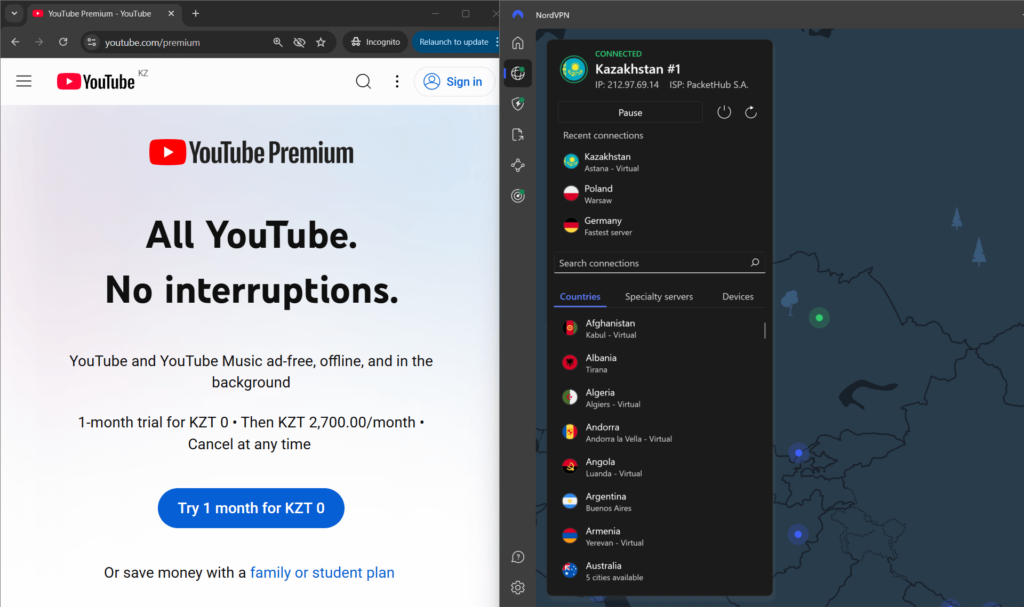
Step 3. Create new Google account
Once you’re connected to a VPN server in a cheaper country, head over to the YouTube Premium page. To avoid region mismatch errors, it’s best to create a new Google account while connected to a VPN.
This step is important because your existing Google account may store region and payment data linked to your actual location, which can interfere with showing the correct local pricing or block the subscription entirely. Keep these tips in mind when creating a new account:
- Use incognito mode or clear your browser cookies to prevent old location data from interfering.
- Make sure you are still connected to the VPN when signing up.
- If prompted, skip adding a phone number during Google account creation to avoid regional verification issues.
- Once your new account is ready, go back to the YouTube Premium page and confirm that the pricing matches the VPN country.
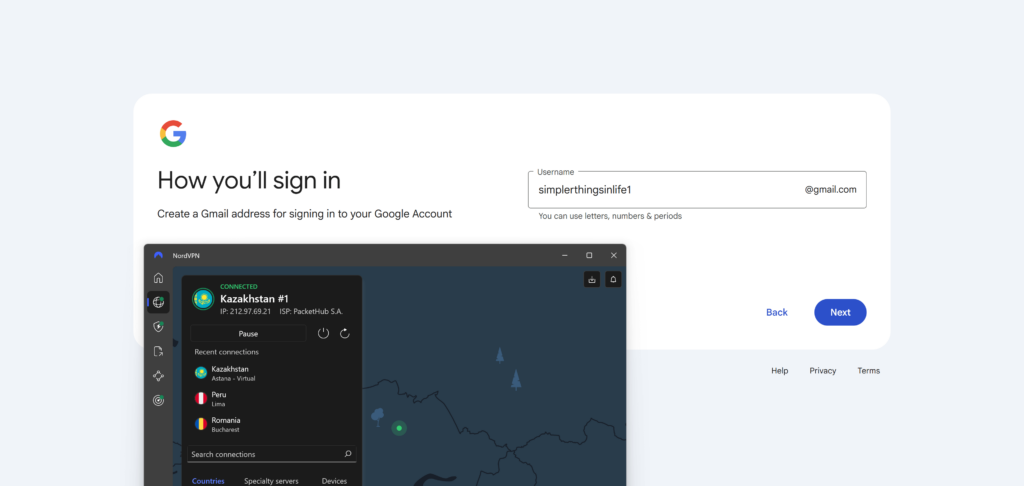
Step 4. Create a new Google Payments profile for the selected country
To subscribe to YouTube Premium at a lower price, you’ll need to create a new Google Payments profile that matches your VPN location. The steps are nearly the same for Android and iPhone; the only difference is that iPhone users typically use Safari and may need to subscribe via browser instead of the app. Here is how to do it:
- As you have already connected to a VPN and have created a Google account, open pay.google.com in a Chrome or Safari (iPhone/iPad users) browser.
- Tap Settings > Country/Region and click Create new profile.
- Select a country that matches your VPN location, such as Pakistan or Kazakhstan.
- Add a local address, for example, you can use a hotel or business address in that country (just make sure it’s properly formatted), and click Submit.
- Set this new profile as your default payment profile.
- Now, go to the YouTube app (still connected to the VPN), log in with your new Google account, and open the YouTube Premium page.
Note!
On iPhone, if you’re using the YouTube app to subscribe, you may also need to create a new Apple ID tied to the same country. Otherwise, App Store payment will be blocked. Alternatively, use Safari and subscribe via the browser.
Step 5. Select a payment method and complete the subscription
Once you see the local YouTube Premium pricing, it’s time to pay. However, many countries with the cheapest YouTube Premium plans require a local payment method, and regular international credit or debit cards are often rejected. There are a few workarounds that I recommend:
- Virtual or prepaid cards: Services like Revolut or Wise allow you to create virtual cards in different currencies. These often work if you match the card’s currency and billing info to your VPN country.
- Gift cards:
- On iPhone/iPad, you can buy App Store gift cards for your chosen country and redeem them to fund your YouTube Premium subscription.
- On Android, use Google Play gift cards in the local currency to pay without a local bank card.
PayPal or digital wallet: In some regions (like Kazakhstan), PayPal or a Revolut account linked to the correct country may also be accepted.
Important:
When prompted, enter a billing address that matches your VPN country. You don’t need a real one, just make sure the address format is valid for that location.

Best VPNs to get YouTube Premium cheaper: a detailed list
I tested over 20 VPN providers to find the cheapest country for YouTube Premium. I selected the best VPNs that consistently unlocked local pricing, maintained fast speeds, and offered reliable servers in regions such as Pakistan, Kazakhstan, and Brazil. My goal was to find VPNs that not only worked for unblocking the cheapest YouTube Premium prices but also made the entire subscription process simple across both desktop and mobile devices. After hands-on testing, NordVPN, Surfshark, and Proton VPN stood out for their ability to unlock the cheapest YouTube Premium prices reliably and securely. Let’s dive into the details of each VPN and what makes them stand out.
Top 1. NordVPN – best VPN to unlock cheapest YouTube Premium prices
- Rating: 9.3⭐⭐⭐⭐⭐
- Servers: 8900 servers in 149 countries
- Price: $ 3.49/month
NordVPN is the best VPN for accessing YouTube Premium at the cheapest price. It offers over 8900 servers in 149 countries, including budget-friendly locations such as Poland, Kazakhstan, and Algeria, where I successfully unlocked cheaper YouTube Premium subscriptions without payment issues. For instance, I connected to a server in Kazakhstan and successfully subscribed to YouTube Premium at a much lower price using my Revolut card. Additionally, I didn’t have any payment issues whatsoever, and the entire process was smooth and efficient.

During my testing, I appreciated NordVPN’s NordLynx protocol, as it delivered fast and smooth streaming speeds that made switching locations and watching content effortless. I also liked how it includes key features like a kill switch, IP and DNS leak protection, and obfuscated servers that effectively hide your real location from YouTube’s geo-blocks. Moreover, the Threat Protection feature was a big plus too, blocking trackers and malicious sites to keep my browsing private and secure. Plus, with strong 256-bit encryption and a strict no-logs policy, I felt confident my data was always safe.
NordVPN starts at $ 3.49/month with the NordVPN YouTube Premium code. You can also try it risk-free by using the 30-day money-back guarantee to see which region gives you the best deal on YouTube Premium.
For a deeper investigation of NordVPN, read our NordVPN review.
Top 2. Surfshark – affordable VPN for the lowest YouTube Premium rates
- Rating: 9.0⭐⭐⭐⭐⭐
- Servers: 4500 servers in 100 countries
- Price: $ 2.49/month
Surfshark is one of the most affordable VPNs I tested for YouTube Premium. It offers over 4500 servers in 100 countries, including the cheapest and reliable YouTube Premium countries, like Algeria, Kazakhstan, and Poland. During my testing, I successfully connected to Kazakhstan and Poland and accessed lower subscription prices. The payment went through smoothly with my Revolut card, and I didn’t encounter any regional restrictions or errors. However, I couldn’t complete the process in India, as YouTube showed an “offer not available” message despite being connected.
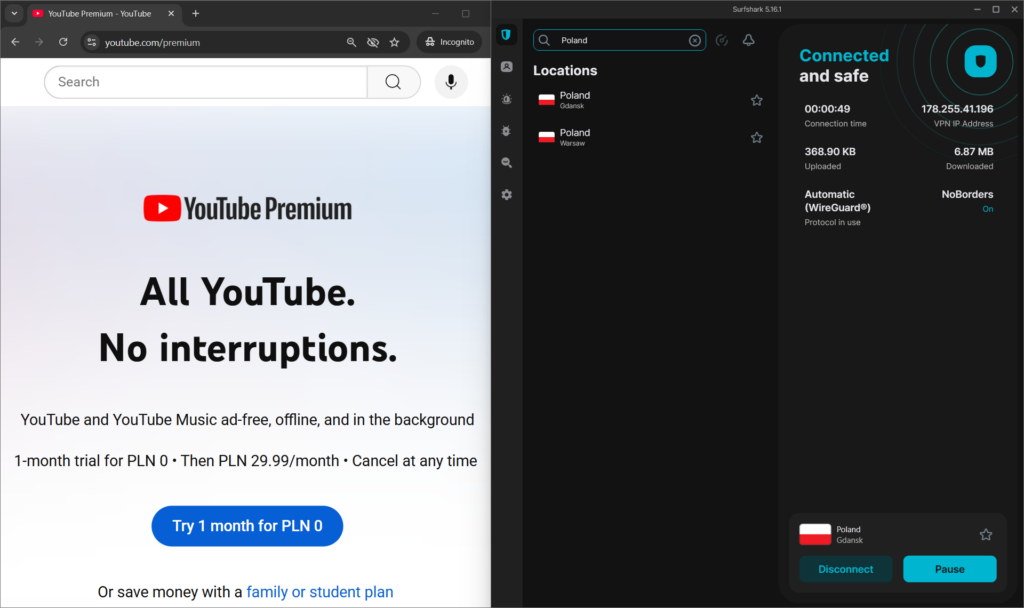
I was impressed with Surfshark’s fast speeds using WireGuard protocol. Streaming was smooth, and switching between locations took just seconds. Additionally, it includes 256-bit encryption, a kill switch, CleanWeb to block trackers and malware, and a strict no-logs policy for keeping your data safe while unblocking YouTube Premium. I also liked the Camouflage and NoBorders modes, which helped bypass strict internet censorship and VPN blocks. Using these features, you can connect to YouTube Premium at the lowest price without being detected. Moreover, my traffic was routed through two servers with the MultiHop feature for even greater privacy.
Surfshark offers YouTube Premium codes, with a monthly price starting at just $ 2.49, making it one of the best-value options. You can also try it risk-free with a 30-day money-back guarantee, or check out the 7-day free trial.
For a deeper investigation of Surfshark VPN, read our Surfshark VPN review.
Top 3. Proton VPN – free VPN option to access cheap YouTube Premium
- Rating: 8.9⭐⭐⭐⭐⭐
- Servers:
- Price: $ 2.99/month
Proton VPN is the best free VPN I tested for YouTube Premium. With Proton VPN Premium plan, you get access to over 20688 servers in 148 countries, including some of the cheapest and most reliable YouTube Premium countries, such as Kazakhstan, Algeria, and Poland. During my testing, I connected to Poland and the UK without issues and successfully saw discounted subscription prices, even though the UK has one of the highest prices. I did this to compare price differences and check how reliably Proton VPN switches between cheaper and more expensive regions without triggering errors.
Proton VPN has a free plan that includes servers in the US, the Netherlands, Romania, Japan, and Poland. However, since you can’t choose specific servers and some features are locked, YouTube might detect VPN usage and block the cheapest offer. Still, it’s a solid starting point if you want to test it before upgrading.
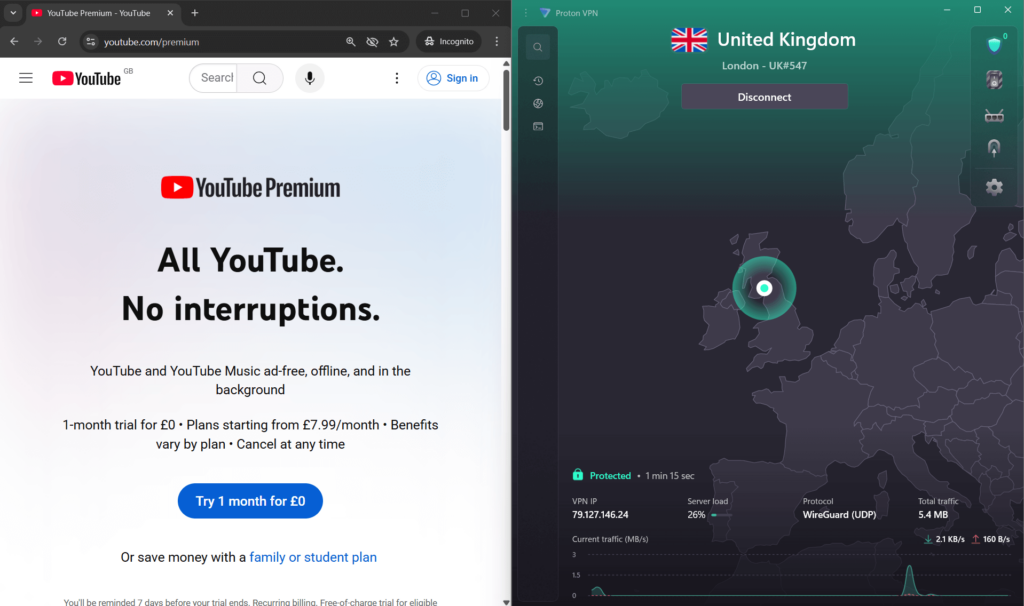
While testing, speeds were decent, especially with VPN Accelerator enabled, which improved performance while browsing and streaming. I also appreciated Proton VPN’s robust security features, including AES-256 encryption, a kill switch, DNS leak protection, and a strict no-logs policy. Its NetShield feature blocked ads and trackers, keeping my session private, while split tunneling let me use YouTube through the VPN and other apps through my normal connection.
Proton VPN’s free plan is solid, but for consistent access to the cheapest YouTube Premium country, I recommend upgrading. Proton VPN plans start at $ 2.99/month. You can also try the premium version risk-free with its 30-day money-back guarantee.
For a deeper investigation of Proton VPN, read our Proton VPN review.
Compare YouTube Premium VPNs
| YouTube Premium VPN | Rating | Servers | Servers in cheap YouTube Premium countries | Works with YouTube Premium | Monthly price | Free trial |
|---|---|---|---|---|---|---|
| 1. NordVPN | 9.3⭐⭐⭐⭐⭐ | 8900 servers in 149 locations | ✅ Yes, Czech Republic, Canada, Japan, Poland, Mexico, Serbia, Algeria, Kazakhstan, Brazil, India, Pakistan, Turkey, Romania | ✅ Yes | $ 3.49/month | ✅ Yes, 3-day free trial and 30-day money-back |
| 2. Surfshark | 9.0⭐⭐⭐⭐⭐ | 4500 servers in 100 locations | ✅ Yes, Czech Republic, Canada, Japan, Poland, Mexico, Serbia, Algeria, Kazakhstan, Brazil, India, Pakistan, Turkey, Romania | ✅ Yes | $ 2.49/month | ✅ Yes, 7-day free trial and 30-day money-back |
| 3. Proton VPN | 8.9⭐⭐⭐⭐⭐ | 20688 servers in 148 locations | ✅ Yes, Czech Republic, Canada, Japan, Poland, Mexico, Serbia, Algeria, Kazakhstan, Brazil, India, Pakistan, Turkey, Romania | ✅ Yes | $ 2.99/month | ✅ Yes, 30-day money-back |
YouTube Premium price by country
YouTube Premium prices vary widely based on your country or region. Users in countries like the United States, the United Kingdom, Australia, the Netherlands, Germany, and Canada pay some of the highest monthly rates in the world. For example, YouTube Premium prices in the US are $13.99/month for the Individual plan, $7.99/month for the Student plan, and $22.99/month for the Family plan. As you can see, even the cheapest plan in the US is relatively expensive compared to prices globally. The table below compares YouTube Premium prices, illustrating how much you can save by switching regions using a VPN:
| Youtube Premium cheapest country | Price (local currency) | Price (USD) | Works with VPN? |
|---|---|---|---|
| UK | £12.99 | $17.46 | ✅ Yes, CC, Paypal, and Paysafe are available as options. |
| Netherlands | €13.99 | $16.32 | ✅ Yes, CC, Paypal, and Paysafe are available as options. |
| Germany | €12.99 | $15.16 | ✅ Yes, CC, Paypal, Klarna, and Paysafe are available as options. |
| US | $13.99 | $13.99 | ❌No, requires domestic payment method |
| Singapore | S$16.99 | $13.25 | ✅Yes, CC and Paypal are available as options. |
| Australia | A$16.99 | $11.15 | ✅Yes, all payment methods are accepted |
| Czech Republic | CZK 209.00 | $9.89 | ✅Yes, CC, Paypal, and Paysafe are available as options. |
| Canada | CA$12.99 | $9.49 | ✅Yes, all payment methods are accepted |
| Japan | JP¥1,280 | $8.65 | ✅Yes, all payment methods are accepted |
| Poland | PLN 29.99 | $8.22 | ✅ Yes, all payment methods, including US credit cards, are accepted |
| Mexico | MX$159.00 | $8.50 | ❌No, requires domestic payment method |
| Serbia | RSD 819 | $8.16 | ✅Yes, CC is available as an option. |
| Algeria | DZD 819.00 | $6.30 | ✅Yes, CC is available as an option. |
| Kazakhstan | KZT 2,700.00 | $5.13 | ✅Yes, all payment methods are accepted |
| Brazil | R$26.90 | $4.82 | ❌No, requires domestic payment method |
| India | INR 149.00 | $1.73 | ❌No, requires domestic payment method and offer was not available |
| Pakistan | PKR 479.00 | $1.68 | ❌Yes, works with US payment methods, but offer was not available |
*Updated in July, 2025
While some countries consistently offer the cheapest YouTube Premium prices, payment issues and increasing geo-restrictions can make it hard to subscribe. For example, India and Turkey used to be top choices due to their incredibly low rates. However, during my recent tests, both regions showed major limitations. Although I could access the localized YouTube Premium pages and saw the correct country code next to the logo, I consistently ran into a “This offer is not available” message, likely due to strict geo-blocking.
Brazil also offers a relatively low YouTube Premium price at around $4.82/month, but it’s almost impossible to subscribe unless you have a local Brazilian payment method. On the other hand, some countries, such as Algeria, offered credit card options, and I was able to subscribe without any problems.
Pakistan is one of the cheapest options at PKR 479/month (around $1.68). During my testing with NordVPN, I accessed the Pakistani version of YouTube and viewed local content. However, when opening the Premium sign-up page, I saw the same message as in Turkey: “This offer is not available.” Although regular video playback with ads worked just fine.
For the most reliable results, I recommend Poland and Kazakhstan. I successfully signed up for YouTube Premium in both regions using NordVPN. Kazakhstan, in particular, stands out for accepting international payment methods without a local card, making it one of the easiest and most affordable options available today.
YouTube Premium Family subscription price by country
YouTube Premium Family Plan lets you share ad-free videos, background playback, and YouTube Music with up to five people. However, if you pay from countries like the US, UK, or Australia, you may spend far more than $22.99/month, which is the US rate. For example, the highest price is in Singapore, S$39.99, around $31.19/month, and in the Netherlands, €25.99/month, around $30.32/month.
During my testing, I connected to the cheapest countries with a VPN to compare Family Plan prices. There was a striking difference; some countries charged less than a quarter of the US rate. Many also accept international credit cards, making it easy to subscribe without a local payment method. The best value came from Kazakhstan, Algeria, and Poland. I used NordVPN to connect to Kazakhstan and subscribed to the Family Plan for just ₸5,000/month ($9.50), with no local card needed. Algeria offered the plan for DZD 1,549/month ($11.92), and Poland offered 59.99 zł/month (~$16.45).
Unfortunately, some countries, such as India, offer the cheapest rates (INR 299/month or approximately $3.48), but most foreign cards are blocked, so unless you have an Indian payment setup, it is not a doable option.
Here is a breakdown of YouTube Premium Family Plan prices by country:
| Youtube Premium cheapest country | Price (local currency) | Price (USD) | Works with VPN? |
|---|---|---|---|
| Singapore | S$39.99 | $31.19 | ✅Yes, CC and Paypal are available as options. |
| Netherlands | €25.99 | $30.32 | ✅ Yes, CC, Paypal, and Paysafe are available as options. |
| Germany | €23.99 | $27.99 | ✅ Yes, CC, Paypal, Klarna, and Paysafe are available as options. |
| UK | £19.99 | $26.88 | ✅ Yes, CC, Paypal, and Paysafe are available as options. |
| Australia | A$39.99 | $26.24 | ✅Yes, all payment methods are accepted |
| US | $22.99 | $22.99 | ❌No, requires domestic payment method |
| Czech Republic | CZK 389.00 | $18.40 | ✅Yes, CC, Paypal, and Paysafe are available as options. |
| Mexico | MX$319.00 | $17.06 | ❌No, requires domestic payment method |
| Canada | CA$22.99 | $16.79 | ✅Yes, all payment methods are accepted |
| Poland | PLN 59.99 | $16.45 | ✅ Yes, all payment methods, including US credit cards, are accepted |
| Serbia | RSD 1,639 | $16.33 | ✅Yes, CC is available as an option. |
| Japan | JP¥2,280 | $15.41 | ✅Yes, all payment methods are accepted |
| Algeria | DZD 1,549.00 | $11.92 | ✅Yes, CC is available as an option. |
| Brazil | R$53.90 | $9.65 | ❌No, requires domestic payment method |
| Kazakhstan | KZT 5,000.00 | $9.50 | ✅Yes, all payment methods are accepted |
| India | INR 299.00 | $3.48 | ❌No, requires domestic payment method and offer was not available |
| Pakistan | PKR 899.00 | $3.16 | ❌Yes, works with US payment methods, but offer was not available |
*Updated in July, 2025
To unlock the YouTube Premium Family Plan from a cheaper country, start by using a reliable VPN. Using a mobile device rather than a desktop makes setup easier, as phones allow more control over GPS and account region settings, which reduces the likelihood of detection. First, connect your VPN to a server located in a low-cost country such as Kazakhstan, Poland, or Algeria. After that, you should clear the YouTube app’s cache and data so that it can update your new location. If you’re on Android, using a GPS spoofing app can help match your physical location to your VPN server, reinforcing the illusion of being in that country. Once the app detects the new region and displays local currency prices, begin the sign-up process.
In some countries, such as India or Brazil, Google may require a local payment method, which can be a challenge. To work around this, consider switching to a country like Kazakhstan, where international cards still work more consistently. If you’re using an iPhone, create a new Apple ID set to the desired country, then top it up using local gift cards. On Android, you can switch your Google Play region, although note that this change may take up to 48 hours to complete. Then, add a payment method that matches your new location.
To avoid detection, it is important to keep your region settings consistent and access YouTube primarily from your mobile device. Avoid switching VPN servers or countries after subscribing, and do not log in from your real location too soon, as this could trigger a region mismatch alert. It is also wise to wait a few days before adding any family members to the plan; doing so too early, especially from different regions, may raise red flags. Make sure the virtual card or payment service you use is accepted in your chosen country, and keep using it for YT plan renewals.
That said, there are still some risks. If Google detects a mismatch between your account location and payment information, it might cancel your subscription without notice. In such cases, you’re unlikely to get a refund, especially if they determine that you’ve violated regional pricing policies. Losing your subscription means losing access to all premium features, including ad-free viewing, offline downloads, and background playback.
To minimize these risks, keep using the same device and region consistently after signing up. Don’t rush to add family members, as any inconsistency across user locations can raise red flags. Keep your VPN active whenever you use YouTube, especially during the first few weeks, to avoid triggering any location checks.
Final tips for using a VPN to get a cheaper YouTube Premium subscription
Securing a cheaper YouTube Premium subscription via a VPN is still a practical option, but it requires careful steps. Based on my testing, the key is choosing a reliable VPN and understanding payment nuances.
Always opt for a premium VPN, such as NordVPN, which boasts a vast server network in countries with low prices and robust unblocking capabilities. Moreover, the cheapest countries for individual and family plans are currently Kazakhstan, Algeria, and Poland.
When I tested different setups, I found that mobile browsers worked more reliably than desktop or the YouTube app. This is because mobile devices can store location data, such as GPS and network information, which helps avoid triggering Google’s region mismatch system. If you switch countries too suddenly or use desktop browsers without consistent location signals, your subscription might fail or get flagged. For payment, keep in mind that some of the cheapest countries for YouTube Premium reject international credit cards. For example, I had better results using virtual or local gift cards. The best part about saving on YouTube Premium is that NordVPN’s 30-day money-back guarantee lets you try everything risk-free.
More ways to save online:
How to use a VPN for cheaper flights
How to buy cheap TikTok coins
How to get Netflix subscription cheaper
How to get Spotify Premium cheaper
FAQ
YouTube Premium in India costs ₹129 per month, which is around $1.55/month. However, during my recent testing, simply connecting to an Indian VPN server and subscribing resulted in a “This offer is not available” message. This means that while the prices are indeed very low, YouTube has implemented strict measures to prevent subscriptions with non-Indian payment methods. With a VPN like NordVPN, which has strong unblocking capabilities, it was not possible to unblock the content.
YouTube Premium in Turkey is priced at just ₺57.99 per month, which is roughly $1.78/month. During my tests using NordVPN, I connected to a Turkish server and saw YouTube’s regional version, including local content. But when I tried to view the Premium subscription option, I consistently received the same message stating that the ‘offer is not available.’ There’s likely a geo-blocking restriction and limited foreign payment methods.
YouTube Premium prices vary by country due to regional pricing strategies, local economic conditions, and market demand. Google adjusts subscription fees to stay competitive and affordable based on each country’s average income level and currency value. That’s why you’ll find much lower prices in countries like Pakistan, India, or Turkey than in the US or the UK. Luckily, using a VPN like NordVPN can help you save on these cheaper options by connecting to a server in a low-cost country.
Yes, using a VPN to get cheaper YouTube Premium still works. YouTube, like many streaming services, uses geo-blocking technologies and is becoming more sophisticated at detecting VPN usage and preventing non-local payments. However, I recommend NordVPN as it is the best to bypass these restrictions and keep you secure and anonymous.
First, you’ll need to choose a reliable VPN provider with servers in countries offering cheaper YouTube Premium prices. I recommend NordVPN due to its extensive network and consistent unblocking ability. Once connected to a server in a low-cost region like Poland or Kazakhstan, it’s often best to create a new Google account while your VPN is active to ensure proper regional detection. Finally, visit the YouTube Premium subscription page to view local, discounted prices. Some countries require local payment methods, which can be bypassed by using virtual cards or region-specific gift cards.
According to my latest research, Pakistan offers the cheapest YouTube Premium subscription, costing just PKR 479/month, which is approximately $1.68 USD. While this is an incredible deal, accessing the offer can be tricky due to YouTube’s strict geo-blocking and payment restrictions. In this case, I recommend connecting to Kazakhstan and Poland, which are reliable options. The best VPN for YouTube Premium is NordVPN, as it allows you to switch regions and has fast, stable connections.
Yes, you can subscribe to YouTube Premium in a cheaper country using a VPN, and then continue using your account from anywhere in the world. For example, if you set your location to Kazakhstan or Poland with NordVPN, complete the subscription using a credit card that works internationally, and then switch back to your original location, your Premium benefits will still apply globally.
No, you will not get banned for using a VPN to buy YouTube Premium. YouTube’s terms don’t explicitly forbid the use of a VPN, and millions of people use one for privacy, security, and to access different regional content. That said, Google may flag a payment or location mismatch, which could lead to a failed transaction, but it does not result in a ban.




can I still use google pay with this method? I don't think you can use fake phone number for google pay, then this method cannot combine with google pay? thanks.
Hi Thomas! During a previous testing round, we were able to create a US-based Google account from abroad using a phone number service. Times change, however, so we'll look into testing this again in the near future. We'll update our article after.
any update? the above no longer works for Argentina
Hi Don! We recently retested the entire process, and it did work for us when trying to use a Turkish VPN server, to get the prices in Turkey. Let us know if that works for you (we've updated the article above so you can simply follow the steps in there again) and, if not, feel free to reach out to tell us what exact problem you're facing. Good luck!
Great Info. Thank You. How does one bypass the Can't verify your country?
We are currently looking into this and running some tests. We will update our article with the latest information as soon as possible!
I had heard of this hack before, never got around to trying it.. and then, sat with my son, saw the long adverts that he had to sit through.
With VPN, and an using a random address in Argentina (found a restaurant from Google maps) was able to sign-up despite using my UK Mastercard - usual bank confirmation processes, but didn't get any problems, although it's certainly a UK card, not Argentina.
Hi Karl! We're glad this method worked for you! It's not a guaranteed method at the moment, due to the restrictions, but sometimes you might get lucky. :)
I don’t know why mine is not working. I
already tried to use VPN to do the
subscription but it is still not working!
The system denied me! It still saying because I’m in a different country so I can’t join this family plan…
Hi Marco! Unfortunately, many people (including ourselves) have been experiencing these issues since YouTube Premium updated their credit card approval process. We're looking for a new solution, but that might take some time. Bear with us!
The payment screen is the issue with this, it gets denied every time. I've tried clearing my cache, using Chrome, Firefox, Safari, and my mobile browser. I've tried multiple Visas and Mastercards, a crypto card, manipulating the addresses, Argnetina, India, Turkey, and just about everything else I can think of and it gets denied on the payment screen every time.
We're sorry to hear it still isn't working after all the effort you put into it. It appears YouTube has changed its subscription process. We're going to run our own tests and update the article accordingly. If there is a way around this, you'll be able to read it here soon!
Didn't work for me.
Set up family group.
Used this method.
Get an error message that I have to contact Google.
That's very unfortunate! It appears that something has changed on YouTube's side since the last time we tested this. We're going to dive into it and update the article with a (hopefully) working method soon.
Do i have to keep running the VPN or once the youtube premium is bought i can use it in any country with no issues.?
Once you've got it, you can use it anywhere, although it won't always work the same way. If you're in a country where Premium isn't available (yet) YouTube Premium might show some ads and you might not be allowed to download videos. If this happens, turning on the VPN and refreshing the page should help. In any of the many countries where YouTube Premium is available, you won't have any issues and can just use Premium as you would with the VPN on.