- How to change Netflix location with a VPN
- Why Netflix libraries differ by country
-
How to change Netflix region with a VPN: step-by-step guide
- Step 1. Subscribe to a trusted VPN service with servers in your target Netflix region
- Step 2. Download and install the VPN app on your streaming device
- Step 3. Connect to a VPN server located in the Netflix region you want to access
- Step 4. Open Netflix and start streaming content from the new region’s library
- Netflix region not changing with a VPN: how to fix it
- Our recommended VPNs to change Netflix region
- How to change Netflix region without a VPN
- Netflix library size by country
- Final tips for changing Netflix region in 2026
- FAQ
Netflix libraries differ between countries because licensing agreements determine what content can be shown within each country. For example, “The Office UK” isn’t available on US Netflix even though you can watch it on Netflix UK, Canada, and in some parts of the EU. BritBox, Hulu, and Peacock currently hold the rights to this show in the US.
However, a VPN can change your Netflix region in seconds and let you watch foreign Netflix content libraries. All you need to do is choose a reliable streaming VPN, download and install the software, and connect to a VPN server to change your IP address and thus your Netflix region.
While this is not a new strategy, not all VPNs can unblock different Netflix libraries. Even some of the best-rated VPN services can struggle. That’s why I tested the best VPNs and methods to change Netflix regions in 2026. I compared 25 streaming VPNs to find which services let you change your Netflix region most effectively in 2026 while offering powerful streaming speeds. Keep reading for a shortlist and more information.
NordVPN effortlessly unblocks Netflix regions in all parts of the world with a fleet of 8900 VPN servers. This network allowed me to access Netflix US, Netflix UK, and Netflix Japan during my in-house tests. In speed benchmarking with Ookla Speedtest, I averaged 468 Mbps streaming speeds across 10 international VPN servers, assuring me that NordVPN has the power needed to support high-speed HD and 4K streaming without lag.

NordVPN comes with a 3-day free trial for Android users who download the official app from the Google Play Store. However, you can get a 30-day money-back guarantee on any operating system, giving you time to try and unblock different Netflix regions yourself.
How to change Netflix location with a VPN
In 2026, the most effective way to change your Netflix region is using a VPN. Netflix limits content availability in all regions to protect its broadcasting agreements, and using a VPN is the only way to securely and effectively change your digital location without losing speed.
You can alternatively try to change your Netflix country using proxy servers, Smart DNS services, or remote desktop connections, but these approaches are usually unreliable for streaming. They typically lack encryption, are easily detected and blocked, and can be too slow for HD streaming.
This makes using a streaming VPN the best option because it offers powerful encryption, obfuscation for bypassing VPN detection software, and the fastest available speeds. I recommend changing your Netflix region with a VPN to avoid these drawbacks and stream content without lag or blockades.
- Choose a VPN. I recommend NordVPN that easily unblocks all Netflix regions.
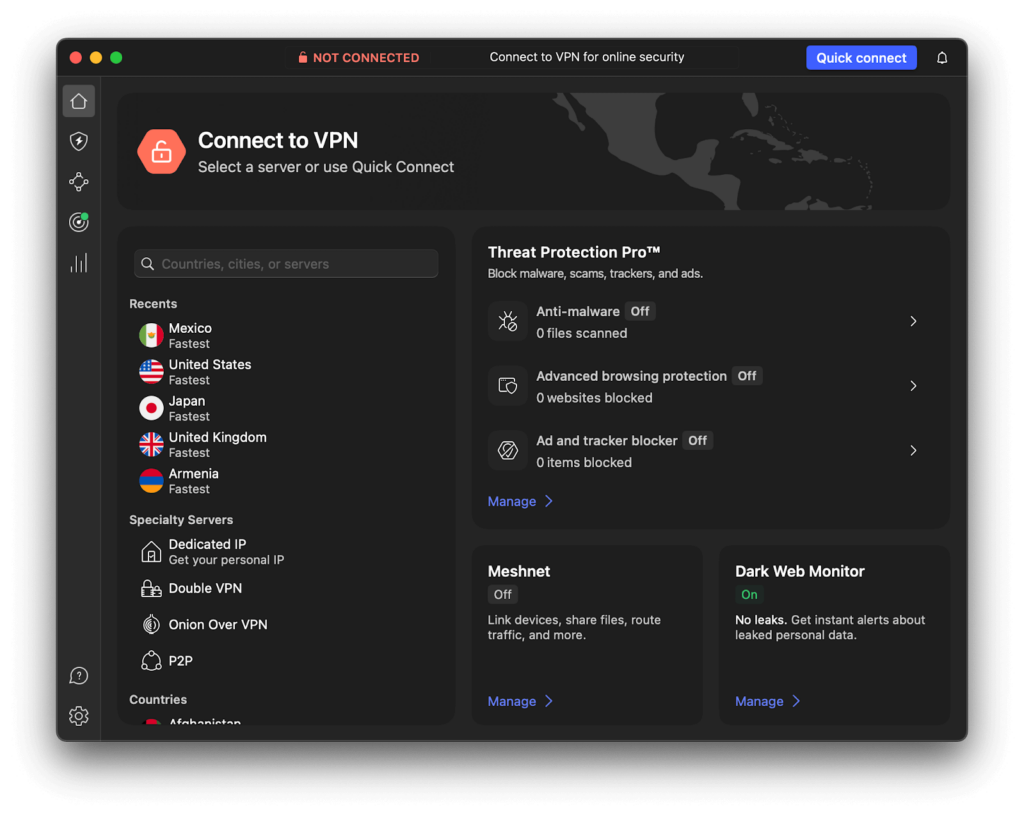
- Download and install the VPN software on your preferred streaming device.
- Connect to a server in another region with a Netflix library you want to unblock.
- Go to Netflix in a new browsing session.
- Enjoy streaming Netflix US, UK, Japan or any other library with your VPN.
Why Netflix libraries differ by country
Netflix libraries vary by country due to licensing agreements, copyright laws, and regional preferences among Netflix users. Netflix doesn’t own all the content it streams, except for shows like Netflix Originals. Many TV shows and movies are licensed from third-party production studios and broadcasters, and those rights are often sold on a per-country basis. In other words, Netflix may have the legal right to stream a show or movie in one country, but not another.
To make sure that they follow the rules, Netflix uses IP-based geo-blocking to work out your location and show you the right content library. According to Netflix’s official help page, “the TV shows and movies that are available to stream may vary by region, and may change over time.”

For example, US Netflix includes content like The Lincoln Lawyer, while UK Netflix has Line of Duty, a UK-based police series that wouldn’t likely be popular in the US. Each title was likely chosen not just based on licensing agreements, but on audience demand. This is why users choose to use a Netflix VPN to change their region and watch new content.
Is it legal to change your Netflix region?
Yes, using a VPN itself is legal in most countries, including the US, and you can technically use it to change your Netflix region. However, it goes against Netflix’s Terms of Use that ban the use of VPNs to bypass content restrictions. Ignoring these terms of use and using a VPN could technically cause problems with your account, but Netflix has never banned a user for using a VPN. Instead, they choose to block VPN IP addresses that they have identified.
In short, while using a VPN to change your Netflix region isn’t illegal and shouldn’t result in a ban, it could fail to work if your VPN server is detected. This is why it’s crucial to use a reliable VPN with strong anonymity and privacy features like NordVPN.
How to change Netflix region with a VPN: step-by-step guide
During in-house tests with 25+ VPNs to change Netflix libraries, I often encountered issues such as VPN services being unable to unblock Netflix, or speeds being too slow to stream. To successfully change your Netflix region, you need to know a few tips that can improve your chance of remaining undetected. For example, choosing an obfuscated server or dedicated streaming server, enabling your kill switch and regularly clearing your browser’s cache. As not all VPNs offer these features, some were discounted, and NordVPN’s cheapest plan (Standard) excelled in unblocking Netflix from any region with the top speeds.
Step 1. Subscribe to a trusted VPN service with servers in your target Netflix region
To successfully change your Netflix country, you should choose a VPN with obfuscated servers, leak protection, and high-speed connections. According to my tests, in 2026, NordVPN is the most reliable VPN for unblocking Netflix libraries as it easily bypasses geo-restrictions, has fast speeds, and supports streaming on all major operating systems.
My favorite part about NordVPN was its dedicated streaming servers and how quickly it loaded HD content on a 468 Mbps connection.
| Netflix country | NordVPN servers | Works with Netflix? |
|---|---|---|
| United States | 2799+ servers in 22 US cities | ✅ Yes, fully unblocked |
| United Kingdom | 440+ servers in 4 UK cities | ✅ Yes, fully unblocked |
| Canada | 30300+ servers in 3 Canadian cities | ✅ Yes, fully unblocked |
| Japan | 13130+ servers in 2 Japanese cities | ✅ Yes, fully unblocked |
| Philippines | Undisclosed number of servers in 1 Philippine city | ⚠️ Limited, some servers |
| Thailand | Undisclosed number of servers in 1 Thai city | ⚠️ Limited, some servers |
| Vietnam | Undisclosed number of servers in 2 Vietnamese cities | ❌ No, not reliably |
| India | UnUndisclosed number of servers in 1 Indian city | ✅ Yes, fully unblocked |
| Brazil | 220+ servers in 1 Brazilian city | ✅ Yes, fully unblocked |
| South Korea | 10+ servers in 1 South Korean city | ⚠️ Limited, some servers |
Step 2. Download and install the VPN app on your streaming device
Now, you’ll need to download and install the VPN on the device you want to use for streaming Netflix content. If you download the official app from the Google Play Store or Apple App Store for mobile devices and tablets, NordVPN can be set up in seconds. Crucially, you won’t need a GPS-spoofing app to unblock Netflix in other regions.
On Windows and Mac, install your VPN and then clear your browser’s cache and cookies before you change Netflix regions. This stops Netflix from detecting old login cookies and detecting your true location.
If you’re using a PS5 or Xbox to stream Netflix, unfortunately there’s no native VPN app for either console. Instead, choose a VPN that can be installed on your router, which will protect all connected devices. I suggest choosing NordVPN thanks to broad router support and setup guides to help you get started.
Finally, other devices like Firestick, Roku, and many Smart TVs lack dedicated VPN applications. In these situations, you can either install the VPN on your router if it’s an internet-connected TV, or you can use Smart DNS – this feature comes bundled with NordVPN.
Whichever method you choose, NordVPN offers simple setup options for nearly every streaming device, allowing you to change your Netflix region and enjoy content globally.
Step 3. Connect to a VPN server located in the Netflix region you want to access
To unblock your chosen Netflix library, you’ll need a VPN that has more than one server located in that country. If there’s only one server, you’ll face issues with congestion as hundreds or thousands of users connect to the same IP address. NordVPN has 8900 VPN servers and can easily unblock any Netflix library without congestion issues.
In my tests, NordVPN unblocked Netflix US, UK, Canada, Japan, India, and Brazil without lag issues and without being detected. These regions have lots of high-speed servers, making it quick to switch IPs if needed. But Netflix libraries in countries like Vietnam and the Philippines were less reliable. Many VPNs have similar problems in regions like these due to strict telecom laws or a lack of infrastructure.
Before connecting, I recommend clearing your cache and cookies, then choosing a NordVPN obfuscated server and enabling your kill switch for the best chances. This will help give you the best chance of accessing any Netflix region around the world.
Step 4. Open Netflix and start streaming content from the new region’s library
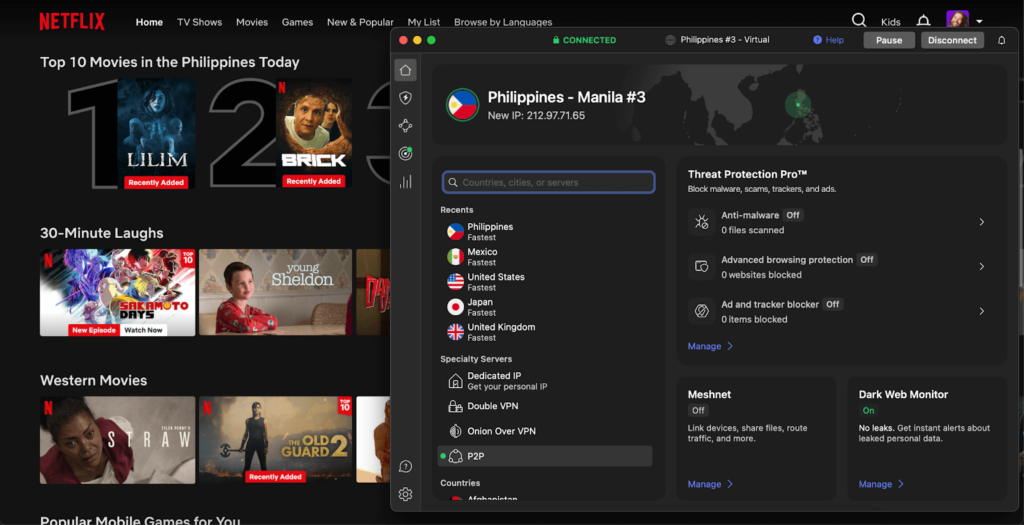
Now, you can open Netflix and start enjoying international content from abroad. In my tests with NordVPN, I was able to stream The Office (US) from the UK, watch Demon Slayer on Japanese Netflix, and unblock Better Call Saul on Canadian Netflix in HD with no lag or buffering problems. To ensure you don’t have issues with access, double-check you’re connected to the correct country before each session.
Note:
Changing your Netflix region will often affect available subtitle and audio options. This is the result of licensing agreements and regional availability. For example, a show in Japan may default to Japanese audio with limited or no English subtitles. A range of major titles offer multi-language support, but it’s not guaranteed in all regions.
That said, exploring other Netflix regions is a great way to unlock hidden gems, regional exclusives, and early releases not available in your country.
Netflix region not changing with a VPN: how to fix it
If you can’t change your Netflix reason with a VPN, even after you’ve connected to a server, there should be an easy fix. While Netflix uses powerful anti-VPN measures, it’s likely that your problem is due to a simple issue that can be resolved quickly, like browser or app caching, IP leaks, or connecting to a blacklisted server. Here are some fixes you can try:
- Try connecting to a different VPN server in your chosen country in case your current server has been blacklisted or is congested.
- Clear your browser cookies and cache to purge old location data, then try closing and reopening the Netflix app to reset your data.
- Use obfuscated or dedicated streaming servers for streaming-optimized anti-VPN settings and the best chance of success.
- Disable IPv6 on your device to reduce the risk of IP leaks. Then check for IP, DNS, and WebRTC leaks to ensure your VPN connection is fully protecting your real location.
- Use a private browser window or try opening Netflix in a different browser or on another device with your VPN active.
- Contact your VPN’s customer support if all else fails, as they can usually resolve issues very quickly.
Our recommended VPNs to change Netflix region
-
1.NordVPN: best VPN for changing and accessing any Netflix country. NordVPN has a vast server network with 8900 servers worldwide, easily unblocks major Netflix regions, and offers the fastest VPN streaming speeds with obfuscated servers for bypassing blocks.
-
2.Surfshark: budget-friendly VPN for easy Netflix location switching. Enjoy unlimited simultaneous connections for Netflix on all devices, with fast streaming performance in the US, UK, and Asia, plus built-in Smart DNS for devices without native apps.
-
3.Proton VPN: privacy-focused VPN that unblocks Netflix regions. Proton VPN offers an airtight no-logs policy, Secure Core servers for robust privacy, and easily unblocks Netflix in the US, UK, and numerous European regions.
How to change Netflix region without a VPN
Using a VPN server to change your Netflix region is the most reliable solution, but there are other options you can try to change your Netflix region without a VPN, including Smart DNS features, proxy servers, and remote desktop connections. Here’s an overview:
- Smart DNS: These features can modify your device’s DNS requests, making it look like you’re located in another country. However, they lack encryption and other security features, and many Smart DNS services have very limited locations to choose from, which limits your Netflix region choice.
- Proxy servers: Proxies can change your IP address and Netflix region, but they don’t offer encryption to protect your anonymity and privacy. What’s more, they’re often overcrowded and slower than VPNs in general, resulting in streaming lag. Most publicly-available, free proxy servers will have been blocked by Netflix too.
- Remote desktop connections: This involves connecting remotely to a computer back at home or in another location to change your Netflix region from abroad. But these services can be expensive or involve complicated setup, especially when compared to a simple VPN service.
These are all reasons why I recommend using a VPN to change your Netflix region in just a few minutes, with no complicated setup required. You’ll have full protection for your data while avoiding slow, laggy streams.
Netflix library size by country
Netflix first launched in the US and operated for around ten years, before expanding to Canada in 2010. Things picked up from here with a broad expansion into other countries halfway through the decade, and you can now access Netflix in almost every country around the world except a select few that have a high degree of internet censorship, such as China, Russia, and North Korea. However, despite its global reach, Netflix’s library varies widely based on your region.
Slovakia has the largest Netflix catalog in the world with around 8,500 shows and movies, followed by the United Kingdom, the Philippines, and Australia.
| Country | Netflix library size |
|---|---|
| 1. Slovakia | 8,427 |
| 2. United Kingdom | 7,580 |
| 3. Philippines | 7,200 |
| 4. Australia | 6,940 |
| 5. United States | 6,750 |
| 6. India | 6,570 |
| 7. Brazil | 6,430 |
| 8. South Africa | 6,270 |
| 9. Spain | 6,180 |
| 10. Turkey | 5,900 |
*Netflix library size = approximate titles based on information provided in data aggregated by uNoGS (unogs.com) and cross-referenced with recent testing and regional availability.
Final tips for changing Netflix region in 2026
To change your Netflix region in 2026, choose a reliable VPN for streaming that has a wide range of servers in your preferred region. This helps to ensure you maintain fast streaming speeds and can avoid servers that have potentially been identified and blocked by Netflix. Be careful which VPN you choose, as some can’t bypass Netflix’s geo-blocks. During my in-house tests, NordVPN performed best, thanks to a network of 8900 worldwide servers and the fastest streaming speeds available.
Before getting started, clear your browser’s cache and cookies so that Netflix can’t recognize the location you’ve used previously. Then, connect to your chosen VPN server to hide your IP address and change your Netflix region. If you notice any buffering issues, try another server since busy periods can result in congestion. Additionally, make sure to install any VPN updates as they become available since Netflix has a strong anti-VPN stance and continually works to block known VPN connections.
Related articles:
- Best free VPNs for Netflix
- How to get Netflix for cheaper
- How to trick YouTube TV location
- How to watch TSN in the US
- How to watch Hulu outside the US
- How to watch Love Island UK in the US
- How to watch Australian Survivor in the US
FAQ
Yes, you can use your Netflix account overseas, but you’ll see a different content library based on the region you’re in. If you want to access the same shows you see at home, I recommend changing your IP address with a VPN to match your home country. I used NordVPN to change my region while in Spain and could access all the same TV series and movies I watch at home in full HD with no lag.
Netflix detects your location using your device IP address, device ID, and login activity so that it can show you region-appropriate content. However, you can change your Netflix region using a VPN. Connecting to a VPN server changes your IP address so that you can access new content libraries by appearing as if you’re located in a different country.
Yes, somebody in a different country can use your Netflix account legally, as account sharing doesn’t break the law. However, Netflix’s terms of service forbid account sharing unless that person is in the same household as you. While you’re very unlikely to be banned, you could be charged extra if they detect a second person using the account elsewhere. I recommend that they use a reliable streaming VPN like NordVPN to ensure their IP address is at least in the same country as yours.
To watch Nigeria Netflix in the US, download a reliable streaming VPN, install it on your device and log in, then connect to a VPN server in Nigeria. I recommend choosing NordVPN, which easily changed my Netflix region during in-house tests and offers the best HD and 4K streaming speeds for uninterrupted viewing.
To change your Netflix region on an iPhone, get a reliable VPN app from the App Store or Google Play Store, install the app, then connect to a VPN server in a different Netflix region. This will change your IP address and result in you seeing a new Netflix catalogue corresponding to the country you’ve connected to. I recommend using NordVPN, which offers a 3-day free trial for Android devices and a 30-day money-back guarantee for all platforms.
To change your Netflix region on a smart TV, you will need to choose a reliable VPN provider like NordVPN, download and install the software from the TV’s app store, and connect to a VPN server in the region you’d like to switch to. Netflix determines your region with your IP address, but a VPN changes your IP address when you connect to a server. Otherwise, you can use a VPN-compatible streaming device such as an Amazon Fire Stick or Roku