A virtual private network (VPN) unblocks different sites, allows you to torrent safely, and helps you stay anonymous online. In other words, a VPN is a powerful tool to increase your online privacy. But which VPN is the best?
It can be difficult to find a great VPN service. Each VPN provider has different features, and it takes quite a while to assess them all. Moreover, some VPNs don’t live up to their promises and end up being unreliable, slow, or vulnerable to threats.
I’ve done the heavy lifting and separated the wheat from the chaff. Through frequent and rigorous testing, I found the best VPNs on the market.
This line-up of the best VPNs is frequently updated to ensure recent developments in the digital landscape are taken into account. At the beginning of 2026, I welcomed a new VPN in my top 5. Read on to discover more about this new challenger.
Best VPNs for 2026 – A New VPN Enters the Top 5
The VPNs listed below will hide your internet traffic and real IP address, unblock international content, and keep you safe online. They also offer the best encryption protocols and have apps for all major operating systems.
At the beginning of 2026, I changed the line-up for the best VPN services based on new testing results. Proton VPN has entered the top 5 as the best VPN for privacy! This open source and non-profit VPN offers supreme security and many additional features.
I’ll start with a quick overview of the line-up. Keep reading for all the details!
I’m convinced you’ll be able to find a VPN that fits your specific needs — whether that’s streaming content from different parts of the world, downloading torrents safely, or optimizing your online security on a budget.
The Best VPNs for 2026
I have tested 70+ VPN by looking at security & privacy features, user-friendliness, streaming abilities and other use cases, such as torrenting and online shopping. The VPNs listed below are the best VPNs for 2026!
1. NordVPN: The Best VPN of 2026
NordVPN
9.3
Pros
Fastest VPN in my tests
Exclusive and secure NordLynx protocol
Useful Meshnet feature to create your own network
Top-notch security and privacy features
Above average amount of simultaneous connections (10)
Threat Protection blocks malware and trackers
Cons
First-time login requires a browser
Occasional CAPTCA check while browsing
Dedicated IP service is expensive
Why Nord deserves the #1 position
NordVPN is a renowned VPN provider with an extensive global server network (8900 servers in 149 countries), military-grade encryption (AES 256), and competitive pricing.
I continue to be impressed by NordVPN’s performance. It offers everything you may require from a premium VPN but goes above and beyond with unique features, such as Threat Protection, Meshnet, dark web monitoring, and P2P servers. Moreover, NordVPN continues to expand its services with additional security products available as add-ons.
NordVPN also manages to stay ahead in speed tests, despite its growing number of subscribers. Streaming, browsing, torrenting or online gaming — NordVPN easily comes out on top every single time I put it through my rigorous testing circuit.
NordVPN in action: streaming, torrenting & online shopping
One NordVPN account secures up to ten devices at the same time. That’s enough to fully secure the phones and laptops of a family of five. NordVPN offers native apps for Windows, Android, Mac, iOS, and Linux, smart TVs, and consoles. It also has browser extensions for popular browsers.
With NordVPN you can unblock Netflix, Hulu, BBC iPlayer, HBO Max, and many other services. I frequently use NordVPN’s international servers to stream my favorite shows. I test NordVPN’s unblocking skills monthly and the VPN never disappoints us.
It hides my real IP address perfectly, as evidenced by IPleak at various points. NordVPN also allows you to torrent anonymously through dedicated P2P servers. Thanks to its excellent speeds, you’ll get your favorite content in no time. I was able to download 50+ GB files without worrying about ISP throttling.
For day-to-day privacy NordVPN is your best choice. While browsing, I didn’t notice any difference in internet speeds. In particular, NordVPN’s Threat Protection (Pro) tool, which blocks ads and trackers, is a great plus! It allows you to shop online without being smothered with ads afterwards.
Privacy & security
In 2024, NordVPN passed its latest security audit with Deloitte, one of the top independent auditors in the world, to back up its no-logs claim. As expected, your data is completely safe with NordVPN! RAM-only servers ensure no data can be stored at all.
Besides the standard VPN protocols, NordVPN also offers a proprietary protocol built on WireGuard, known as NordLynx, which is faster than OpenVPN. The latest protocol in development is NordWhisper, which is specifically designed to get past Netflix blocks and other streaming restrictions.
Moreover, NordVPN has a lot of advanced security features to offer, including:
Obfuscated servers: Hide VPN usage, great for bypassing censorship.
Double VPN: Routes your internet traffic through two VPN servers to encrypt it twice.
Advanced kill switch: Lets you specify which apps to block if your VPN connection drops.
Dark Web Monitoring: Scans the dark web for leaks associated with your email address.
In short, you can trust that NordVPN doesn’t just keep you online activity private, it also offers the right tools for each use case.
Speed and server network
NordVPN is the fastest VPN I’ve tested. I could easily maintain up to 96% of my original speed on servers nearby. On distant servers, NordVPN managed to keep up to 92% of the connection speed. With the lightweight NordLynx protocol, you won’t even notice you are using a VPN.
This makes NordVPN a great choice for streaming and torrenting without hiccups. Due to the low ping on nearby servers, NordVPN is excellent for multiplayer games like Call of Duty as well.
With 8900 servers in 149 countries, NordVPN is great for unblocking international content. Just pick a server in any country, using map view. Whether you want to watch Netflix UK or Crunchyroll Japan, NordVPN has got you covered!
On top of that, NordVPN offers obfuscated servers, Tor servers, and P2P servers. At additional costs, you can even get a dedicated IP, which is solely available to you. In other words, NordVPN can cater to all your needs!
Features
What makes NordVPN stand out from the crowd is its Meshnet feature. Meshnet gives you secure remote access to other devices. This is a great feature if you want to host a LAN party, share files with others or access your home network when you are travelling.
You can also use Meshnet to bypass password-sharing bans, since it lets you connect to your home IP address remotely. You can invite external devices to join your Meshnet. In this way, the people with whom you share your Netflix password can use your IP address and keep watching Netflix.
I should also mention NordVPN offers additional services, such as an encrypted cloud storage (NordLocker) and a password manager (NordPass). NordVPN’s Threat Manager Pro can even replace your current antivirus.
NordVPN is at the top of its game. It outperforms competitors with ultra-fast speeds, a huge server network, top-notch security features, and phenomenal streaming and torrenting capabilities. Definitely a must-have if you’re looking for a top VPN service.
Erica Greenwood
VPN Expert
Room for improvement
You can’t sign in directly through the NordVPN app. You need to do this through a browser. If you’re logging in for the first time, this means that you need to go online unprotected for a short period of time. This might be a problem in countries with strict censorship.
NordVPN: Final verdict
Our experts all agree: NordVPN is the best VPN service for 2026 and continues to consolidate its position at the top of the ranking. It’s a world-class VPN with bulletproof software suited to beginners and experts alike. Get a NordVPN subscription for just $ 3.49/month.
2. Surfshark: The VPN with the best bang for your buck
Surfshark
9.0
Pros
Secure no-log VPN with many features
Unlimited simultaneous connections
CleanWeb blocks ads and malware
NoBorders Mode and Camouflage Mode to bypass censorship
Rotating IP is great for unblocking
Surfshark Nexus keeps you protected while switching servers
Cons
Based in The Netherlands (part of the 14 Eyes Alliance)
Dedicated IPs are expensive
Surfshark is an affordable VPN which offers a robust set of features, including obfuscation, split tunneling, and a strong ad blocker. One Surfshark account supports unlimited simultaneous connections. This makes Surfshark a great VPN to share with friends and family.
Surfshark in action: streaming, torrenting and browsing
As a top VPN provider, Surfshark works on all major operating systems. There are native apps for Windows, Mac, iOS, Android, and Linux, as well as browser extensions for Chrome, Edge, and Firefox.
Surfshark works well with Netflix and other streaming services. I managed to unblock 30+ regional Netflix libraries, including Netflix US. Unblocking Disney Plus, Hulu and Prime Video went effortlessly as well.
Surfshark is a great choice for torrenting. It allows P2P traffic over your VPN connection and will automatically connect you to a specialized server when you’re torrenting. I was able to access and download movies from popular torrenting sites without any lag and without exposing my real IP address.
For everyday browsing, Surfshark is a lifesaver. Not only will Surfshark keep your browsing data safe, but Surfshark’s CleanWeb also protects you from ads and malware. With Alternative ID, you can even create a second identity to keep your info out of reach of data brokers.
Privacy and security
Surfshark uses AES 256-bit encryption and ChaCha20. It supports safe protocols, including OpenVPN, IKEv2, and WireGuard. Moreover, Surfshark uses perfect forward secrecy, which means encryption keys are changed constantly.
As an audited strict no-log VPN, Surfshark doesn’t store any data about your internet traffic. It uses RAM-only servers, which are wiped on every reboot. So, even though Surfshark is located in the Netherlands – part of the Nine Eyes – you don’t have to worry about your privacy.
Just like NordVPN, Surfshark has a lot of advanced security features including:
MultiHop: Routes your traffic through two VPN servers for more secure connections.
NoBorders Mode: Lets you bypass online censorship and geoblocking.
Surfshark Alert: Gives you a notice in case of a data breach (dark web monitoring).
GPS spoofing on Android: Allows you to cloak your real GPS location on your phone.
Speed and server network
Although Surfshark is not as fast as my #1 NordVPN, it offers excellent VPN speeds. I was able to maintain at least 94% of my initial speed on nearby servers. Moreover, Surfshark’s latency is better than most VPN’s.
In my experience, Surfshark’s speed is perfect for streaming. I have watched many movies and series in HD quality without any hiccups, thanks to Surfshark. Even servers further away offer a great streaming experience.
Surfshark has many specialized servers. You can choose between static IPs, MultiHop servers or obfuscated servers (NoBorders mode). At an additional cost, you can even get a dedicated IP.
Features
I was very impressed by Surfshark Nexus. This network allows you to rotate between servers without losing your encrypted connection. This means you can switch servers without being afraid your real IP address gets intercepted.
Surfshark Nexus has made two other key features possible. Due to the fact users aren’t connected to a single server, but to the entire network of servers, Surfshark is able to offer:
Rotating IP: this feature automatically changes your IP address every 10 minutes. This is great to avoid geo-blocking.
Dynamic MultiHop: this feature allows you to choose your own entry and exit points in a double VPN connection.
I should also mention this VPN offers Surfshark Antivirus, which is included in Surfshark One. This antivirus got a 100% score on the latest AV test.
Room for improvement
I am not very pleased with the fact that Surfshark is based in a Nine Eyes (the Netherlands) country. However, since Surfshark doesn’t store anything about your internet traffic, this shouldn’t be a problem. Even if authorities ask Surfshark for user data, there will be nothing to hand over.
Surfshark: Final verdict
Surfshark’s virtual private network offers great value for money. If you’re looking for one of the best VPN providers that is affordable and helps you unblock streaming services while offering great security features, you can’t go wrong here. Get a Surfshark subscription for just $ 2.49/month.
You can use Surfshark’s 30-day money-back-guarantee to test the VPN app for yourself. If you’re not happy with the service, you’ll be refunded in full. A free seven-day trial is available for Android and iOS.
3. Proton VPN: The Rising Star for Online Privacy
Proton VPN
8.9
Pros
Non-profit organization with open source development
Swiss legislation is extremely privacy friendly
Highly effective ad blocker
Specialised servers for popular use cases
User-driven feature implementation
Remarkable value for money with Proton Ultimate
Cons
Advanced features may require know-how
Live chat only for premium users
Dedicated servers only for business plans
Why Proton VPN rose to the ranks of the top 3
Since Proton’s rebrand in 2022, Proton VPN has made significant improvements in terms of quality. This secure no-log VPN offers many advanced features, such as a Stealth protocol, P2P servers, and even Tor servers. With an open-source structure, Proton VPN is a true privacy advocate.
The Proton ecosystem, which includes Proton Mail, Proton Drive and Proton Calendar, is a robust alternative for every Google service, if you wish to protect yourself against prying eyes. With Proton Ultimate, you can use all of Proton’s services and ditch Big Tech.
Proton VPN in action: streaming, torrenting and everyday security
Proton VPN allows up to ten simultaneous connections, which should be more than sufficient to protect all your devices. You can install the Proton app on Android, iOS, Windows, macOs, Chromebook and Linux.
Due to its speed, Proton VPN is a great choice for streaming. I was able to unblock Netflix US, Netflix UK and BCC iPlayer with ease. Watching a movie is a smooth experience, since you won’t suffer from any buffering or other delays.
What sets Proton VPN apart from other VPNs, are its torrenting features. It is the only VPN on this list which supports port forwarding to bypass firewalls. During my torrent tests I could clearly see upload activity, whereas VPNs without this feature would either be slow or at 0.
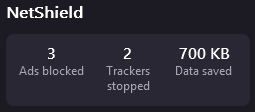
Proton’s encrypted tunnel will hide your online activity and browsing history. In particular, I am very fond of NetShield, Proton’s advanced ad blocker. This made a big difference when browsing news sites, which can be completely saturated with ads when you browse without a paid subscription. Proton shows you how many ads and trackers they blocked, and it was a lot more than I expected!
Privacy & security
Proton VPN uses secure protocols, including OpenVPN and WireGuard. The company has also developed its own Stealth protocol which hides VPN usage and is suited to avoid censorship or geo-blocking. In other words, Proton offers a VPN connection for all of your needs.
Since Proton VPN is based in Switzerland, it isn’t required to log any data. Moreover, it can’t be forced to hand over any data to other countries, since it is protected by the Swiss privacy laws. If privacy is your main concern, Proton is a good choice.
Proton VPN’s no-log policy has been audited in 2024 by Securitum. Proton doesn’t log your internet traffic, IP address, session length, or location. Furthermore, you can pay with cash or Bitcoin to remain anonymous.
Moreover, Proton VPN is open source. This means anyone can inspect the code and investigate whether the company’s claims are true. I like this transparent way of operating which shows Proton is really dedicated to online privacy.
Speed & server network
With 20700 servers in 149 countries, Proton VPN’s server network is certainly sizeable. It’s easy enough to find a server nearby for optimal speeds, or connect to any of the international servers for unblocking purposes.
Proton has excellent VPN speeds. If you turn the VPN Accelerator on, you will have fast and steady connections. During my speed test, I maintained 90 to 95% of the original speed, depending on the distance of the servers.
The upload speeds are also impressive. During my test, upload speeds didn’t drop below 200 mbps, even on servers in Australia and Japan. This makes Proton a great choice for torrenting.
Proton VPN offers special servers for streaming, P2P sharing, and accessing the Tor network. NordVPN is the only other VPN which offers these specific servers. Moreover, Proton VPN also has Secure Core servers, which route all traffic through two different VPN servers.
Features
Proton VPN is the only provider on this list which offers a free VPN. Proton VPN Free doesn’t have a data limit and offers non-stop online protection, making it one of the best free VPN services. However, there are some limitations. For example, you can’t manually select a server, making this free VPN unsuited for unblocking.
Besides Proton VPN, the Proton ecosystem consists of an encrypted mail service (Proton Mail), encrypted cloud storage (Proton Drive), a password manager (Proton Pass), and Proton Calendar.
This non-profit ecosystem is a great alternative for many Google services and gives you the opportunity to step away from Big Tech.
Room for improvement
There is some room for improvement. Proton doesn’t offer dedicated IP addresses, at least not for regular users. Dedicated IPs are part of Proton’s business plan and I hope they will become available soon for all subscriptions. Since Proton has user-driven feature implementation, this isn’t unlikely.
Another drawback is Proton’s live chat. The live chat is 24/7 available for subscribers of the paid plans. Subscribers to Proton’s free plan or people interested in subscribing can’t chat with support. Luckily, everyone can contact Proton using the contact form.
Proton VPN: Final verdict
Proton VPN is a secure open source non-profit VPN which has become very feature-rich in a short time. Proton VPN protects your online activity, while blocking ads and increasing your online freedom.
Every subscription comes with a 30-day money-back guarantee, which offers a way to try Proton VPN risk-free.
4. CyberGhost: Good VPN with specialized servers
CyberGhost
8.8
Pros
9800 servers in 100 countries
Dedicated gaming, streaming and torrenting servers
In-house NoSpy servers
Privacy Guard to maintain control over your data
Security Suite for extra safety on Windows
45-day money-back-guarantee
Cons
Speed is sometimes inconsistent
Live chat agents aren't always available
I picked CyberGhost as one of the best VPNs because it’s a good, cheap, beginner-friendly, and secure VPN. This provider has a wide range of VPN servers, with over 9800 servers in 100 countries.
Moreover, CyberGhost offers some excellent features such as dedicated streaming servers, a Security Suite for Windows, and dedicated IPs.
CyberGhost in action: streaming, torrenting and gaming
You can connect to CyberGhost servers with up to seven different devices at the same time using just one account, which is more than enough for all your devices. CyberGhost offers dedicated apps for Windows, Mac, iPhone, iPad, Android, and Linux. You can protect all your devices in just a few clicks.
CyberGhost is one of the top VPN providers for streaming. Apart from Netflix, I have successfully managed to get access to streaming services such as Hulu, HBO Max, Paramount+ among others. During my latest test CyberGhost had some trouble unblocking BBC iPlayer.
CyberGhost also offers dedicated servers for gaming and torrenting. Due to inconsistent speeds and latency, these servers don’t always offer what they promise. While CyberGhost functions well with everyday activities, I recommend choosing another VPN on this list for data-intensive activities.
Privacy & security
CyberGhost uses AES 256-bit and ChaCha20 encryption and offers a choice of different protocols, including OpenVPN, IKEv2, and WireGuard. It’s a certified no-logs VPN, so it doesn’t keep any user data. It uses RAM-only servers to make sure no data about your online traffic are stored.
However, the provider does keep some anonymized logs about how you use the CyberGhost VPN app. This is only for improving the VPN software experience, and no identifiable logs are stored.
Speed and server network
CyberGhost is not the fastest VPN I have tested, but it performs well, especially on nearby servers. For everyday activities such as browsing, listening to music or even streaming, CyberGhost’s speeds are sufficient.
If you experience trouble, I suggest trying a different server. For example, CyberGhost’s dedicated streaming servers tend to have better speeds than the regular servers.
For ultimate safety, CyberGhost offers NoSpy servers. These servers are located in Romania and are fully owned, managed and hosted by CyberGhost. Furthermore, CyberGhost offers dedicated IPs for a reasonable price.
Features
CyberGhost has some special features to keep Windows users safe and protect them from the downfalls of their OS.
Each CyberGhost subscription comes with a feature called Privacy Guard. Privacy Guard allows you to decide which information you share with Microsoft apps, such as Edge, Defender and the Microsoft Store.
At additional costs, you can add a Security Suite to your CyberGhost subscription. This add-on contains antivirus (offered by Intego) to protect your Windows device from malware and other threats. It also includes an updater which makes sure all your programs are up to date to minimize security risks.
Room for improvement
I noticed that this premium VPN service is sometimes inconsistent, with speeds dipping now and then. Even at peak performance, speeds don’t compare to the likes of a NordVPN or Surfshark server.
Moreover, I did note that live chat agents are sometimes unable to answer certain queries, often offering up generic answers already available on the support page.
CyberGhost: Final verdict
CyberGhost is a high-quality VPN service offered at a competitive price. All this makes CyberGhost an excellent VPN for torrenting and Netflix. It’s also one of the best VPN providers for complete beginners.
They have a large server network spread all over the world. While the extensive features of other providers landed CyberGhost in fourth place, this service remains an excellent option. Get a CyberGhost subscription for just $ 2.19/month.
5. Private Internet Access: Great VPN with the largest server network
PIA
8.5
Pros
35000 servers in 91 countries
Unlimited simultaneous connections
PIA MACE blocks ads
Advanced kill switch
Open source transparency
Dedicated IPs available
Cons
Inconsistent speeds
Dated interface
Private Internet Access is an excellent premium VPN app that offers solid security and a large global network of VPN servers. Despite its affordable price, Private Internet Access competes with top providers. It offers full transparency, excellent encryption protocols, and a zero-logs policy.
In action: streaming, torrenting and surfing anonymously
PIA VPN has native apps for Windows, macOS, Linux, iOS, and Android. Moreover, they offer browser extensions for Chrome, Firefox, and Opera. PIA supports unlimited simultaneous connections on a single account, so you can connect as many devices as you want. Always a plus!
PIA strongly focuses on privacy and is a great choice if you want to be more anonymous online without breaking the bank. PIA’s advanced kill switch will hide your IP at all times. You can even subscribe anonymously using Bitcoin.
While PIA is known for being a secure VPN, it’s a great option for streaming as well. I was able to get access to Disney Plus, HBO Max, BBC iPlayer, and different Netflix libraries with PIA VPN.
I was also able to download torrents safely and anonymously with PIA. Other VPNs might be slightly faster or more optimized, but PIA will provide you with a secure torrenting experience.
Privacy & security
PIA supports different protocols, including OpenVPN and WireGuard. Furthermore, PIA has a strict no-logs policy, which means they won’t store any information about how you use the VPN service. This policy has been audited in 2024 by Deloitte.
With PIA’s Multi-Hop and Obfuscation feature, you can add another layer of encryption to your online traffic. This feature combines a connection to a VPN server with a connection to a proxy server. This is ideal to circumvent censorship or unblock streaming services.
Moreover, PIA can help you block ads, trackers, and malware with its PIA MACE function. I tested PIA MACE and it successfully blocked ads on the websites I visited. These features are mostly available only by the best VPN providers in the industry.
Speed and server network
PIA has good speeds; I kept at least 90% of my original speed when connected to servers in Europe. I was able to stream HD movies without any buffering or other trouble. Downloading large files was possible as well.
With 35000 servers in 91 countries, PIA’s server network can be called impressive. Moreover, it is the only VPN in this list with servers in every state in the US. That makes Private Internet Access a great choice for accessing geo-blocked content.
At additional cost, you can also get a dedicated IP address. This can be helpful for unblocking streaming services and will decrease the number of reCAPTHA’s you will encounter.
Features
PIA offers Antivirus by PIA as an add-on to their VPN subscription. It is only available for Windows and costs just $1.00 per month. This is a very affordable and convenient way to protect your devices from malware.
Room for improvement
There are some things that PIA can do better. Despite offering a massive server network, I’ve noticed that speeds are often inconsistent and dip sharply when you connect to distant networks in countries like Australia and Japan.
The VPN apps can also do with better design since the look is a bit dated. The user interface could also be improved: I’d like to see easier access to key features and settings.
Private Internet Access (PIA): Final verdict
Private Internet Access has been around for a long time and has built a good reputation. Although PIA has fewer features than NordVPN and Surfshark, it is still a decent VPN that will keep your everyday online life safe from prying eyes. Get a PIA subscription for just $ 2.19/month.
Check out our PIA-review if you like to know more.
Hands-on testing: Every VPN app is put through a rigorous series of tests and awarded a rating.
Detailed research: A deep dive into data breaches, corporate policies regarding user privacy, independent audits, relevant legislation, and more.
Decades of expertise: All test results are interpreted and rated by our team of cybersecurity experts.
Here are some of the most important ranking factors I use to identify the best of the best VPN providers.
Speed
VPN encryption causes your internet speeds to drop to an extent. However, top VPNs will keep speed drops well under 20%. In fact, the best VPN services I recommend here are so fast that they run in the background without you even realizing it.
This means you’ll enjoy quick downloads and lag-free streams while staying completely anonymous. At the moment, NordVPN is the fastest VPN on nearby servers, according to my tests. NordVPN maintained as much as 96% of my connection speed.
For consistency, I test speeds on the same platform (speedtest.net) from the same location (the Netherlands). These are the most recent speed test results (January 2026) of my top three VPNs:
VPN
NordVPN
Surfshark
Proton VPN
No VPN (Mbps)
203.93
197.97
201.46
Fastest server (Netherlands) (Mbps)
187.16
188.63
192.29
Faraway server (New York) (Mbps)
146.34
179.93
178.93
Security and reliability
Here are the most important indicators of a secure VPN:
Good VPN protocols: I want to see reliable protocols like OpenVPN (the most secure) and WireGuard (the fastest).
Unbreakable encryption: The AES 256 cipher has become the industry standard, but ChaCha20 is reliable and becoming more and more popular.
Zero data leaks: Leaking my real IP address or DNS requests means instant disqualification from my list. I always check for leaks via IPleak.
Automatic kill switch: If a VPN app malfunctions, the kill switch has to cut your connection to prevent leaks. When testing, I will force a disruption and verify whether the kill switch keeps my real IP address hidden.
These are just the essential must-haves. I give extra points for double encryption, malware protection, dark web monitoring, and other advanced features.
Privacy and logging
Before ranking a VPN, I review its privacy and logging policy. I also assess the validity of independent audits by doing a deep dive into any available transparency reports.
Ideally, VPN services should adopt a strict no-logging policy. This means preventing any record of your data. Specifically, I am talking about:
Connection logs: Your IP address, connection timestamps, protocols, connection frequency
Activity logs: Your search history, downloads, and the sites you visit
If you care about your online privacy, getting the best no-log VPN is key. The type of data I mention can be used to identify you, monitor your online traffic, or even mount a hack attack against you. Using a zero-log service will protect you from these privacy breaches.
Important Note:
VPNs can record harmless data like anonymous statistics, device info, and app settings without jeopardizing your privacy. As long as this data can’t be used to determine who you are and what you’re dong online, I’m talking about no-log VPNs.
On the privacy front, I also pay attention to the location of your VPN and its governing legislation. Unfavorable VPN locations include the 14 Eyes countries and states with mandatory data retention.
Price
For VPNs, higher prices don’t necessarily translate to better quality or the best VPN software; affordable VPNs such as CyberGhost, PIA and Surfshark have an excellent reputation and track record. Their encryption and no-logs policy will keep your data safe, even though they are cheap.
VPNs move up in my ranking if they have a generous refund period. This gives new users time to test the service risk-free. Thirty days is a standard money-back guarantee, and I believe companies shouldn’t go lower than that.
How to save money when buying a VPN:
Longer VPN subscriptions are always cheaper than their shorter counterparts. So, when you find the best VPN provider for you, I recommend saving money by committing to a longer subscription period.
Best VPN discount deals (January 2026)
Our best VPNs regularly offer special promotions. This month, NordVPN and Surfshark have these can’t-miss deals.
Almost all VPN apps I’ve tested offer support for multiple simultaneous connections. This means you can secure all the devices in your household with just one VPN subscription. Providers like Surfshark or PIA even support VPN use on unlimited devices.
Compatibilities are also an important factor to keep in mind. In other words, you want your VPN to work on all your devices, from your computer to your smart TV. Extra points to VPNs with high-quality native apps.
Server network
With high-quality servers, you’ll get better speeds and better chances of unblocking geo-restricted services like Netflix. These are my points of interest regarding VPN server networks:
Number of servers
Reach: how many countries and server locations
Quality of the servers (owned, rented, physical or virtual)
Obfuscation or stealth (whether VPNs can mask your VPN traffic to look like regular browsing)
RAM-only servers (servers without a hard drive that can’t store user data)
Specialized servers (such as servers optimized for streaming, gaming, P2P-sharing or accessing the Tor network)
I also gave extra points for niche features that help with geo-unblocking or increase your internet connection speed, such as Surfshark’s NoBorders Mode.
Here’s a quick overview of my ranking factors applied to the best VPN services.
VPN
NordVPN
Surfshark
Proton VPN
CyberGhost
PIA
Number of servers
8900
4500
20700
9800
35000
Number of countries
149
100
149
100
91
Obfuscation (stealth mode)
✔
✔
✔
✖
✔
RAM-only servers
✔
✔
✖
✔
✔
Specialized servers
Streaming, double VPN, P2P, Tor
Streaming, double VPN, P2P
Streaming, double VPN, P2P, Tor
Streaming, gaming, P2P
Streaming, double VPN
User-friendliness and customer support
Even experienced VPN users hit a roadblock with their VPN once in a while. When it comes to ease of use, a good VPN gets points for the following criteria:
An informative website that’s easy to navigate
Generous FAQ and support sections on the site
Easy access to 24/7 customer support (live chat)
Tech-savvy support team
Quick and easy set-up
Intuitive app design
Convenient in everyday usage (streaming, browsing)
Our top VPNs all have very informative websites and strong customer support.
Ability to unblock Netflix and download torrents
Many VPN users purchase a premium VPN app to access the best streaming catalogs. A VPN can help you access Netflix US outside of the United States or watch BBC iPlayer from outside of the UK, for example.
With that in mind, I tested dozens of VPNs with all major streaming services, and here are the results of the best VPN services.
Streaming service
Can NordVPN unblock it?
Can Surfshark unblock it?
Can Proton VPN unblock it?
Can CyberGhost unblock it?
Can PIA unblock it?
Netflix
✔
✔
✔
✔
✔
Disney Plus
✔
✔
✔
✔
✔
HBO Max
✔
✔
✔
✔
✔
BBC iPlayer
✔
✔
✔
✖
✔
AmazonPrime Video
✔
✔
✔
✔
✖
Since streaming services have started pushing back against VPN use, occasionally, you might encounter a server with a blacklisted IP. This will be flagged as a proxy, and you’ll get an error. Just change the server or enable obfuscation, and the problem should be fixed.
With the best VPN providers above, like NordVPN, I rarely come across this issue.
I’ve tested a lot of premium VPNs besides the top five listed above. Here are some short VPN reviews of good VPNs that I liked but that didn’t quite make my list.
FastestVPN
FastestVPN is a budget-friendly VPN app located in the Cayman Islands. Our FastestVPN review revealed that this VPN provider offers an excellent price-to-value ratio and is an ideal gateway service for VPN beginners.
Right now, you can get 93% off the lifetime deal and pay only $40!
Why it didn’t make my list: I did not choose FastestVPN as one of the providers in the best VPN list as it has a small server network, and it can sometimes perform poorly on faraway servers.
IPVanish
During my IPVanish testing, I discovered that even though it is not one of the best VPNs, it is a good VPN service that supports unlimited connections. It was launched by the company that also owns StrongVPN, Mashable, and PCMag.
IPVanish has 3400 servers across 113 countries. This VPN unblocks Netflix (and similar geo-restricted platforms) and allows torrenting.
Why it didn’t make my list: IPVanish logs some of your data and doesn’t accept crypto payments.
MullvadVPN
Mullvad VPN has a strong focus on privacy, making it a secure VPN service. It’s also very fast, and its customer support team has always helped solve my problems. By all means, it’s a decent choice.
If you want to find out more about the tool, read our MullvadVPN review.
Why it didn’t make my list: It’s pricey for a VPN app that can’t unblock Netflix. Hence, I did not include it in my best VPN list.
Intego Privacy Protection VPN
Intego Privacy Protection VPN has a user-friendly interface and dedication to not logging user data. It also supports torrenting, and it can unblock Netflix, so it’s a decent all-around choice. For the full details, read our Intego Privacy Protection VPN review.
Why it didn’t make my list: Intego doesn’t offer dedicated IP addresses, which can hinder your ability to unblock sites. Its privacy policy can also be vague at times.
Private VPN
Private VPN is a secure VPN service that focuses on online privacy, featuring excellent encryption, a no-logs privacy policy, and multiple payment methods, including cryptocurrency.
Unfortunately, during my Private VPN review, I felt it was a bit flat on all other fronts, so I do not consider it the best VPN.
Why it didn’t make my list: Private VPN has a small server network, which will impact your connection speeds, ability to unblock geo-restricted sites, and more.
TorGuard
Despite what the name implies, TorGuard isn’t connected to the Tor Project in any way. Rather, it’s a good VPN app for torrenting, with servers that allow P2P file sharing and impressive download speeds, as I discovered during my TorGuard review.
It also has a vast server network and dedicated IP addresses, and it accepts payment via cryptocurrency.
Why it didn’t make my list: TorGuard is hard to set up for beginners, and it’s pretty expensive at $ 2 per month. You’re better off with cheaper but better options like NordVPN or Surfshark.
VyprVPN
VyprVPN tries to innovate in the security sector of the VPN industry. For example, they have their own encryption protocol, Chameleon.
Besides that, when testing VyprVPN, I observed that it allows P2P file-sharing, can unblock Netflix, and offers a smooth interface.
Why it didn’t make my list: VyprVPN’s connection can be shoddy at times. You also can’t buy it anonymously, and it has an annoying freemium business model. Not to mention, the paid subscriptions are more expensive than staple options like NordVPN.
The Best VPNs Right Now
After testing dozens of popular VPN services, I’ve ranked the top five best VPN providers. Which of these five is the best choice for you depends on your personal needs and preferences. But rest assured that all five are as effective and secure as can be.
Using a reliable VPN service improves your online privacy and security. NordVPN, my #1 VPN, is currently on offer with a 75% discount! Have a look for yourself, and soon, you’ll never want to be online without a VPN.
Best VPN Providers of 2026: Frequently Asked Questions
Do you have a question about the best VPN providers of this moment? Are you looking for a quick solution to a problem? Have a look at the FAQ down below and click a question to see the answer!
Can I use a free VPN instead of a paid one?
Free VPNs can be useful, but they aren’t the best services around. They’re often slow and come with limitations on your speed and data use. Some even sell your personal data or misuse your connection.
Fortunately, even some of the top VPNs are very cheap these days. Therefore, I recommend you use a cheap VPN instead of a free one to get the best experience.
What is the best VPN provider for 2026?
There are a couple of excellent VPN providers out there. Which is the best for you, depends on your wishes. NordVPN will prove to be the best choice for many due to its fast connections, large server network, Netflix support, and strong privacy options.
What is the best free VPN?
The top free VPN of this moment is Proton VPN Free. Proton VPN is known for its high quality and secure connections, and its free version gives you access to three different server locations.
The best part is that Proton VPN Free allows you to use its service without any speed or data limits. The one downside is that the speed of your connection might still be affected, because many people tend to use the same Proton VPN Free servers.
What is the best VPN for streaming?
NordVPN currently is one of the top VPNs for streaming. Whether you want to watch Netflix, Hulu, Disney Plus, or Max, NordVPN will make it work. With this VPN, you’ll be able to stream content you wouldn’t normally have access to. In addition, a NordVPN subscription won’t cost you all that much.
What is the best cheap VPN of 2026?
Protecting your online life shouldn’t be expensive. Surfshark is, without a doubt, the very best cheap VPN right now. It offers fast connections, gives access to many international versions of Netflix, and works with strong encryption methods to keep you safe.
What is the best VPN for iPhone?
We recommend getting NordVPN for your iPhone or iPad. This VPN is the fastest one I’ve tested and it works especially well with Apple products. Apart from speed, it ranks high on security and other features too.
What is the best VPN for Android?
The best VPN to use on Android phones like Samsung Galaxy, OnePlus, Google Pixel, and others, is Surfshark. This VPN is really cheap, offers servers with excellent speeds, and has a user-friendly app that’s easy to use.
What is the best VPN for torrenting?
NordVPN is a top choice for torrenting, because of the high speeds it offers combined with robust security features. It can help you to quickly download torrent files while staying safe.
We quite liked iVPN's look, speed, and levels of security. Unfortunately, their relatively small server network combined with relatively high prices made this provider miss out on a spot in our top 5. If you'd like to read our full review, you can find it here: iVPN review.
CyberGhost is the best! I have used Cyberghost for 3 yeard and I have to say that it is a cheap, private, secure, and good VPN! It can unblock any streaming service. I have bought a dedicated IP by CyberGhost and it is very very GOOD. LOVE IT TO THE MOON AND BACK!
There are multiple advantages to having a dedicated IP. Since you're the only one using your dedicated IP, you'll be less likely to be added to a blacklist or asked to go through verification processes. On top of that, things like unblocking Netflix will be easier, although you'll only be able to unblock one country's Netflix library per dedicated IP. If you'd like to know more, you can consult our full article on dedicated IPs.
Usually these VPNs that are owned and operated by bigger cybersecurity companies leave something to be desired. We didn't test McAfee's software ourselves yet, but what we have read about it is that it doesn't unlock a lot of geographically blocked content, it has to abide by certain US privacy regulations and therefore has to keep certain logs, speeds are inconsistent and the customer support is subpar.
Thanks for the information, how do you rank TunnelBear and IPVanish? They're highly ranked elsewhere, as I've been travelling before this lockdown situation and found them useful in few countries where few of the websites don't work.
We gave TunnelBear an 8/10, which means it currently takes in the seventh place in our list. If you'd like, you can check out our detailed review of TunnelBear right here. IPVanish ended up getting a 7.3. You can find that review on this page.
We have not yet had the chance to write a full review for AirVPN in English (but we do have one in our native tongue). Our main reasons for not having it in our Top 5, however, are because it doesn't seem to work with Netflix and its interface is slightly complex for the average user.
Personally, I use Surfshark and I found that it's quite good at bypassing geo-blocks and it works fine for streaming. They don't have a free trial to try it out, unfortunately, but the yearly subscriptions are usually pretty cheap.
I agree with Paula. For example, I was searching for a VPN that works with Netflix but is not expensive, so NordVPN was the best option for me. It absolutely depends on the needs. But, I've also heard good reviews on ExpressVPN, but it's just not for my pocket. I'm glad, that Nord fulfills my needs and I have no issues with using it.
Thank you for the informative article. Our communications with the world seem private and select because we are usually solitary when sending and receiving messages. That doesn't mean we are anonymous or impervious. I have now learned from this article the importance of having a VPN.
A lot of people have a tendency to ask, “What is the absolute best VPN service?” The truth is that no VPN service is “the” best. There is only the best one for your specific needs.
That's exactly right. This is why we submit all of the VPNs we test to thorough reviewing and score them separately on different aspects (safety, speed, usability, and so on). That way, you can always see which one would suit your tastes and needs best.










What about iVPN?
We quite liked iVPN's look, speed, and levels of security. Unfortunately, their relatively small server network combined with relatively high prices made this provider miss out on a spot in our top 5. If you'd like to read our full review, you can find it here: iVPN review.
CyberGhost is the best! I have used Cyberghost for 3 yeard and I have to say that it is a cheap, private, secure, and good VPN! It can unblock any streaming service. I have bought a dedicated IP by CyberGhost and it is very very GOOD. LOVE IT TO THE MOON AND BACK!
We're glad to hear it! We're big fans of CyberGhost, too :)
Would you be kind enough to explain why a dedicated IP is a good idea. Why is it worth the extra money? I have used PIA for more than 6 years.
There are multiple advantages to having a dedicated IP. Since you're the only one using your dedicated IP, you'll be less likely to be added to a blacklist or asked to go through verification processes. On top of that, things like unblocking Netflix will be easier, although you'll only be able to unblock one country's Netflix library per dedicated IP. If you'd like to know more, you can consult our full article on dedicated IPs.
What about the Norton VPN?
We are currently working on reviewing Norton Secure VPN. Check back for our full results in a few weeks.
What about McAfee VPN
Usually these VPNs that are owned and operated by bigger cybersecurity companies leave something to be desired. We didn't test McAfee's software ourselves yet, but what we have read about it is that it doesn't unlock a lot of geographically blocked content, it has to abide by certain US privacy regulations and therefore has to keep certain logs, speeds are inconsistent and the customer support is subpar.
Thanks for the information, how do you rank TunnelBear and IPVanish? They're highly ranked elsewhere, as I've been travelling before this lockdown situation and found them useful in few countries where few of the websites don't work.
We gave TunnelBear an 8/10, which means it currently takes in the seventh place in our list. If you'd like, you can check out our detailed review of TunnelBear right here. IPVanish ended up getting a 7.3. You can find that review on this page.
Any reason why AirVPN is not on any list?
We have not yet had the chance to write a full review for AirVPN in English (but we do have one in our native tongue). Our main reasons for not having it in our Top 5, however, are because it doesn't seem to work with Netflix and its interface is slightly complex for the average user.
Personally, I use Surfshark and I found that it's quite good at bypassing geo-blocks and it works fine for streaming. They don't have a free trial to try it out, unfortunately, but the yearly subscriptions are usually pretty cheap.
I agree with Paula. For example, I was searching for a VPN that works with Netflix but is not expensive, so NordVPN was the best option for me. It absolutely depends on the needs. But, I've also heard good reviews on ExpressVPN, but it's just not for my pocket. I'm glad, that Nord fulfills my needs and I have no issues with using it.
Thank you for the informative article. Our communications with the world seem private and select because we are usually solitary when sending and receiving messages. That doesn't mean we are anonymous or impervious. I have now learned from this article the importance of having a VPN.
A lot of people have a tendency to ask, “What is the absolute best VPN service?” The truth is that no VPN service is “the” best. There is only the best one for your specific needs.
That's exactly right. This is why we submit all of the VPNs we test to thorough reviewing and score them separately on different aspects (safety, speed, usability, and so on). That way, you can always see which one would suit your tastes and needs best.