- Key differences between Surfshark and PIA
- Surfshark vs PIA price comparison
- Which has more global servers: PIA vs Surfshark
- Which is more secure: PIA or Surfshark
- Which VPN has stronger privacy policies: Surfshark or PIA
- Which is better for streaming: Surfshark or PIA
- Should I choose PIA or Surfshark for torrenting
- Should I choose PIA or Surfshark for gaming
- Which VPN is easier to use: Surfshark or PIA
- Surfshark vs PIA Reddit comparison
- Final verdict: Is Surfshark better than PIA in 2025?
- FAQ
Both Surfshark and Private Internet Access (PIA) are well-known VPNs, each with its own strengths and weaknesses. While PIA has been a long-standing player in the industry, Surfshark has rapidly become a top competitor and continues to grow.
To discover which VPN is better, I put them head-to-head. I collaborated with the VPNoverview research team and conducted extensive testing, diving deep into everything from speed and security to streaming performance and app usability. After thorough testing, Surfshark proved itself to be the stronger choice in almost every category. Read on to see the detailed results and discover why Surfshark is a winner.
| VPN provider: | Surfshark | PIA |
| Website: | https://surfshark.com/ | https://www.privateinternetaccess.com/ |
| Rating: | 9.0/10⭐⭐⭐⭐⭐ | 8.6/10⭐⭐⭐⭐ |
| Servers: | 4500 servers in 100 countries | 35000 servers in 91 countries |
| Speed performance: | 780Mbps | 596Mbps |
| Simultaneous connections: | Unlimited | Unlimited |
| Encryption: | AES-256, ChaCha20 | AES-128, AES-256 |
| Streaming: | Netflix, Hulu, Disney+, BBC iPlayer, HBO Max, and more | Netflix, Hulu, Sky Sports, CBD Gem, and more |
| Torrenting support: | ✅ Yes, supports P2P optimized servers | ✅ Yes, supports P2P optimized servers and port forwarding |
| Starting price: | $ 2.49/month | $ 1.33/month |
| Money-back guarantee: | 30-day money-back guarantee | 30-day money-back guarantee |
Key differences between Surfshark and PIA
Both Surfshark and Private Internet Access (PIA) are among the top VPN services, but my tests revealed key differences that set them apart. While both offer robust security and solid performance, Surfshark consistently outperformed PIA in several crucial areas.
My testing revealed that Surfshark is better than PIA due to its faster speed and more reliable streaming capabilities. It effortlessly unblocked a wide range of geo-restricted content and provided a smoother viewing experience. However, this doesn’t mean that PIA isn’t a great choice. PIA is still a great option for users who prioritize an absolutely massive server network and an incredibly low price point. Both providers have their advantages and disadvantages:
| Surfshark pros and cons | Private Internet Access (PIA) pros and cons |
| ✅ Unlimited simultaneous connections. One Surfshark account protects unlimited devices at once, ideal for families and users with multiple gadgets. | ✅ Huge server fleet. With over 35,000 servers worldwide, it reduces server congestion and maintains stable connections. |
| ✅ Reliable speeds. Powered by the WireGuard protocol, Surfshark retains over 93% of its base speed, smooth for 4K streaming, gaming, and large downloads. | ✅ Highly customizable app. Advanced settings and configuration options allow experienced users to optimize their connection. |
| ✅ Excellent streaming performance. Consistently unblocks major streaming platforms, including Netflix, Hulu, and Amazon Prime Video, easily and in high definition. | ✅ Affordable plans. It has the cheapest long-term subscription – $ 1.33/month for 3 years + 3 extra months |
| ✅ Robust security suite. CleanWeb ad blocker and MultiHop double VPN enhance online privacy and security. | ❌ Weak streaming support. Works on some platforms, but fails to unblock Amazon Prime Video or Hulu. |
| ❌ Some features cost extra. Dedicated IPs cost extra, and antivirus with Alternative ID come only with the Surfshark One plan. | ❌ US jurisdiction. Headquartered in the United States, a Five Eyes country, which may raise concerns about privacy. |
Here are the main differences between Surfshark and PIA:
- Surfshark is faster. Surfshark outperforms PIA at both download and upload speeds, especially on long-distance connections. Surfshark retained 93% of its base speed, while PIA dropped to 68%. In these cases, it’s a better choice for games, streaming, and downloading large files.
- PIA has a larger server network. PIA boasts over 35,000 servers globally, compared to Surfshark’s 3,200 servers. This massive network allows PIA to avoid overloading.
- Surfshark is better for streaming. Surfshark consistently unblocks and streams content on platforms like Netflix, Hulu, and BBC iPlayer. While PIA struggled on some platforms.
- PIA is more reliable for torrenting. A port forwarding feature improves peer connections, speeding up and stabilizing downloads.
- Surfshark is better for gaming. Its low ping ensures smoother gameplay, while DDoS protection and unlimited bandwidth keep matches stable.
- Surfshark’s security is robust. It goes beyond standard encryption and no-logs with extra tools like CleanWeb and MultiHop for stronger protection.
- PIA is more customizable. Advanced users can tweak encryption and ports, whereas Surfshark focuses on simplicity.
- Surfshark is cheaper. Its long-term plan costs just $ 2.49/month for 2 years plus 3 extra months. It also offers a variety of plans, making it easy to find one that fits your needs.
- Both bypass geo-blocks. They worked in restricted regions, but Surfshark did it with less trial and error.
Surfshark vs PIA price comparison
As of August 2025, Surfshark is more affordable VPN and versatile than PIA. For instance, PIA offers three plans: a 1-month plan at $11.95/month, a 1-year plan at $3.33/month, and a 3-year plan. In comparison, Surfshark’s Starter plan starts at $15.45 for 1 month, or $2.29/month for the 2-year plan. If you only need a VPN for a short period, Surfshark is the cheaper choice.
For long-term deals, Surfshark’s Starter plan costs $3.19/month for 12 months plus 3 free months, and only $ 2.49/month for 24 months plus 3 extra months. PIA’s 3-year plan with 2 bonus months comes in slightly higher at $ 1.33/month.
Another key difference is the variety of plans. Surfshark offers three tiers, Starter, One, and One+, ranging from $ 2.49/month to $3.99/month on long-term plans, with extras such as antivirus protection and data breach alerts. PIA keeps it simple with just three VPN plans for all subscription lengths.
Overall, Surfshark outperforms PIA with lower rates and more flexibility. Below is a table that compares their prices and policies:
| Subscription plans | Surfshark | PIA |
| 1-month plan: | $15.45/month | $11.95/month |
| 1-year plan: | $3.19/month | $3.33/month |
| 2-year plan: | $ 2.49/month | – |
| 3-year plan: | – | $ 1.33/month |
| Free trial | ✅ Yes, 7 days (Android and iOS) | ❌ No |
| Money-back guarantee | 30-day money-back guarantee | 30-day money-back guarantee |
| Current deal: | Get Surfshark, now 85%! | Get PIA, now 89%! |
When I explored the trial and refund options, I noticed a key difference between these VPNs. Surfshark offers a 7-day free trial if you sign up via their mobile app for Android or iOS. Once activated, the trial works across all devices, which allowed me to test the VPN fully. It also comes with a 30-day money-back guarantee when purchased directly on the website.
PIA, on the other hand, does not provide free trials. You can only rely on its 30-day money-back guarantee to get a refund if you’re not satisfied. This means that while both VPNs allowed me to claim a refund within 30 days, only Surfshark offered the added flexibility of testing the service first.
Which has more global servers: PIA vs Surfshark
During my testing and exploration, I found that PIA has significantly more servers globally. It operates 35000+ NextGen servers in 91+ countries, compared to Surfshark’s 4500 RAM-only servers in 100+ countries. While PIA offers far more servers, Surfshark covers a slightly larger number of countries, providing wider geographical coverage. This can be helpful for accessing region-locked content that PIA may not be able to reach. Here is a quick breakdown of their server infrastructure:
| Feature | Surfshark | PIA |
| Total servers | 4500 servers | 35000+ servers |
| Countries covered | 100+ countries | 91+ countries |
| Server types | RAM-only, obfuscated, P2P | NextGen |
| Specialized servers | ✅ Yes (P2P, MultiHop, Camouflage mode, static IP, dedicated IP) | ✅ Yes (Multi-Hop, P2P, NextGen, streaming-optimized servers, static IP, dedicated IP) |
| Server ownership | Fully owned | Mostly owned |
PIA has more servers, which means users can experience less congestion and better load balancing. This is helpful if you want stable speeds during peak hours. However, while Surfshark has fewer servers, it compensates with a broader geographical coverage, which makes it easier to access region-locked content in countries where PIA doesn’t have servers.
Both VPN providers have invested in a modern infrastructure. Surfshark offers obfuscated servers, called Camouflage mode, which are particularly useful for bypassing strict firewalls and censorship. These servers disguise your VPN traffic to look like regular internet traffic, making it harder for ISPs or governments to detect that you’re using a VPN at all. On the other hand, PIA has Multi-Hop servers that add an extra layer of privacy by routing your traffic through both a VPN server and a SOCKS5 or Shadowsocks proxy. Additionally, both services offer static IP servers, which provide the same IP address each time you connect, as well as P2P-optimized servers for seamless file sharing.
Which is more secure: PIA or Surfshark
Both PIA and Surfshark cover essential security features, including a kill switch, leak protection, and a strict no-logs policy. During my testing, I explored both services on multiple devices and locations. However, after extensive testing and research, I was impressed by Surfshark’s advanced protocols and extra privacy features, while PIA surprised me with its transparency. The following table compares the privacy features of both VPNs:
| Security aspect | Surfshark | PIA |
| Jurisdiction | The Netherlands | United States |
| Encryption | AES-256-GCM | AES-128 and AES-256 |
| Protocols supported | WireGuard, OpenVPN, IKEv2 | WireGuard, OpenVPN, IKEv2 |
| No-logs policy | Independently audited | Independently audited and proven in court |
| Kill switch | ✅ Yes (system-wide and app-specific) | ✅ Yes (system-wide and app-specific) |
| Leak protection | DNS, IP, WebRTC | DNS, IP, WebRTC |
According to my research, both providers use industry-standard AES-256 encryption, which is the same level employed by government and military organizations. However, PIA uses AES-128 encryption, which is less secure, and you have to manually change it to AES-256 for the highest level of protection. Surfshark, on the other hand, uses AES-256 encryption by default, providing stronger security out of the box.
I also delved into their respective jurisdictions and no-logs policies. Surfshark is based in the Netherlands, a privacy-friendly country that is not part of the 5/9/14 Eyes alliances, which makes it a more secure VPN than PIA. For example, PIA is headquartered in the United States, a founding member of the 5 Eyes alliance. This intelligence-sharing agreement enables member countries (the US, UK, Canada, Australia, and New Zealand) to legally circumvent their own privacy laws and share collected data among themselves. While both providers have had their no-logs policies independently audited and proven in court, Surfshark’s jurisdiction offers an extra layer of reassurance for privacy-conscious users.
Moreover, Surfshark is also strong in its security features, which are available with its base subscription. In my tests, Surfshark’s CleanWeb ad blocker was slightly more effective at blocking a wider range of pop-ups, trackers, and malicious ads than PIA’s MACE feature.
Kill switch
Surfshark and PIA have a built-in kill switch. This feature is the most important security feature for VPN because it cuts your internet connection if the VPN unexpectedly drops, keeping your IP address and data safe from leaks.
I found Surfshark’s kill switch easy to use across all devices, including mobile apps. I didn’t have to make any changes; I just turned it on, and it stayed active, whether I was streaming, torrenting, gambling, or switching servers.
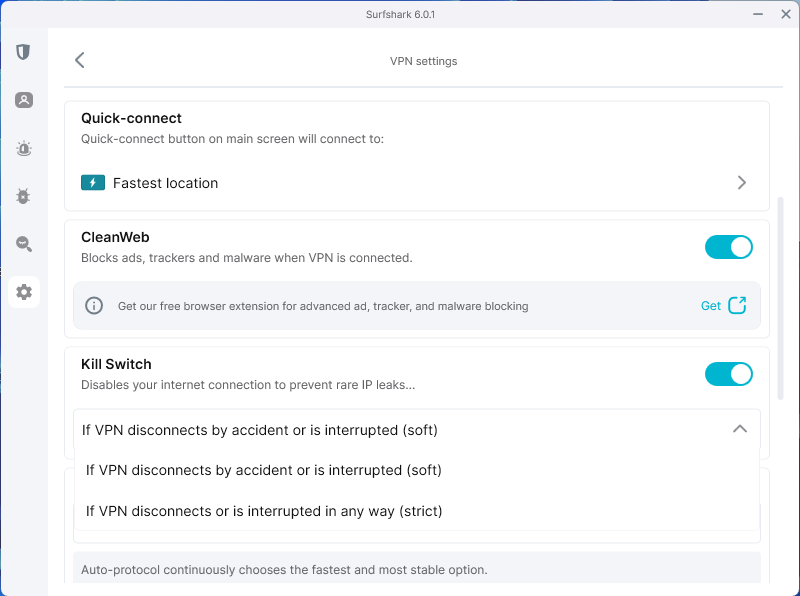
PIA also features a reliable kill switch, but I noticed it required some additional tweaking in the settings to configure it properly. You can choose between Auto, Always, or Off, which gives more control but can be confusing for new users. When the VPN was off, some traffic was still allowed through PIA after I manually changed it to Always. As a result, for everyday use, I prefer Surfshark since it is simpler and easier to use. You just turn the kill switch on, and it covers everything.
Split tunneling
Both Surfshark and PIA support split tunneling, a feature that lets you decide which apps or websites use the VPN and which bypass it. Surfshark’s feature, called Bypasser, is straightforward and effective. It allows you to select which apps bypass the VPN or, alternatively, only route specific apps through the VPN.

On the other hand, PIA’s split tunneling is even more advanced. Besides app-based split tunneling, it also supports splitting by IP address and domain. By routing specific websites or IP addresses through the VPN while the rest of your traffic stays on your regular connection, you can have more control over your connection. In my opinion, this is a significant advantage, particularly for users who require customized routing to meet their specific needs.
Obfuscation
Using VPN obfuscation, you can disguise your VPN traffic to look like regular internet traffic. As a result, firewalls and network administrators cannot recognize the VPN’s signature, allowing you to bypass VPN-blocking restrictions. In my testing, I found that Surfshark and PIA both offer obfuscation. Surfshark automatically enables obfuscation when using the OpenVPN protocol (UDP or TCP). It’s easy to use; you just select the protocol, and you’re good to go. This mode is called Camouflage Mode.
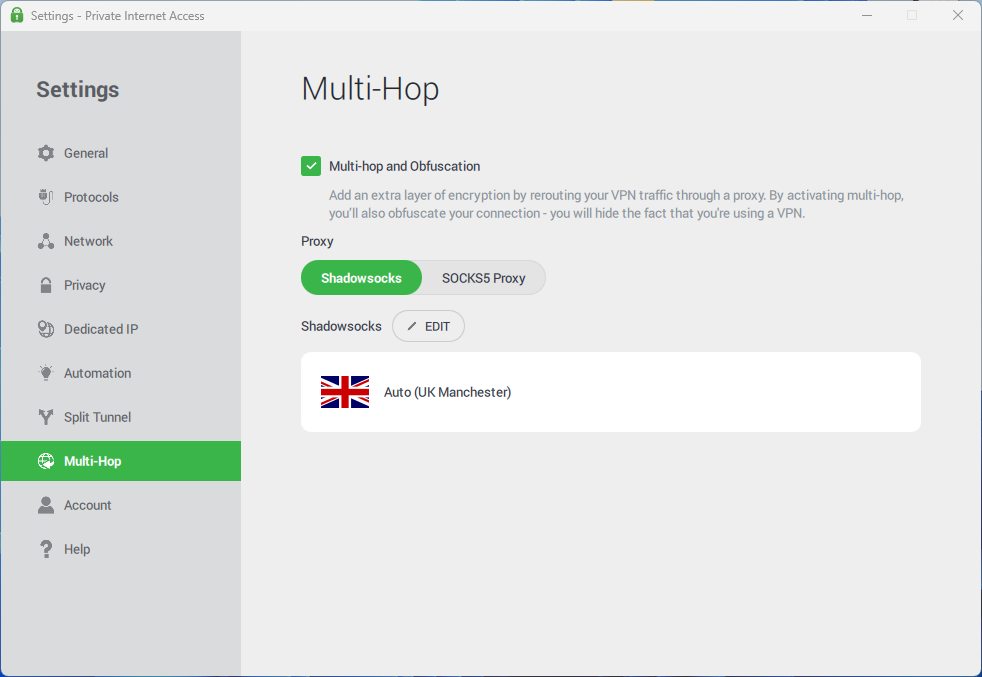
PIA, on the other hand, uses obfuscation as part of its Multi-Hop feature, which routes your traffic through both a VPN server and a proxy. While this adds an extra layer of privacy, it requires a bit more manual setup and is only available on a limited number of servers. Eventually, Surfshark’s approach is more user-friendly and reliable than other methods of bypassing network restrictions without adding complexity.
Specialty servers
Specialty servers are optimized for specific tasks, such as peer-to-peer file sharing or enhanced security. My testing showed both VPNs offer them, but with different focuses. Surfshark offers MultiHop, static IP servers, and dedicated IP addresses. MultiHop is ideal for extra privacy, while a static IP is perfect for consistently accessing certain online services without security alerts. Plus, Surfshark offers dedicated IP addresses, which are unique to a single user, for an extra fee.

Alternatively, PIA has a massive network and offers both regular and streaming-optimized servers. Its streaming-optimized servers are specifically designed for a smooth, buffer-free experience on platforms like Netflix and Hulu. PIA also offers dedicated IP addresses at an extra cost. A dedicated IP from PIA is a unique address that only you can use. Both are great for avoiding frustrating CAPTCHA requests and maintaining a consistent online identity, but Surfshark’s integration of this feature into its base plan makes it a much better value.
Ad and malware blocker
An ad and malware blocker is a crucial tool for a cleaner, safer browsing experience. After testing both Surfshark’s CleanWeb and PIA’s MACE, I can confidently say that both are effective, but Surfshark wins. My testing revealed that CleanWeb was more effective at blocking a broad range of ads, including those on video streaming sites, and it also provides real-time breach alerts. While MACE is a solid ad blocker, I found it wasn’t as consistent and, importantly, it’s not available on iOS. Ultimately, Surfshark provides a more comprehensive and reliable solution.
Which VPN has stronger privacy policies: Surfshark or PIA
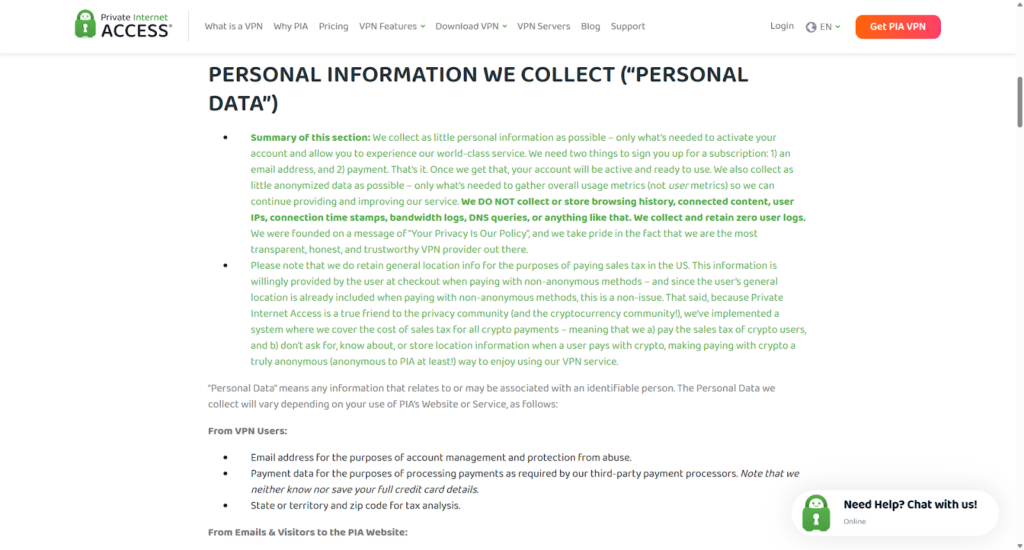
Both Surfshark and PIA have a no-logs policy, meaning they don’t collect, track, or store your online activity. This is a critical foundation for any trustworthy VPN. Surfshark’s no-logs policy has been independently audited by Deloitte, a major auditing firm. PIA has also had its no-logs claims proven in court multiple times, which is powerful validation.
However, a key difference lies in their respective jurisdictions. Surfshark is based in the Netherlands, a jurisdiction that does not require data collection, logging, or provisioning. Due to this, Surfshark does not track your original IP address or online activity. On the other hand, PIA is headquartered in the United States, which is a founding member of the Five Eyes Alliance. This alliance enables member countries to legally circumvent their own privacy laws and share collected data among themselves.
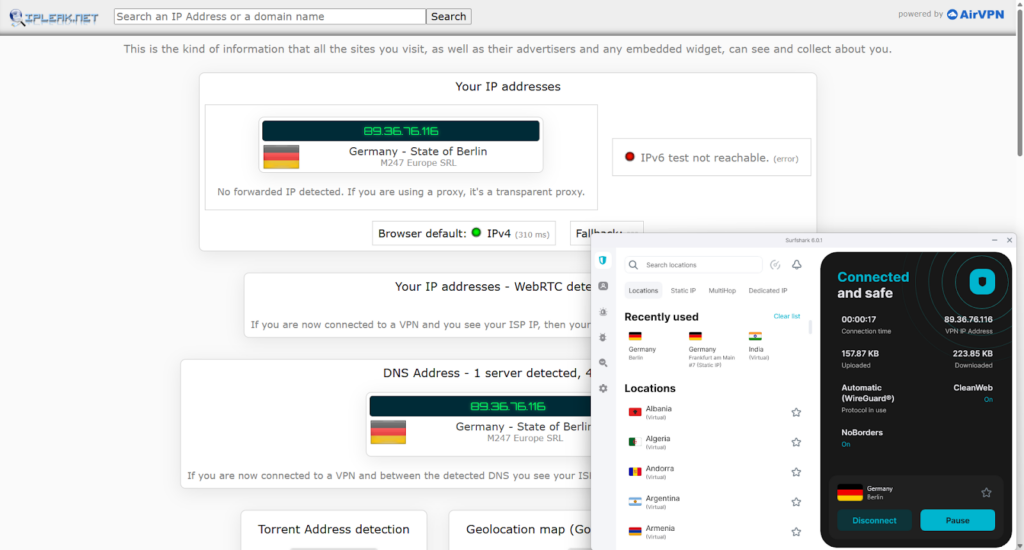
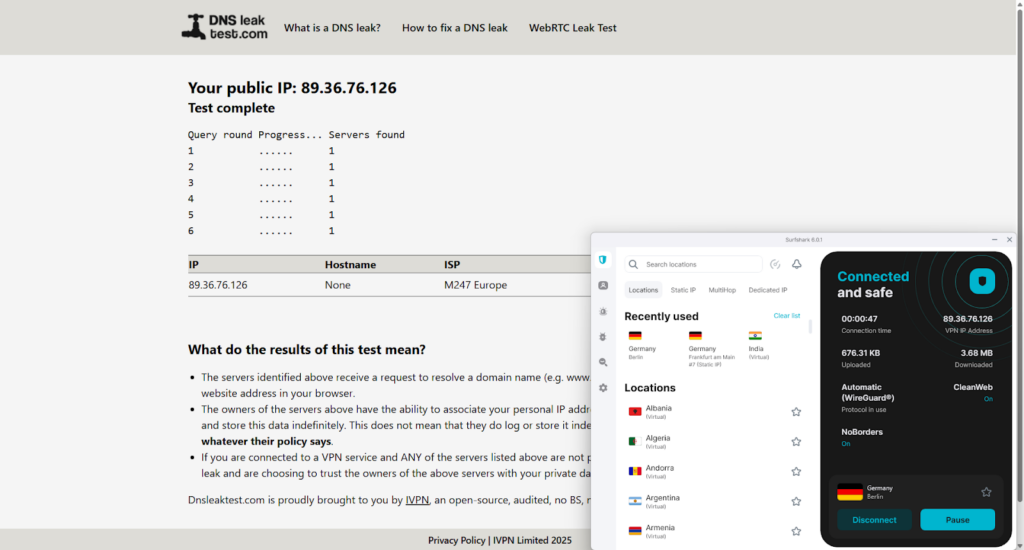
I also tested for data leaks, as an IP, DNS, or WebRTC leak can expose your real location. Fortunately, both VPNs passed all my leak tests, providing robust protection across the board. This is a critical security check, and I was pleased to see both services performed flawlessly.
Finally, let’s talk about protocols. Both VPNs support industry-standard protocols like OpenVPN, IKEv2, and WireGuard. For most users, WireGuard is the top choice for speed. For privacy, I prefer OpenVPN because it offers both UDP and TCP protocols. Because UDP is faster but less reliable, while TCP is slower but guarantees data delivery. The option to switch between these two is a bonus for users who want to fine-tune their connection based on their needs.
No-logs policy
Both Surfshark and PIA have no-logs policy, but there are key differences in their jurisdictions and how they’ve verified their claims. For example, Surfshark is based in the Netherlands, a Nine-Eyes alliance member, which is a more secure location than PIA’s headquarters in the US, a founding member of the Five-Eyes alliance. While both have independent audits of their policies, PIA is still based in the US. It’s not ideal because being based in the US exposes PIA to government surveillance and data requests, which could sabotage its no-logs promise.
Independent audits and transparency reports
During my testing, I explored the latest independent audit and transparency reports for both Surfshark and PIA. Surfshark’s no-logs policy was recently verified by Deloitte. The assessment, published in June 2025, confirmed that Surfshark’s systems are configured not to collect or store any user activity logs.
PIA’s transparency report for Q1 2025 stated that it had received 28 legal requests for user data. However, due to its strict no-logs policy, PIA had nothing to provide to the authorities. Even though PIA is headquartered in the US, its strict no-logs policy proved effective under pressure, with nothing to disclose.
Which is better for streaming: Surfshark or PIA
I compared speeds between Surfshark and PIA on different servers. First, let’s talk about speed. While both VPNs offer good speeds, my tests showed that Surfshark is consistently faster than PIA, especially on long-distance connections. I recorded Surfshark retaining an impressive 93% of its original speed, while PIA retained 68%. With Surfshark, streaming was in HD and 4K and smoother with minimal buffering.
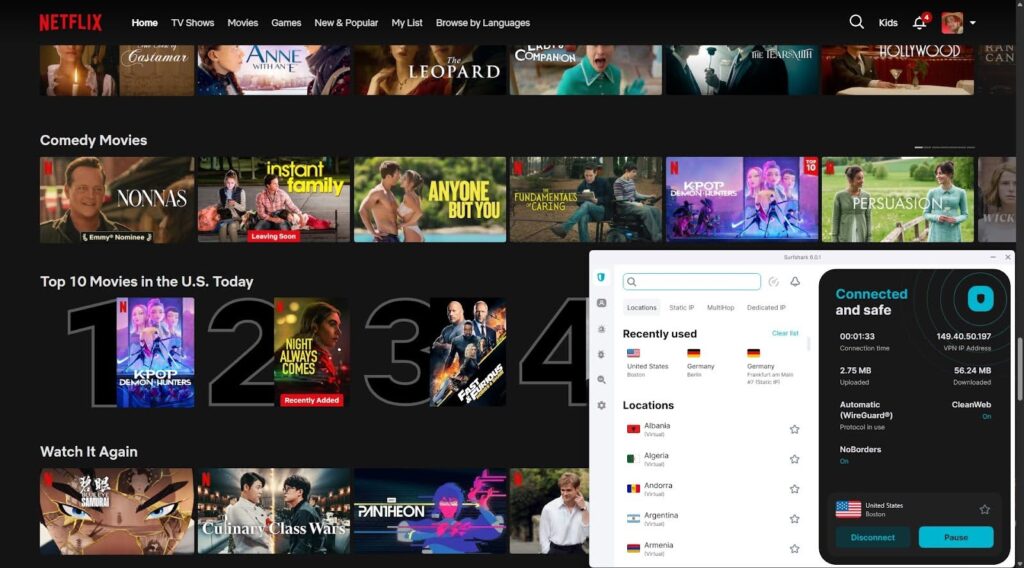
Beyond speed, a VPN’s ability to unblock content is a key factor. During my testing, Surfshark consistently unblocked a wide range of streaming platforms, such as Netflix, BBC iPlayer, and Hulu. PIA also unblocked many services, but it was less consistent and sometimes struggled with certain platforms. The table below details my findings for each service:
| Streaming service | Surfshark | PIA |
| Netflix | ✅ Yes | ✅ Yes |
| BBC iPlayer | ✅ Yes | ✅ Yes |
| Disney Plus | ✅ Yes | ✅ Yes |
| Hulu | ✅ Yes | ✅ Yes |
| HBO Max | ✅ Yes | ✅ Yes |
| Amazon Prime Video | ✅ Yes | ✅ Yes |
| ITVX | ✅ Yes | ✅ Yes |
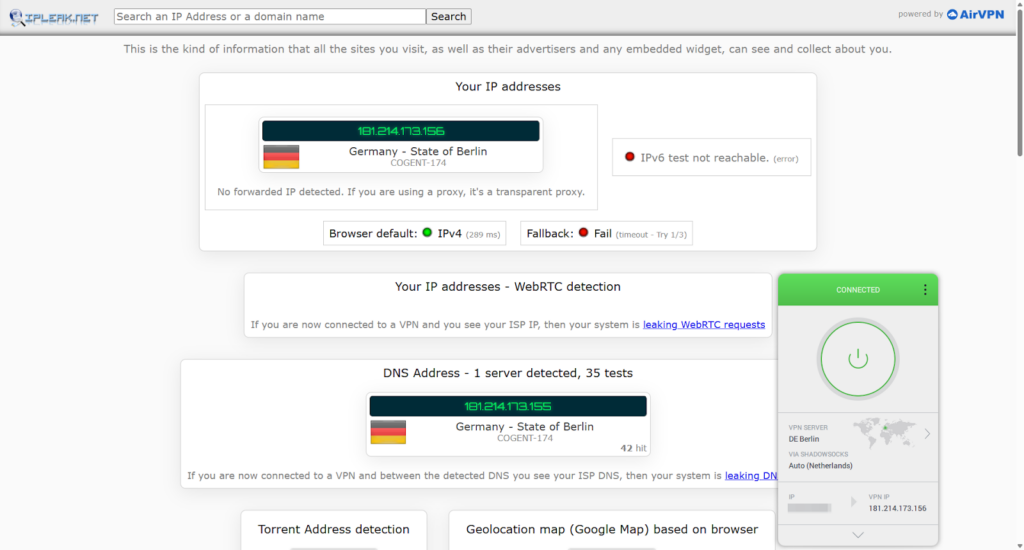
Based on my testing, Surfshark is a clear winner among VPNs for streaming. I connected to servers in different locations to test its ability to access various regional libraries, and I had no issues watching different content catalogs on my mobile devices and computers. The streaming quality remained flawless, and I did not notice any lagging issues or slowdowns. Surfshark’s high-speed retention ensures smooth, buffer-free experiences. While PIA also works with Netflix, it was less consistent with unblocking libraries.
Should I choose PIA or Surfshark for torrenting
There are two main reasons why torrenting requires the use of a VPN: privacy and speed. It hides your IP address so no one, including your ISP, can monitor your activity. Additionally, a VPN prevents your ISP from throttling your connection, which can dramatically slow down your download speed. I tested both Surfshark and PIA to see which was the better choice for P2P file sharing.
As mentioned above, Surfshark is faster (93% retention speed) than PIA (63%), but for a dedicated torrenting user, speed isn’t the only factor, as port-forwarding is a game-changer. However, both VPNs offer robust security features and support P2P traffic, making them excellent options for torrenting. Therefore, PIA is slightly better suited to torrenting due to a key feature: port forwarding. PIA supports P2P on all of its + servers, resulting in less congestion and faster speeds. Moreover, PIA offers port forwarding, which can significantly increase your download speeds by connecting you to more peers in a torrent swarm.
While Surfshark also supports P2P on all of its servers, it lacks this port forwarding feature. In my testing, PIA’s port forwarding boosted the speed of certain torrents, making it the faster choice for dedicated torrent users.
Should I choose PIA or Surfshark for gaming
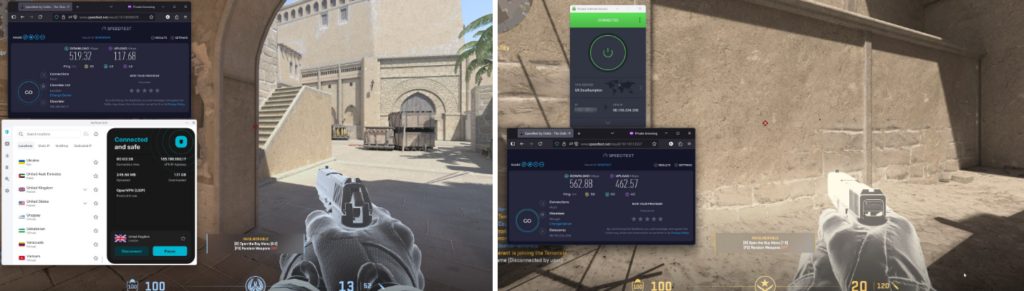
Yes, both VPNs are reliable for gaming based on my tests. I played fast-paced games like Call of Duty, CS2 and Fortnite using servers in the US, UK, and France, and the connection remained stable. While PIA’s average ping was 30ms, Surfshark’s was 23ms, and it delivered smooth gameplay without noticeable lag during my testing. Moreover, I examined its ability to prevent DDoS attacks. My findings confirm that Surfshark and PIA offer robust protection against DDoS attacks by masking your real IP address. As a result, malicious traffic is directed to the VPN’s server instead of your home network, which is essential for competitive gamers.
Moreover, both services can also be set up on a router, which is ideal for console gamers who want to play on devices like PlayStation and Xbox. However, while neither provider offers “gaming-specific” servers, their overall performance and features are excellent VPNs for gaming. Both have unlimited bandwidth, which is great for large game updates and downloads.
Which VPN is easier to use: Surfshark or PIA
If a VPN’s interface is confusing, even the most secure service can be difficult to use. Based on my testing, Surfshark is the clear winner in terms of user-friendliness, while PIA is better suited to users who want advanced customization options.
The installation process for both VPNs is straightforward and quick; however, the user experience differs immediately afterwards. Surfshark’s app is minimalistic and clean. When you open it, you are greeted with a Quick-Connect button that connects you to the fastest server, making it convenient for beginners. The server list is simple and easy to navigate, with a search bar and clear categories for different server types.
Conversely, PIA’s app is more detailed and technical. While this gives you a huge amount of control over your connection, it can feel overwhelming for new users. The main dashboard is packed with information and settings, which is great for a tech-savvy user who wants to fine-tune their encryption, protocols, and port forwarding. However, it can be intimidating for someone just looking to click “connect.”
Both VPNs are compatible with all major operating systems, including Windows, macOS, Android, iOS, and Linux. They also support routers, smart TVs, and gaming consoles. Surfshark and PIA offer unlimited simultaneous connections on a single account.
Surfshark vs PIA Reddit comparison
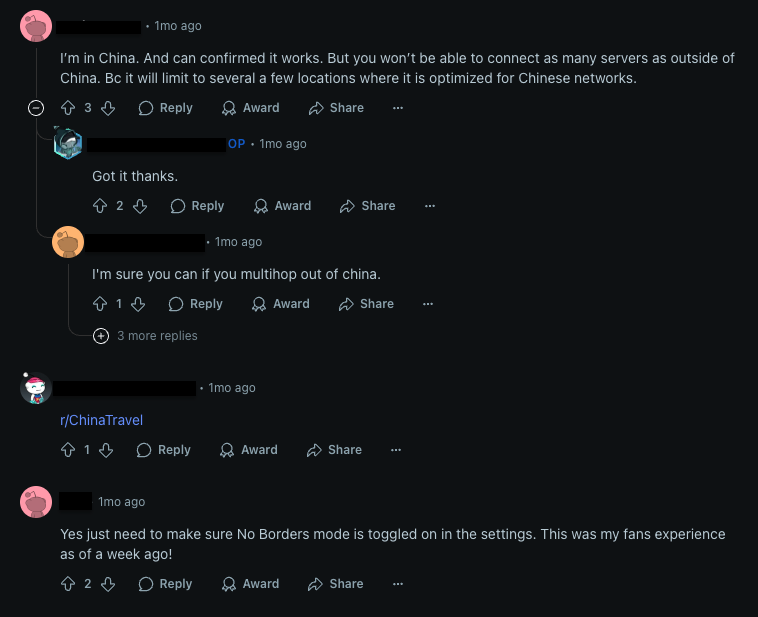
Based on my review of recent discussions on Reddit, a few key points stood out that aligned with my own testing of both Surfshark and PIA. One recent discussion came from a user in China confirming that Surfshark worked behind the Great Firewall. However, they mentioned that only a few servers are optimized for China, so you don’t get the full network. During my own testing, I reached similar results, enabling NoBorders mode was essential to keep connections stable. I also found that selecting MultiHop improved reliability when accessing blocked platforms.
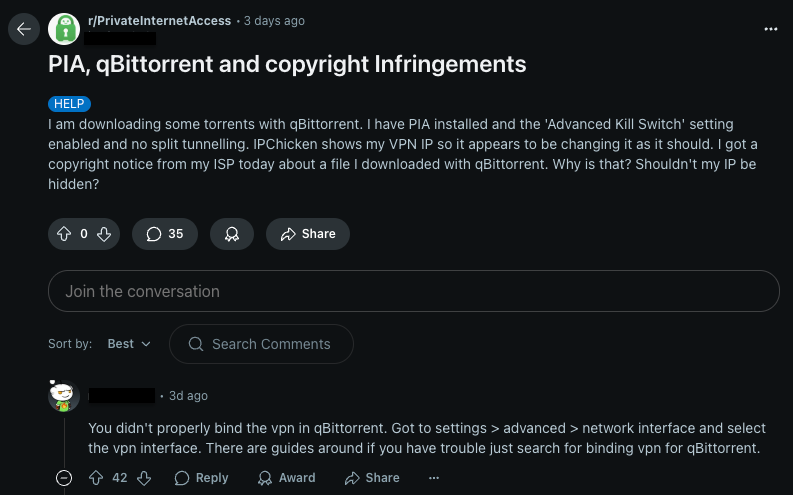
On the other hand, a PIA user shared concerns about torrenting with qBittorrent. Despite enabling the kill switch, they still received a copyright notice. The issue was that the VPN wasn’t properly bound to the torrent client. From my side, I had no such problems once I configured PIA correctly. Still, it shows that Surfshark is easier for beginners because advanced settings are less confusing, while PIA requires a bit more manual setup for P2P.
From my research and a review of user feedback on Reddit, I’ve found that both Surfshark and PIA are powerful VPNs, but they cater to different user bases. Surfshark stands out for its reliability in challenging environments, with users confirming that its NoBorders mode works effectively in places like China. In contrast, PIA’s powerful but technical features can be a double-edged sword, as user error can lead to privacy leaks. As a result, Surfshark remains a premium choice for its ease of use and consistent performance, while PIA is a better fit for tech-savvy users who want a more customizable experience.
Final verdict: Is Surfshark better than PIA in 2025?
Surfshark and PIA are valid options when choosing a VPN service provider. After careful testing, I concluded that Surfshark is slightly better than PIA. In the end, the best choice comes down to your own needs and priorities.
| When to choose Surfshark? | When to choose PIA? |
| ✅ When you need fast speeds and stable connections | ✅ When you need access to a wider server fleet |
| ✅ When you need to unblock a variety of geo-restricted platforms | ✅ When you need a VPN for torrenting and file sharing |
| ✅ When you prioritize strong security features | ✅ When you want a customizable app |
| ❌ When you are a dedicated torrenter who needs port forwarding | ❌ When you are a beginner who wants a simple, easy-to-use app |
Where Surfshark performs better than PIA:
- Pricing. Surfshark offers a better deal for a 2-year plan for $ 2.49/month for 2 years plus 3 extra months than PIA for a 3-year plan plus 2 months free for $ 1.33/month.
- Servers. While PIA offers a larger server network with over 35000 servers in 91 countries, Surfshark provides servers in a wide range of countries with RAM-only servers and specialized options for obfuscation and Double VPN.
- Speed. Surfshark is faster than PIA thanks to the WireGuard protocol.
- Streaming. Surfshark offers more stable streaming without lags or buffering than PIA and has faster speeds.
- Gaming. Surfshark delivers lower ping and DDoS protection, making it the preferred choice for gamers.
- Privacy and security. Surfshark offers a more advanced privacy and security toolkit with additional features compared to PIA.
Where PIA performs better than Surfshark:
- Torrent support. PIA performs better at torrenting than Surfshark.
- Device connection. Both Surfshark and PIA allow unlimited simultaneous connections.
Final verdict:
Surfshark outperforms PIA in 2025 due to its streaming, gaming, ease of use, and security features. Although PIA is more for tech-savvy and torrent lovers, Surfshark offers the best overall value with its extensive options and outstanding performance in the VPN market.

You may also like to read:
- NordVPN vs Surfshark
- CyberGhost vs Surfshark
- CybrGhost vs PIA
- ExpressVPN vs Surfshark
- ExpressVPN vs PIA
- PIA vs NordVPN
- Surfshark vs PIA
- Proton VPN vs Surfshark
- ExpressVPN vs Surfshark vs NordVPN
- Compare IPVanish and Surfshark VPNs
FAQ
The main difference between Surfshark and PIA is that Surfshark is faster and easier to use, making it a better choice for streaming and gaming. PIA is slightly slower but offers more advanced configuration options, port forwarding for torrent, and is suitable for tech-savvy users.
Yes, based on my thorough testing, Surfshark is the better VPN. It came out on top in most of the key categories, including speed, price, streaming, gaming, and ease of use. While PIA is a very strong contender and a better choice for dedicated torrenting, Surfshark’s overall performance and user-friendly experience make it the superior option for most users.
No, PIA had an average ping of 30ms and retained 68% of my base speed. Surfshark, however, delivered lower ping (23ms) and higher speed retention (93%), making it generally faster for gaming, streaming, and large downloads.
Surfshark is the more reliable VPN for bypassing sports blackouts. In my testing, it consistently unblocked streaming platforms and offered a wide range of server locations across several countries, which is crucial for accessing regionally restricted content. Plus, Surfshark’s higher speed retention ensures smooth and buffer-free streaming during live sports events.