
- Does a VPN change your location?
-
Best VPNs that can change your location in 2026
- 1. NordVPN – Best VPN to spoof your location instantly (fast & secure)
- 2. Surfshark – Affordable VPN to change IP address worldwide
- 3. Proton VPN – Secure location masking VPN for privacy protection
- 4. CyberGhost – Easy VPN for switching virtual location fast
- 5. TotalVPN – Simple VPN to hide your real location online
- Compare the best VPNs for geo-spoofing
- How I tested and selected the best VPN to change my IP address
- What VPN can change location for free?
- Is it illegal to change location with a VPN?
- Other ways to change your online location
- Final tips for changing your VPN location effectively
- FAQ
A VPN lets you change your location to another country or a specific US state by connecting to a server in that area, as long as the provider has one available. After testing 20+ VPNs, NordVPN stood out as the overall best VPN to change location in 2026 thanks to its global reach and speed. Surfshark came second thanks to its strong US state coverage, while Proton VPN ranked third with its 10 free server locations for users looking for a free VPN to change location.
- NordVPN – best overall VPN to change location. With 8900+ servers across 149+ countries, it gives you broad global coverage and makes it easy to switch your IP address to almost anywhere. Thanks to its NordLynx protocol, it’s one of the fastest VPNs on the market, making it a reliable option for streaming and gaming, backed by strong privacy protections.
- Surfshark – best for budget-conscious users. It offers wide coverage with 4500+ servers in 100+ countries, unlimited device connections, and affordable pricing starting around $ 2.49/month. It’s a practical choice for those who want to change location without overspending.
- Proton VPN – best free option for changing location securely. With 20700+ servers in 149+ countries and advanced privacy features like Secure Core and Tor over VPN, it’s built for privacy-first users. Meanwhile, its free plan allows location changes across 10 server locations, but premium plans unlock the full network.

You can try NordVPN risk-free with a 3-day free trial available on Android, perfect for testing how well it changes your IP or virtual location. Plus, all plans come with a 30-day money-back guarantee, giving you plenty of time to explore its features with zero commitment.
Does a VPN change your location?
A VPN can change your online location by masking your IP address, but it doesn’t change your device’s physical GPS location. When I tested various VPNs, I found they work great for spoofing your IP, making websites think you’re browsing from somewhere else. That’s enough for most use cases like unblocking Netflix libraries, getting around geo-blocks, hiding your browsing activity, or accessing region-locked services.
However, if an app or website checks your device’s GPS data (like Google Maps or certain mobile apps), the VPN alone won’t trick it. Some advanced VPNs (usually mobile ones) offer GPS spoofing features, but most don’t.
So if you’re trying to fake your exact location for a location-based dating app or a rideshare service, you might need a separate GPS spoofing tool in addition to the VPN. But for most people, especially those using a VPN for privacy, streaming, or gaming, changing the IP address is more than enough.
- Choose a reliable VPN. I recommend NordVPN, which has 8900+ servers in 149+ countries and strong unblocking power.
- Download and install the app on your device.
- Open the app and log in.
- Select a server in the location you want to appear in.
- Connect – you’re good to go!
Best VPNs that can change your location in 2026
I personally tested 20 VPNs to find the fastest and most reliable options for easily changing your virtual location. My focus was on connection speed, ease of switching servers, and the ability to bypass geo-blocks reliably. After zooming in on and testing each provider hands-on across multiple countries and devices, I’ve narrowed it down to the top 5 VPNs that deliver fast location changes with just a click.
1. NordVPN – Best VPN to spoof your location instantly (fast & secure)
- Rating: 9.3⭐⭐⭐⭐⭐
- Servers: 8900 servers in 149+ countries
- Price: $ 3.49/month + 3-day free trial and 30-day money-back guarantee
NordVPN is my #1 VPN to change your location in 2026, thanks to its speed, global coverage, and consistent performance. What makes it my top pick is its incredibly fast and expansive global server network. I’ve tested a handful of VPNs, and NordVPN always connects the quickest and rarely drops, even when switching between countries. That’s a big deal when you’re trying to stay one step ahead of location-based restrictions.
My experience with NordVPN
What I noticed straight away is just how many servers NordVPN has – over 8900 servers in 149+ countries. Living in the US, I rely on nearby server options in Canada, Mexico, and across the States. The more servers a VPN offers in your region, the faster and more reliable your connection stays, even during peak hours. NordVPN operates a mix of physical and virtual servers. Virtual servers are more commonly used in countries with VPN restrictions, like India, where local data retention laws would otherwise conflict with NordVPN’s no-logs policy.
| Region | NordVPN servers | Countries covered |
| North America | 3,536+ | 4+ |
| Europe | 2,578+ | 47+ |
| Asia and Oceania | 680+ | 27+ |
| South America | 150+ | 13+ |
| Africa | 100+ | 15+ |
| Middle East | 80+ | 13+ |
With NordVPN, streaming wasn’t a problem. I easily unblocked Netflix US, Hulu, and BBC iPlayer. I could also access betting and gambling platforms like Bet365 and PokerStars and enjoy smooth sessions without any interruptions. However, I recommend enabling Obfuscated Servers and Threat Protection to better hide your location and avoid detection.
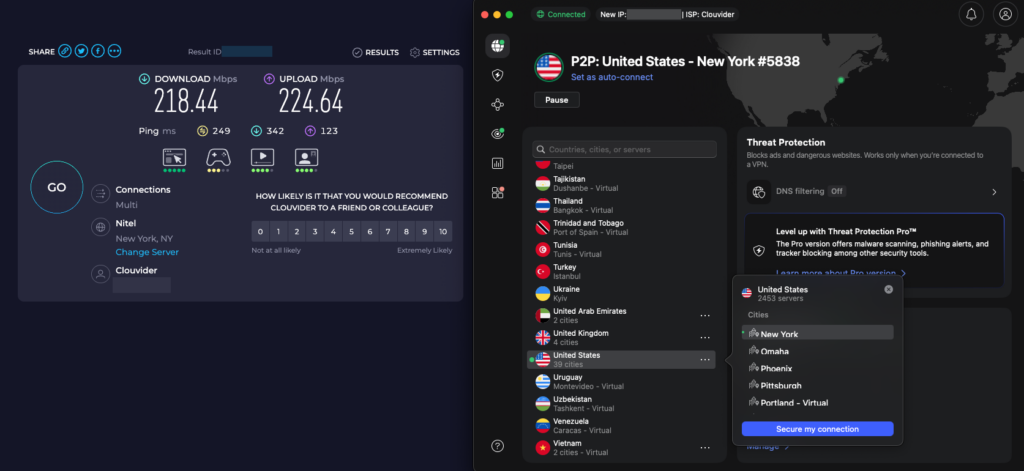
As for performance, NordVPN kept my 4K streams smooth. At 218Mbps in my tests, NordVPN was the fastest VPN on this list, outperforming CyberGhost VPN and TotalVPN in both download speeds and overall connection stability. NordVPN also passed both DNS and WebRTC leak tests without exposing my real IP. Even when switching between countries, the connection remained secure and leak-proof, which is crucial for staying one step ahead of geo-blocks and restrictions.
It’s backed by AES-256 encryption and WireGuard (NordLynx) protocol for enhanced speed and security. It supports 10 devices at once, offers a 3-day free trial on Android, and you get a 30-day money-back guarantee if you want to test it out without any risks. However, while the app is easy to use overall, the wide range of features and specialty servers may feel slightly overwhelming for complete beginners.
Given its speed, reliability, and NordVPN price of $ 3.49/month on the 2-year plan, it stands out as one of the best VPNs to change location in 2026.
What I like:
- Lightning-fast speeds thanks to the NordLynx protocol
- No-logs privacy independently verified through Deloitte audits
- 8900+ servers in 149+ countries provide strong global coverage
What I don’t like:
- Shortest free trial on this list
2. Surfshark – Affordable VPN to change IP address worldwide
- Rating: 9.0⭐⭐⭐⭐⭐
- Servers: 4500 servers in 100+ countries
- Price: $ 2.49/month + 7-day free trial and 30-day money-back guarantee
Surfshark is one of the best budget VPNs that can change your virtual location in seconds without compromising on speed or security. It’s perfect for streaming, unblocking restricted sites, and staying anonymous online, all while costing way less than most premium options. What really stands out is that I can use it on unlimited devices, which makes it ideal for sharing with family or running on all my gadgets at once.
My experience with Surfshark
Surfshark gives you access to over 4500 servers in 100+ countries, including a strong presence in the US, Canada, and South America. I’ve noticed that having lots of servers in nearby countries gives me better speeds when jumping between regions to bypass restrictions or pricing blocks.
| Region | Surfshark servers | Countries covered |
| North America | 806+ | 4+ |
| Europe | 1,500+ | 46+ |
| Asia and Oceania | 450+ | 37+ |
| South America | 170+ | 14+ |
| Africa | 50+ | 5+ |
| Middle East | 60+ | 4+ |
I’ve successfully streamed Netflix US, Disney+, Hulu, BBC iPlayer, and even accessed sites like DraftKings and Betfair. To stay hidden, I always enable Camouflage Mode and CleanWeb to block trackers and avoid VPN detection.
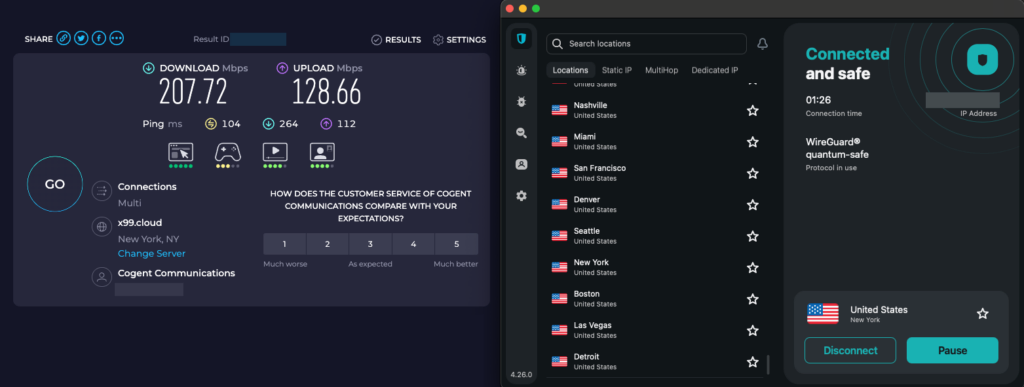
Speeds were around 208Mbps with WireGuard, placing Surfshark just slightly behind NordVPN but still fast enough for smooth HD and 4K streaming. In further testing, Surfshark passed DNS, IPv6, and WebRTC leak checks with no IP exposure. There’s also a kill switch that activates in case your connection drops, ensuring your virtual location stays protected at all times. The VPN is backed by AES-256 encryption, a solid no-logs policy, and offers unlimited device connections. Surfshark also offers dedicated IP addresses in 19 locations worldwide, including countries like the US, UK, Germany, France, Canada, Japan, and Singapore.
Alongside a 7-day free trial, Surfshark offers a 30-day money-back guarantee, making it easy to try risk-free. At $ 2.49/month for the 2-year plan, Surfshark cost makes it one of the most affordable premium VPNs to change your IP address and location.
What I like:
- Unlimited device connections with a single subscription
- RAM-only servers and independently audited no-logs policy
- Budget-friendly pricing starting at $ 2.49/month
What I don’t like:
- Some advanced features, like a dedicated IP, cost extra
3. Proton VPN – Secure location masking VPN for privacy protection
- Rating: 8.9⭐⭐⭐⭐
- Servers: 20700 servers in 149+ countries
- Price: $ 2.99/month + free version and 30-day money-back guarantee
Proton VPN stands out as the best privacy-focused and free VPN to change location, making it a powerful option for bypassing geo-restrictions and protecting your online activity. What makes it stand out is that, unlike other free VPNs, Proton VPN doesn’t cap your data. This means I can stay connected as long as I need without getting cut off. It’s a huge bonus if you’re not ready to pay for a VPN but still want serious privacy and decent location-switching.
My experience with Proton VPN
I’ve used Proton VPN mainly for secure browsing, bypassing local restrictions, and testing region-specific content. It’s been solid, thanks to its robust features and the massive server network of 20700 servers across 149+ countries. For comparison, other top providers on this list operate in a similar country range, but Proton VPN currently maintains a higher overall server count. The free version gives you access to servers in Canada, Japan, Mexico, Netherlands, Norway, Poland, Romania, Singapore, Switzerland, and the US, which actually covers a surprising number of use cases. Still, it’s limited compared to Proton VPN’s paid plan, so I would recommend using the free version to test the service and upgrade it to the premium tier for the complete server list and better performance.
| Region | Proton VPN servers | Countries covered |
| North America | 6,305+ | 11+ |
| Europe | 6,267+ | 31+ |
| Asia and Oceania | 1,535+ | 19+ |
| South America | 355+ | 6+ |
| Africa | 521+ | 19+ |
| Middle East | 360+ | 14+ |
Besides the free servers, Secure Core, or virtual-only nodes, there are another 15343+ dedicated Plus servers across 149+ countries available to paying users. However, Proton VPN doesn’t offer a dedicated IP option for individual plans.
The free Proton VPN plan is solid, but it doesn’t unlock Netflix or BBC iPlayer, which can be another consideration for the upgrade. However, I was still able to access US-based news sites, YouTube TV content, and some sports betting platforms for free. For better masking, I used Secure Core and always kept NetShield on to block ads and trackers.
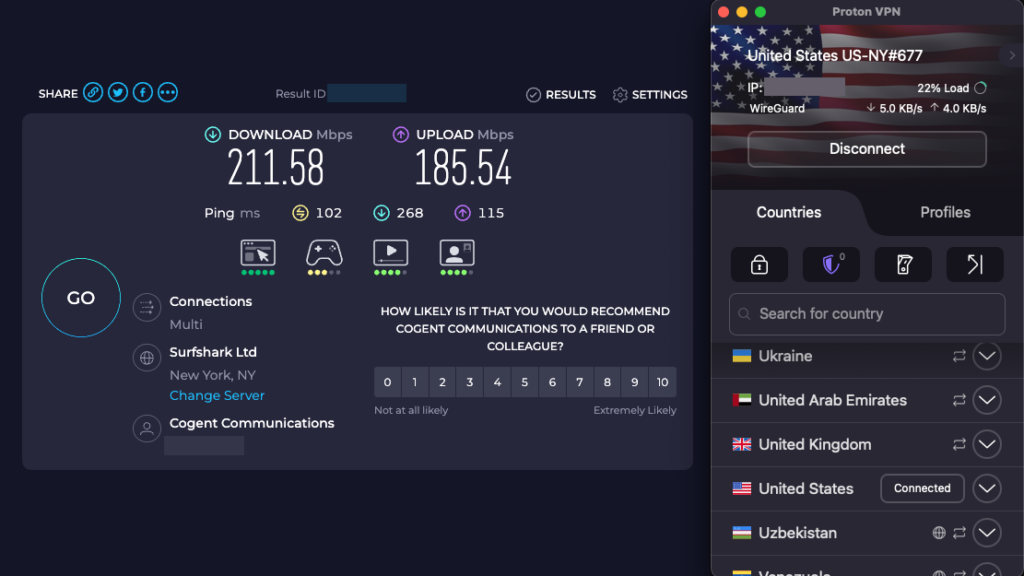
With the premium version, speeds averaged around 212Mbps in my tests, placing Proton VPN just behind NordVPN but slightly ahead of Surfshark in overall performance. But even on the free servers, browsing and streaming in HD were smooth. Proton VPN uses strong AES-256 encryption, runs on OpenVPN and WireGuard, and follows a strict no-logs policy. Lastly, Proton VPN showed no DNS, IPv6, or WebRTC leaks in my tests, and the real IP address remained hidden when switching locations.
Proton VPN is the best VPN to change your location for free, thanks to its reliable free version, and upgrading to the $ 2.99/month plan unlocks the full server network and comes with a 30-day money-back guarantee.
What I like:
- Best free VPN to change location with unlimited data
- Largest server network on this list (20700+ servers in 149+ countries)
- Secure Core routing for extra privacy protection
What I don’t like:
- No personal dedicated IP option on standard plans
4. CyberGhost – Easy VPN for switching virtual location fast
- Rating: 8.8⭐⭐⭐⭐
- Servers: 9800 servers in 100+ countries
- Price: $ 2.19/month + 7-day free trial and 30-day money-back guarantee
CyberGhost is a user-friendly VPN that makes it easy to change your virtual location, especially if you need full US state-level server coverage. The VPN has a vast, well-structured network and lets you spoof IPs from coast to coast seamlessly. For hiding geo-location, whether it’s for unlocking state-based content, testing regional pricing, or avoiding local blackouts, it’s been seriously reliable.
My experience with CyberGhost
CyberGhost network impressed me straight away: 9800+ servers across 100+ countries, including dedicated servers for streaming, gaming, or private browsing. In the US alone, I found coverage in all 50 states, meaning I can switch from New York to San Francisco or Miami instantly. CyberGhost also offers dedicated IP addresses in multiple countries, like the US, UK, Germany, Canada, France, Japan, and Australia.
| Region | CyberGhost servers | Countries covered |
| North America | 1,917+ | 4+ |
| Europe | 6,283+ | 45+ |
| Asia and Oceania | 1,021+ | 25+ |
| South America | 442+ | 14+ |
| Africa | 170+ | 6+ |
| Middle East | 191+ | 6+ |
CyberGhost unblocked everything I threw at it: Netflix (15+ libraries), Disney+, Hulu, BBC iPlayer. I’ve even accessed ESPN+, but also DraftKings via US city servers. To avoid detection, I stuck to streaming-optimized servers, enabled the kill switch, and used the VPN’s NoSpy servers for enhanced protection and anonymity.
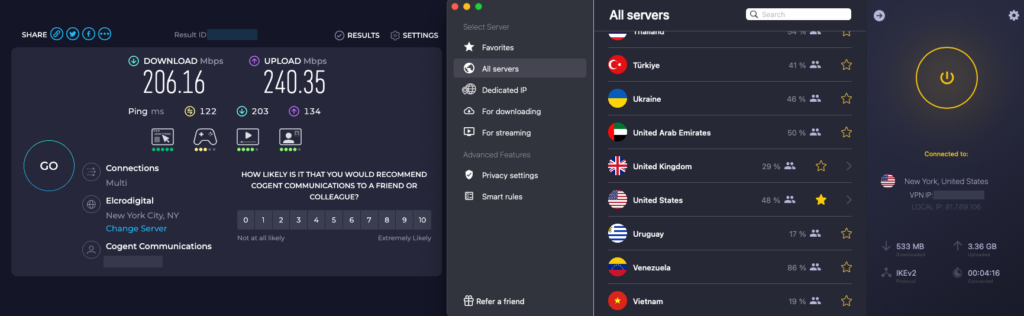
Performance was good – WireGuard tests hit decent speeds, although they were a bit far from the top-tier VPNs like NordVPN or Surfshark. Still, it was enough for 4K streaming and gaming with speeds around 206Mbps. Moreover, CyberGhost showed no DNS or WebRTC leaks, and its kill switch worked reliably, cutting off my internet connection when the VPN suddenly dropped. Privacy is robust: AES‑256 encryption, kill switch, RAM-only servers, and a strict no-logs policy backed by transparency reports.
Besides Specialized servers, CyberGhost includes a Smart Rules feature for more advanced customization and allows up to 7 simultaneous device connections. CyberGhost starts at $ 2.19/month with a longer-term subscription, backed by a generous 45-day money-back guarantee. Overall, it’s a strong choice for users who want full US state-level spoofing and easy streaming access, but speed-focused users may prefer higher-ranked options.
What I like:
- Large server network with full US state coverage
- User-friendly apps with streaming-optimized servers
- Good for streaming and P2P on designated servers
What I don’t like:
- Speeds can be slower on distant and heavily loaded servers
5. TotalVPN – Simple VPN to hide your real location online
- Rating: 7.0⭐⭐⭐
- Servers: 1800+ servers in 90++ countries
- Price: $ 1.59/month + 7-day free trial and 30-day money-back guarantee
TotalVPN is a cheap and easy-to-use VPN for hiding your real location, which is a practical choice for those new to VPNs. With over 1800 servers across 90++ countries, including 24+ US cities, you can switch regions quickly without complicated setup. It’s suitable for bypassing geo-restrictions, accessing region- or state-specific services, or avoiding blackout zones.
My experience with TotalVPN
What surprised me most was the breadth of the server coverage for a budget-friendly VPN. The ability to pick from multiple US cities, including New York, Seattle, Las Vegas, and Miami, means it’s easy to find a fast, uncrowded server near you. For a cheap VPN to change your location, it supports quite a few US cities, which makes geo-spoofing simple and dependable. On the downside, TotalVPN doesn’t offer a dedicated IP option.
With TotalVPN, I could unblock streaming platforms like Netflix (US, UK, Canada), Disney+, Hulu, and betting sites like DraftKings, but it did take me a couple of server changes to access BBC iPlayer. For an extra layer of protection, I enabled features like Total Adblock and a system-level kill switch, and used the OpenVPN protocol instead of IKEv2 for browsing and testing.
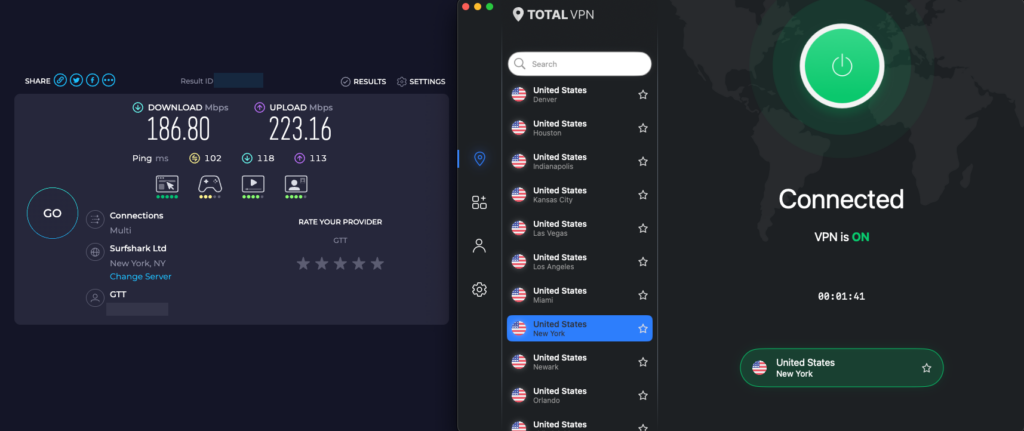
TotalVPN speeds averaged around 187Mbps, and while it’s the slowest VPN on this list, it was enough for reliable streaming sessions. Security-wise, it uses the industry-standard AES-256 encryption and claims to maintain a no-logs policy. In my tests, I didn’t detect any DNS or WebRTC leaks thanks to its DNS/IP leak protection, so my real IP address remained hidden when switching locations. There’s also a basic app-based split tunneling on certain devices, making TotalVPN a straightforward ‘set-and-forget’ option for those who don’t need advanced tools like SOCKS5 proxies.
TotalVPN supports up to 8 simultaneous device connections, and although there’s no free version, you can benefit from the 7-day free trial on Android. Otherwise, you can grab TotalVPN for just $ 1.59/month and test the service out thanks to its 30-day money-back guarantee. So if you’re looking for an affordable VPN to hide your real location online, TotalVPN offers solid basics at a low price.
What I like:
- Affordable pricing with simple setup
- 7-day free trial on Android to test risk-free
- Solid US city coverage for location switching
What I don’t like:
- No dedicated IP option available
Compare the best VPNs for geo-spoofing
| Best VPN to change location | Rating | Servers | Dedicated IP option | Speed (960Mbps download) | DNS/IP leak protection | Simultaneous connections | Supported platforms | Price |
| 1. NordVPN | 9.3⭐⭐⭐⭐⭐ | 8900+ servers in 149+ countries | ✅ Yes | 218Mbps | ✅ Yes | Up to 10 devices | Windows, macOS, Linux, Android, iOS, Smart TVs, and routers | From $ 3.49/month |
| 2. Surfshark | 9.0⭐⭐⭐⭐⭐ | 4500+ servers in 100+ countries | ✅ Yes | 208Mbps | ✅ Yes | Unlimited devices | Windows, macOS, Linux, Android, iOS, Smart TVs, and routers | From $ 2.49/month |
| 3. Proton VPN | 8.9⭐⭐⭐⭐ | 20700+ servers in 149+ countries | ✅ Yes (Business plans only) | 212Mbps | ✅ Yes | Up to 10 devices | Windows, macOS, Linux, Android, iOS, Smart TVs, and routers | From $ 2.99/month |
| 4. CyberGhost | 8.8⭐⭐⭐⭐ | 9800+ servers in 100+ countries | ✅ Yes | 206Mbps | ✅ Yes | Up to 7 devices | Windows, macOS, Linux, Android, iOS, Smart TVs, and routers | From $ 2.19/month |
| 5. TotalVPN | 7.0⭐⭐⭐ | 1800+ servers in 90++ countries | ❌ No | 187Mbps | ✅ Yes | Up to 8 devices | Windows, macOS, Android, iOS | From $ 1.59/month |
How I tested and selected the best VPN to change my IP address
To find the best VPNs for changing location in 2026, I tested each provider from the 20-VPN pool over 3 weeks across different devices and regions. I ranked each VPN based on five main factors:
- Location spoofing reliability (30%)
- Connection speed (25%)
- Streaming and content access (20%)
- Privacy and security features (15%)
- Device compatibility and usability (10%)
First and most important, the VPN had to let me switch locations instantly and reliably, especially across US cities, Canada, and Europe. As soon as I got blocked or my IP leaked, I cut the service from the list.
Next, I tested speeds using speedtest.net with a 240Mbps baseline, so anything that dropped below 170Mbps didn’t make the shortlist, as it wasn’t fast enough for smooth streaming or fast downloads. I also verified whether each VPN could unblock Netflix, Hulu, BBC iPlayer, as well as gambling sites like DraftKings and Betfair. This separated the truly capable providers from those with only basic location masking.
I then looked into each provider’s encryption strength, no-logs policy, and transparency. I also checked if features like a kill switch, WireGuard support, and DNS leak protection were available and stable.
Lastly, I looked at how smoothly the VPN worked across Windows, macOS, Android, and iOS, since I use multiple devices daily. Only VPNs that passed all five areas with strong results made the final cut for this article.
What VPN can change location for free?
Proton VPN stood out in my testing as the best free VPN to change location, thanks to its 10 free server locations and zero data limits. Unlike most free VPNs, Proton VPN lets you switch your IP address without restrictions on how much you browse. On the free plan, you can connect to servers in the US, Canada, Japan, Mexico, Netherlands, Norway, Poland, Romania, Singapore, and Switzerland. This is enough to spoof your location for casual browsing or unblocking streaming sites from those regions. That said, it’s slower than the paid version and doesn’t work reliably with Netflix and some other streaming sites.
If you need faster speeds or access to more countries, I suggest trying NordVPN or Surfshark. NordVPN offers a 3-day free trial on Android, while Surfshark provides a 7-day free trial on up to three devices. Besides, both VPNs also come with 30-day money-back guarantees, so you can use them risk-free. I’ve used this option myself when traveling – I subscribed, changed my location for my needs, and canceled before the month was up. Also, it’s a smart way to test out premium features or hide your location temporarily without committing long-term.
Is it illegal to change location with a VPN?
In most countries in the world, using a VPN to change your location is completely legal. A VPN is simply a tool that protects your privacy and routes your internet traffic through another location. In fact, VPNs are widely used by businesses, journalists, travelers, and even governments.
That said, there are some exceptions. A few countries, like China, Iran, North Korea, and Russia, have strict restrictions or outright bans on unauthorized VPN use. In those places, using a VPN without government approval could lead to legal consequences. Also, even in countries where VPNs are legal, using them for unlawful activities (like hacking, fraud, or downloading copyrighted material) remains illegal.

Changing your location to access streaming content, protect your personal data, or bypass local censorship is generally legal. But it’s always smart to double-check the laws in your country and review the terms of service of the platform you’re accessing. Some streaming services may block your account if they detect VPN use, though this is rare.
So while VPNs themselves are legal in most parts of the world, it’s how you use them that matters. If you’re just trying to keep your activity private or watch shows from another country, you’re typically within the law.
Other ways to change your online location
Besides using a VPN, there are a few other tools that can help you change your online location, but each comes with its own pros and cons. Naturally, I have tested many of them, and while they can be useful in certain cases, they’re usually not as reliable or secure as a trusted VPN.
- Proxies. Using a proxy is a simple way to hide your IP address, which is essentially rerouting your traffic through another server. They work for basic location masking, like accessing a website blocked in a certain country, but they don’t encrypt your connection, so they’re not great for privacy or security.
- Smart DNS. You can access geo-blocked content by changing your DNS settings. They’re fast and work well for streaming, but they don’t hide your IP or protect your data, which is a limitation that can put you at risk.
- Tor. This is a privacy-focused browser that bounces your traffic through multiple encrypted nodes. It’s great for anonymity, but it’s quite slow, so not ideal for streaming or location-based apps.
- GPS spoofing apps. These can fake your device’s physical location, especially proven effective on Android. I’ve used these for testing mobile apps, but they often require developer settings and don’t affect your IP address.
Final tips for changing your VPN location effectively
To change your location with a VPN successfully, start by selecting a server in the exact country or US state that you want to appear in. If speed matters, choose a server that’s closer to you. After connecting, clear your browser cache and cookies or use incognito/private mode to prevent location leaks. Enabling the VPN kill switch adds another layer of protection by keeping your real IP address hidden if the connection unexpectedly drops.
It’s also wise to confirm your new IP address using an IP lookup tool like whatismyipaddress.com and run a DNS leak test on dnsleaktest.com to ensure your real location isn’t exposed. I highly recommend doing this before accessing geo-restricted content to make sure everything works correctly. Finally, keep your VPN app up to date to maintain strong security and stable performance.
Out of all tested providers, NordVPN stands out as the best VPN to change location in 2026. It offers fast speeds, wide global coverage, and reliable access to region-locked services. So whether you’re streaming, gaming, or browsing privately, it delivers the stability you need to change location without hassle.
You may also like to read:
- What is a dedicated IP address
- Best VPN for HBO Max
- How to watch Hulu from anywhere
- How to change your location on iPhone
FAQ
Yes, a VPN can change your virtual location by directing your internet traffic through a server in another country. This lends you a new IP address from that location, making it appear as if you’re browsing from there, even if you’re actually somewhere else physically.
Google Maps often relies on GPS and device location data, so a VPN alone may not fully change your exact map position on smartphones. However, a VPN does change your virtual location by assigning you a new IP address, which can affect how Google Maps detects and displays your region.
NordVPN is the best VPN for changing location that works especially well on iPhones. Based on my tests, NordVPN is fast, easy to use, and has thousands of global servers. Surfshark and Proton VPN are also great options, offering strong privacy and reliable location spoofing on iOS.
Proton VPN is currently the best free VPN to change location, offering 10 free server locations with no data limits. It allows you to switch your IP address for basic browsing and light unblocking, though speeds and streaming performance are more limited than paid VPNs.
Proton VPN has the largest server network, operating over 20700 servers across 149+ countries. This extensive network allows users to change locations easily, find less crowded servers for better speeds, and improve their chances of unblocking geo-blocked services.
The best VPNs to change your location between the US states are NordVPN and Surfshark, known for their robust security features and fast overall performance. CyberGhost is also a strong contender as it offers servers in all 50 states (which is rare) and lets you choose specific cities. This is perfect for unblocking region-based content, avoiding blackouts, or accessing state-specific services like local news, betting sites, or streaming libraries.
The best VPN for location spoofing is NordVPN. It offers a huge global server network, fast speeds, and strong privacy tools to mask your real IP. I found it works great for switching countries or cities instantly, whether you’re trying to access blocked websites, stream content, or browse anonymously.